




Piano Fire 2: Slide Challenge review
 Analysis by Appsdrops
I look at a music game partly by how it sounds and plays, but also by whether its cues are easy to follow in ordinary situations. Piano Fire 2: Slide Challenge is built around tapping and sliding through musical tiles, so its appeal is immediate: it gives your hands something rhythmic to do while familiar pop-style music keeps the session moving. In my view, that simple premise is also the key to judging who will enjoy it. It can be a lively little break, but it is not automatically comfortable for every player, device, or setting.
Clear cues, quick decisions
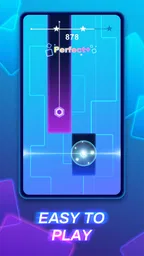
At its core, this is a music game from Adaric Music. Rather than asking you to learn a complicated instrument interface, it centers play on responding to tiles as the music unfolds. That makes the basic idea easy to grasp: watch the play area, follow the rhythm, and tap or slide when the sequence calls for it. I like that the concept does not require music theory or prior piano experience.
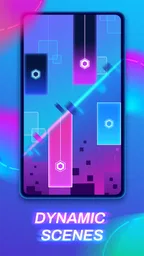
The screen’s moving pattern is the main source of information, which keeps the experience focused but also puts pressure on visual attention. When the action is flowing well, I find it satisfying to match a sequence without stopping to think through every gesture. If you are new to this style, it is sensible to begin when you can give the screen your full attention, rather than trying to learn it while walking or switching between other tasks.
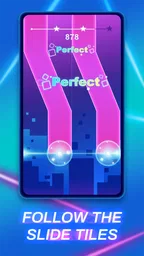
The interface is oriented toward play, not extended reading. That can be helpful for someone who wants to start quickly, though it means the most useful guidance is the feedback you get from the game itself. I would treat an early session as a chance to learn how the tiles behave and how reliably your device registers your touch. A small adjustment in how you hold the phone can make a real difference when a sequence expects a slide rather than a quick tap.
The game’s name signals a challenge-focused experience, but I would not assume that every session will feel equally relaxed. Rhythm games naturally ask you to anticipate what comes next, and a missed action can break your concentration. If you prefer a calm music player, or want to listen without watching a screen, this is the wrong kind of music app. Its music is part of an active task, not background listening.
Getting comfortable with the controls
My practical advice is to keep your device steady and use the hand position that lets you make both taps and short slides without stretching. That is more useful than chasing speed straight away. Players who tend to use one hand may find some sequences less comfortable depending on their grip and screen size; using two hands can reduce awkward reaches, but it also changes how much of the display your fingers cover.
This is a small but important trade-off: a tighter grip can make the phone feel secure, yet it may limit your range of motion. I would try a few short attempts with a relaxed hold before settling into a long session. If your fingers often obscure the next tile, shifting the phone slightly or changing which hand leads may help. These are ordinary adjustments rather than special settings, and they can improve comfort without requiring you to play faster.
Touch, sound, and sensory comfort
Because the game ties movement to music, it gives rhythm a central role in the experience. That is a strength for players who enjoy audio cues and want their actions to feel connected to a song. It can also be a limitation for anyone who finds repeated beats tiring, prefers silence, or needs a quieter environment. I would not choose it as a discreet activity in a meeting, classroom, or shared space unless I had already checked that the sound and interaction were appropriate there.
Touch is equally important. Tapping and sliding are direct gestures, which can feel intuitive, but repeated precision movements may be tiring or difficult for people with limited dexterity, hand pain, tremor, or reduced range of motion. A casual first impression can hide that demand: the gestures look simple, yet keeping up with a sequence asks for repeated timing and control. If your hands tire quickly, brief play periods are a more sensible test than trying to push through a long run.
I also would not mistake a simple control scheme for universal accessibility. A game can be easy to understand and still be demanding to operate. If you rely mainly on audio rather than visual cues, the screen remains a significant part of the task; if you rely mainly on vision and have difficulty processing fast movement, the musical rhythm may not make the visual sequence easier. The best fit depends on which kind of cue helps you most and how your hands respond to the required gestures.
Where it fits into a real day
I can see this working well during a short break at home: you have a few minutes, your phone is in hand, and you want an activity that feels more engaged than simply opening a music app. The format is also a natural fit for someone who likes rhythm challenges and enjoys coordinating attention with quick movements. Since it is free to download, it is easy to try without committing to a purchase, though optional in-app purchases range from $2.99 to $19.99 per item.
Its practical value depends on context. On a crowded commute, you may have to brace the phone, avoid bumping other people, and keep your attention on a moving screen. That is not an ideal combination for precise gestures. At a desk or on a couch, you can hold the device more steadily and focus on the music. I would avoid playing while crossing a street, navigating stairs, or doing anything that needs your eyes and hands; the game is not suited to divided attention.
For a shared household, headphones may help keep music to yourself, but they do not remove the need to watch the screen. Conversely, playing aloud can make the rhythm more apparent while disturbing others. That choice is worth considering before opening the game in a quiet room. If you are sensitive to sound, or need to keep one ear available to your surroundings, a rhythm game that requires active listening may not be your best option in that moment.
How it compares with other music games
Compared with a conventional piano-learning app, this is much more about responding to a game sequence than building a real-world keyboard skill. I would not use it as a substitute for lessons or expect it to teach note reading. Its advantage is immediacy: you can engage with music through simple gestures instead of dealing with the layout and technique of a full keyboard.
Compared with a passive streaming app, it asks far more of you. You are not just choosing a track and listening; you are coordinating taps and slides with what is happening onscreen. That extra involvement is exactly why it may be more fun for someone who gets restless while listening, but also why it is a poor choice when you want music to accompany another task. If your main goal is discovering songs, relaxing with audio, or keeping your hands free, a music player is more practical.
The game has reached over 50 million installs and holds a 4.6 average from around 82 thousand ratings, suggesting that the basic format has found a broad audience. Those figures do not tell me whether it will suit your hands or your sensory preferences, so I would put more weight on a short personal trial than on popularity. Its content rating is Everyone 10+, a useful signal for families considering the general audience, but a parent should still decide whether the on-screen play and music suit a particular child.
What to check before settling in
The current version is 10.0.103, and the game requires Android 6.0 or later. That gives many Android users a clear compatibility point to check before installing. It is also free, but the presence of paid items means I would look at purchase prompts carefully, especially if a child will be playing. I would not treat “free” as a promise that every optional part of the experience costs nothing.
For someone with a smaller phone, the key question is not simply whether the game opens; it is whether the tiles remain comfortable to follow while your fingers move across the display. A larger screen may offer more room, but holding a larger device can itself be harder for some players. If touch accuracy is inconsistent, try a stable surface or a different grip before deciding that the rhythm is beyond your ability. If the same physical demand remains uncomfortable, there is no need to force it.
One useful way to assess fit is to separate three questions: can you see the sequence clearly, can you make the gestures without discomfort, and does the sound feel pleasant at a sensible volume? A “no” to any one of these can change the experience substantially. That simple check is more informative than assuming that a music game is automatically accessible because its controls are limited to taps and slides.
Who I would recommend it to
I would recommend Piano Fire 2: Slide Challenge to people who enjoy music-driven challenges, have a comfortable way to hold and touch their device, and want a game that asks for active attention. It is especially appealing if you like short sessions where rhythm and hand coordination matter more than learning a complex system. Adaric Music has made a concept that is easy to describe and quick to understand, and the large player base suggests it has broad appeal.
I would suggest skipping it, or at least trying it cautiously, if fast visual movement is uncomfortable, precise repeated gestures cause pain, or you need a game that can be played without sound or close attention to the screen. A slower, turn-based game may be easier on attention and hands; a standard music app is better when listening is the whole point. Neither alternative is a failure of preference. The right choice is the one that fits the way you want to use your phone.
A thoughtful, conditional recommendation
My overall impression is positive but measured. The game’s appeal comes from joining music and hand movement in a straightforward challenge, not from offering a substitute for a piano lesson or a hands-free listening experience. That focus gives it a clear audience, while also making its limits easy to identify: visual tracking, repeated touch, and a need to pay attention are central to play.
For me, the best approach is to install it for a brief trial in a comfortable, low-distraction setting, check how the gestures feel, and keep an eye on any purchase prompts. It is free to start, has a 4.6 average, and carries an Everyone 10+ age rating, but those details cannot decide whether the experience is comfortable for an individual. If the rhythm feels engaging and the controls suit your hands, it can be a cheerful break. If either becomes a strain, choosing a less demanding music game—or simply listening instead—is the better call.
What we like
- Quick swipe controls are easy to learn.
- Short levels suit brief play sessions.
- Music provides clear cues for timing.
- A wide song selection keeps runs varied.
- Progress gives players a reason to return.
What could be better
- Fast sequences can be difficult for beginners.
- Some tracks may require extra downloads.
- Ads can interrupt play between levels.
- Repeated patterns may feel monotonous over time.
- Accidental swipes can cause missed notes.







