


Piano Cat: Music Games review
 Analysis by Appsdrops
The appeal of Piano Cat: Music Games is easy to grasp: tap a cat-themed tile in time with a song, listen to the result, and try to keep the rhythm going. I like that its premise makes music play feel approachable rather than like a lesson. It is a free music game from Agile Lion Games, and its cheerful presentation is aimed at Everyone. If you want a quick, low-pressure way to interact with piano-style music, it is worth a look.
One tap turns a song into a small challenge
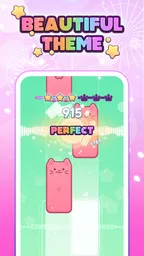
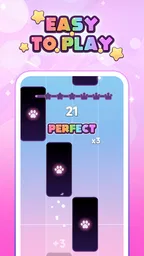
The first action is simple: follow the tiles and tap as they arrive. That simplicity is a strength on a phone, where a complicated control scheme would get in the way. The cat imagery also gives the activity a softer, more playful tone than a bare piano keyboard. You are responding to a visual cue and hearing the musical result, so the basic loop is immediately understandable even if you have never played a rhythm game.
That accessibility does not mean the game will suit every kind of music player. It is a casual rhythm experience, not a piano-learning tool. I would not choose it to practise reading notation, build finger technique, or learn how to play a particular song on a real instrument. Instead, it is for people who enjoy matching taps to music and want a game that gets to the point without asking them to study controls first.
A practical way to approach a new song is to watch the tile pattern for a moment before trying to chase a high score. Rhythm games can feel harder when you focus only on tapping quickly; paying attention to the spacing between cues makes it easier to find a steady pace. If you miss a tap, use the next few beats to settle back into the pattern rather than rushing to compensate. That small adjustment can make a short session feel more satisfying.
How the rhythm gives each tap meaning
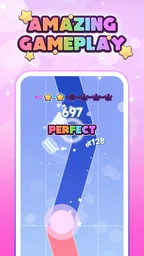
The enjoyment comes from the connection between a visible cue and a sound. A tap is not just a button press: it is your attempt to stay aligned with the song. When the sequence feels natural, the interaction becomes almost automatic, and the music is easier to enjoy. When you lose the beat, the same simplicity makes the mistake clear. There is little distance between your timing and what happens on screen, which is useful for learning a song’s feel but can also make a clumsy run feel exposed.
For a relaxed first try, I would keep the phone comfortably steady and use a light touch rather than striking the screen hard. This is a small practical point, but it matters in a game built around repeated taps: tense hands make it harder to stay consistent. It also helps to play somewhere you can hear the music clearly. The visual cues carry the action, but listening gives you another way to anticipate what is coming and makes the music part of the challenge rather than background noise.
The trade-off is that a straightforward tile-tapping format can become repetitive if you expect every session to feel like a new kind of game. The core pleasure is refining timing and enjoying songs through a playful interface, not mastering a deep instrument simulation. I see that as a good fit for short breaks, but a limitation for players who want extensive musical controls, composition tools, or a demanding rhythm system with lots of strategic layers.
Small wins, and why another attempt feels tempting
The reward in this kind of play is immediate: a run that stays in rhythm feels smoother than one full of missed cues. That makes improvement easy to understand without needing a long tutorial. You can notice whether you are reacting more calmly, keeping your attention on the pattern, or recovering faster after a mistake. The most satisfying session is often not a perfect one, but the point at which a song that felt awkward at first begins to flow.
That is also why the game can work well as a little reset between other tasks. Imagine waiting for a friend or taking a short pause at home: you can open it, focus on a song for a while, and put it down without committing to a long campaign. The game is listed as playable offline, which makes that kind of use especially convenient when a connection is unavailable. Offline play is a practical advantage for travel or patchy reception, though I would still treat it as a music game to enjoy in the moment rather than assume it will replace a dedicated music library or streaming app.
When a run goes poorly, the natural next step is to try again with a more deliberate approach: listen for the beat, watch the next cue, and avoid letting one missed tile throw off the rest. That reset is a useful part of the loop. It gives you a clear reason to return without making the game feel like homework. But it can also create a familiar rhythm-game trap: repeating the same section over and over may stop being fun if you are chasing perfection rather than enjoying the song. I would take a break when retries start to feel tense.
Where it fits among music games
Compared with a traditional piano-learning app, this is much more about responding to prompts than understanding how music is built. A learner who wants lessons, notation, or practice on a real keyboard should choose a teaching tool instead. Compared with a larger rhythm game, Piano Cat is easier to approach because its central interaction is clear and its cat-themed presentation keeps the mood light. The compromise is that players seeking broad customization or a more involved progression may find the format too focused on its central tap-and-listen cycle.
That distinction is useful when deciding whether to install it. If your goal is a friendly music game that can be played casually, its design makes sense. If you want a competitive experience, a realistic instrument, or a structured curriculum, the cute theme should not be mistaken for those deeper features. I would also recommend using headphones when you want to focus on timing, while keeping the volume comfortable; the point is to hear the rhythm, not to turn a short game into an exhausting session.
The game has a 4.6 average from around 3,500 ratings and has passed one million installs, suggesting that its simple pitch has found an audience. Those figures are context, not a guarantee that every player will enjoy the same things. The people most likely to connect with it are casual players, cat fans, and anyone who likes tapping along to music without a steep learning curve. Players who quickly tire of repetition or need substantial musical instruction should look elsewhere.
A modest loop with a clear purpose
Piano Cat: Music Games is currently at version 0.2.0 and supports Android 7.0 or later. Its appeal is the small, repeatable cycle: follow a tile, tap, hear how the timing lands, enjoy a good run, and begin again when you feel like improving or simply playing another song. Agile Lion Games has kept the idea easy to understand, and the game’s free price lowers the barrier for anyone curious about a light rhythm game.
My recommendation is specific: try it if you want a cheerful, offline-friendly way to spend a few spare minutes with music, and go in expecting a casual tapping game rather than a piano course. Its strongest moments come when the cues and the beat click together; its main limitation is that this same focused loop may not offer enough variety for players who need a lot of depth. For a quick musical break, though, the simplicity is the point.
What we like
- Simple touch controls make the game easy to pick up.
- Short rounds suit quick play sessions.
- Familiar piano melodies make songs easy to recognize.
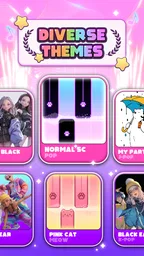
- Bright cat-themed visuals give the game a playful style.
- Progressive song challenges can encourage replay.
What could be better
- Timing challenges may frustrate players who miss a note.
- Some songs or features may require in-app purchases.
- Ads can interrupt play depending on the version.
- Repeated tapping may feel monotonous over longer sessions.
- The experience may offer limited appeal to players seeking real piano lessons.







