

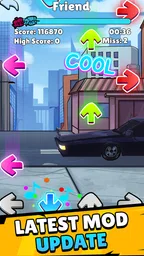
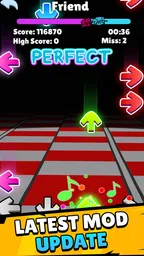
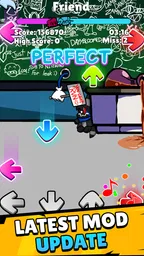
Music Rap Time Battle review
 Analysis by Appsdrops
Music Rap Time Battle is a music game for quick bursts of concentration: you follow moving prompts and tap in time, trying to keep your fingers aligned with the rhythm. I find that simple premise appealing when I want something more active than listening to a playlist but less involved than learning an instrument. The key question is whether you enjoy timing-based challenges and can tolerate the occasional missed beat. If you do, Music Rap Time Battle is easy to understand and worth trying; if you want open-ended music creation or a relaxed rhythm experience, another kind of music app will suit you better.
What to consider before you play
Unicorn Studio Official’s game sits in the music category, but it is not a music player or a tool for making tracks. Its focus is tapping along to on-screen cues. That distinction matters: the enjoyment comes from responding accurately, not from choosing songs for background listening or building a composition. I would approach it as a compact reflex game with a musical frame rather than as a substitute for a rhythm instrument or a full-fledged music-learning app.
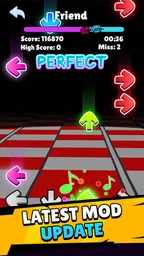
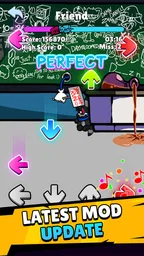
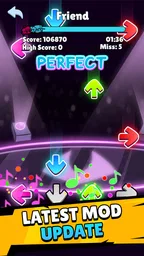
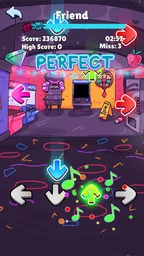
The basic interaction is easy to grasp. Watch the arrows, then use your finger to hit them in time. That low barrier makes it suitable for a first try without a long tutorial or a commitment to learn complicated controls. The challenge is in staying attentive as the prompts arrive. A short pause between other tasks can make a natural session, while playing when distracted is likely to feel less satisfying because timing games reward focus.
Its audience is broad: the content rating is Everyone, and the game is free to download. That makes it approachable for casual play and for younger players, though a parent should still consider whether in-app purchases are appropriate for their household. Individual in-app items cost $1.99. I’d treat spending as optional, not a requirement for deciding whether the basic tapping loop is enjoyable.
Why the simple tapping loop works
The strongest decision-making point is the directness of the play. There is no need to learn a complicated control scheme before you can judge whether the central activity clicks for you. You can focus on the connection between what you see and when you tap. For a brief break, that immediacy is a genuine advantage over games that require lengthy setup, story catch-up, or careful planning before each session.
It also gives your attention a clear job. Rather than passively hearing music, you have to watch and react. I find that useful when I want a small challenge during a spare moment: the game asks for enough concentration to feel engaging, but its premise is easy to return to after putting the phone down. That makes it a better fit for short, self-contained play than for someone looking for a deep, continuous music experience.
A practical tip is to judge your first session by the feel of the timing, not by whether you immediately perform well. If you are tapping late or early, slow down mentally and watch the cues rather than trying to anticipate every move. Rhythm games can feel harsher when you rush, and a deliberate first run helps you work out whether the visual prompts make sense to you. If the interaction still feels awkward after a few tries, that is useful evidence that this particular style may not be your preference.
Where it stands against other music games
Compared with music apps built around listening, this game asks for active input and gives you a task to complete. Compared with music-making apps, it is far less about personal expression: you are responding to cues rather than arranging sounds or recording your own ideas. And compared with rhythm games that emphasize more elaborate controls, its finger-tap premise is an approachable starting point. Those are category-level differences, not claims that one format is universally better.
The trade-off is that a straightforward interaction can become repetitive for players who want variety in how they play. If your main goal is to discover new music, a streaming or radio app is the more direct choice. If you want to practice an instrument, a dedicated lesson or instrument app offers a more relevant kind of feedback. If you prefer a rhythm game with a broader set of control demands, look for one whose described mechanics match that preference instead of expecting this one to become a music-production tool.
For a real everyday use case, imagine having a few minutes before a ride or while waiting for a friend. This is the kind of game I would open when I want to occupy that gap with something requiring attention, then close when it is time to move on. It is less suitable when you need a hands-free activity, want to keep music playing while doing something else, or are trying to unwind without reacting to prompts.
Getting a fair first impression
One useful way to test the game is to play when you can give the screen your full attention, rather than judging it while multitasking. A missed tap in a distracted moment tells you little about whether the game itself suits you. Keep the first try short and notice whether following the arrows feels satisfying or merely demanding. That distinction is more important than pushing through a session out of obligation.
It can also help to separate a timing problem from a preference problem. If you enjoy the idea but struggle to line up taps, give yourself a few attempts to settle into the visual rhythm. If you find the act of tracking arrows tiring or you simply want to hear music without monitoring the screen, no amount of practice will change the game’s central appeal. In that case, choosing a different music format is a sensible decision, not a failure to learn it.
Because it is a finger-driven game, your playing environment matters. A stable grip and a screen you can see comfortably make it easier to respond consistently. I would avoid trying to play while walking or doing anything that needs your eyes elsewhere; the core activity depends on watching and reacting. That is a small but important trade-off for a game designed around quick visual cues.
Cost, compatibility, and switching expectations
The game is free, with optional in-app purchases priced at $1.99 per item. That lets you try the central experience before deciding whether it deserves a place on your device. I would not buy an item simply because it is available; first check whether you enjoy the actual tapping loop and whether you expect to return to it. The value of an optional purchase depends on your own interest, rather than on the game’s category alone.
The current version is 1.0.0.68, and it requires Android 7.0 or later. Its broad reach is reflected in more than 10 million installs, alongside an average rating of 4.0 from around 28,000 ratings and 909 written reviews. Those figures suggest that many players have tried it, but they cannot tell you whether its specific rhythm-and-tapping style will match your taste. I’d use them as context, not as a substitute for a brief personal trial.
Switching away is easy in principle because the game’s role is narrow. You can move to a listening app when you want music in the background, a creation app when you want control over sound, or another rhythm game if you prefer a different play style. The main cost is not learning a complicated system; it is giving up a particular kind of quick, visual challenge. If that challenge is what you enjoy, an alternative may not provide the same small burst of focused interaction.
Who should choose it—and who should pass
I’d recommend Music Rap Time Battle to someone who likes tapping games, enjoys following musical timing, and wants a simple activity for short breaks. Its free entry point makes it reasonable to test, and the Everyone rating makes its intended audience broad. The game is especially worth considering if you want your phone session to involve active attention rather than passive listening, but do not need a detailed music lesson or creative studio.
I would skip it if you dislike reaction-based play, prefer to listen with the screen off, or want to compose and edit music. It is also not my first suggestion for a player seeking a calm, hands-off experience: tracking arrows is the point, so attention is part of the price of admission. Someone who wants more complex rhythm controls should compare the mechanics of other games before settling in here.
Overall, I see this as a straightforward option in the music-game space, not an all-purpose music app. Its appeal depends on whether the simple act of watching cues and tapping along feels rewarding to you. Try it during a quiet few minutes, focus on the timing, and decide based on that experience. If you enjoy the focused loop, the free download is an easy way to keep a small rhythm challenge close at hand; if you want listening, learning, or music creation, choose a tool built for that purpose instead.
What we like
- Quick rap battles make it easy to start playing.
- Rhythm-based rounds reward timing and concentration.
- The battle format offers a change from standard music games.
- Short sessions suit casual play.
- The rap theme gives the game a distinct style.
What could be better
- Gameplay may feel repetitive after several rounds.
- Success depends on keeping up with the beat.
- Players looking for a deep story may be disappointed.
- The rap-focused style may not suit every music fan.
- Some players may find the challenge difficult at first.







