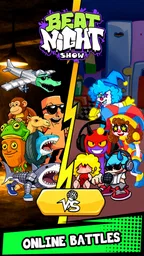



Music Beat Night Show review
 Analysis by Appsdrops
Music games are easy to pass around: one person starts a round, someone else wants a turn, and before long the phone has become part of the evening’s entertainment. Music Beat Night Show takes that idea into a rap-inspired rhythm battle, inviting players to match the beat while facing off against enemies. I like the straightforward premise: it gives a shared-device session a clear focus, even when everyone is taking turns rather than playing together.
A rhythm game that fits a shared screen
The game’s central hook is right there in its pitch: beat enemies in a battle set to rap music and bring the night show to life. That makes it easy to explain to someone who has never opened it. There is no need to sell a complicated premise before handing over the phone; the appeal is music, timing, and a bit of playful competition. For a household looking for a casual game to sample together, that directness is a welcome starting point.
I would think of it as a pass-the-device kind of pick. One player can try a song or challenge, then offer the next person a turn. That simple pattern works well when people have different levels of experience or only a few spare minutes. It also avoids assuming that every person in the room wants to commit to a long play session. The game’s rhythm-battle framing gives each turn a natural purpose: listen, follow the beat, and see how the encounter goes.
Its music category is a good fit for that social setting. Music can draw in people who might not normally seek out a conventional action game, while the enemy-battle theme gives rhythm play a little extra drama. I find that combination useful for a shared screen because it offers more than a passive listening experience but still has an easy-to-understand premise. Whether a player is confident with rhythm games or simply curious, the basic idea is approachable.
Taking turns without turning it into a contest
When a game is shared, the mood often depends more on the group than on the app itself. I’d introduce this one as a casual challenge rather than a test of musical ability. Let each person try a turn, cheer on the player holding the phone, and keep the focus on the beat instead of comparing results. That keeps the session welcoming for younger players, beginners, and anyone who just wants to see what the game is about.
The game is free to download, which makes it easy for a family or group of friends to give the premise a try before deciding whether it belongs in their regular rotation. It also has in-app purchases, with items priced from $0.99 to $2.99. On a shared phone or tablet, that is worth discussing before play begins. A quick household rule—such as asking before any purchase—is a practical way to keep expectations clear without making the game itself feel like a chore.
I would also decide whose device and store account are being used. On a phone that belongs to one person, the owner should be the one who handles installation and any purchase decisions. If several people use the same device, make that boundary clear before passing it around. This is ordinary shared-device common sense, not a special game feature, and it helps avoid confusion about who is responsible for account activity.
Simple setup, clear boundaries
Before handing over a device, I’d make sure the player knows whether the session is just a trial or whether the game is likely to stay installed. That can be especially helpful when children and adults share a phone. Keep the device owner involved in decisions about downloads and spending, and set a limit on playtime if that is part of your household routine. Those small steps make casual gaming easier to manage without interrupting the fun every few minutes.
The available age guidance is Everyone, so the game is presented for a broad audience. That can make it a reasonable candidate for a shared family device, but age labels are only one part of a parent’s decision. I’d still consider whether the music and battle theme suit the particular child, and whether the child understands the household rules for using the device. A parent can take a quick look at the game and decide whether it feels right for their family.
For children who use a parent’s phone, it helps to explain the difference between playing and changing the device or account. A child can have a turn with the rhythm game while the adult remains responsible for app-store decisions and purchases. That division is simple, easy to remember, and useful for all kinds of shared entertainment. It also avoids implying that the game provides account boundaries or family controls of its own.
Coordinating turns and expectations
Shared play tends to go more smoothly when everyone knows how turns work. In my view, the best approach is to agree on a simple order before starting: each person gets a try, then the group decides whether to continue. If one player wants more time to learn the rhythm, that can be accommodated without making the session feel like a competition. The game’s central idea is clear enough to support informal turn-taking, even when the players have different levels of confidence.
Music can also make a shared session lively, so it is worth being considerate of the room. If people nearby are reading, working, or resting, keep the device at a comfortable volume and choose a suitable moment to play. That is particularly helpful in a household where one phone moves between several people or where gaming happens in a common area. A little coordination lets the game become part of the evening without taking over it.
I would avoid promising that every player will enjoy the same parts of the experience. Someone who likes rhythm challenges may be drawn to keeping time, while another person may be more interested in the rap-show presentation and enemy battles. The game’s short, memorable premise makes it easy to invite people to try it, but there is no need to insist that everyone become a regular player. A shared-device game is often most successful when it is available for a quick turn and easy to put down.
What the game’s popularity suggests
Music Beat Night Show has an average rating of 4.6 from around 8,600 ratings, and it has been installed over 5 million times. Those figures suggest that it has found a sizable audience, though I would treat them as context rather than a promise that every household will have the same experience. Preferences in music games are personal: some players want a relaxed way to follow a beat, while others enjoy a more competitive feel. The title’s broad pitch gives people a quick way to decide whether that style interests them.
The game is from HOLA GAME and was released on December 1, 2023. Its current version is 1.3.6, and it requires Android 7.0 or later. It is free to play, with optional in-app purchases in the $0.99–$2.99 range per item. For a shared household device, the main practical takeaway is to check compatibility and agree on purchase expectations before installing. Those details matter more than any assumption that every player will use the game in the same way.
It is also worth keeping the difference between a personal account and a shared device in mind. If several people use one phone, the owner should stay in charge of the store account and any spending. If family members each have their own device, they can make their own choices under the rules that apply in the household. Either way, a little communication is more useful than expecting a game to manage family routines for you.
Age, trust, and a sensible first session
Because the content rating is Everyone, parents may find the game easier to consider than a title aimed at older audiences. Still, I would start with a brief look together, especially for a younger player. That gives a parent a chance to see whether the music and presentation feel appropriate and lets the child hear the rules about asking before making purchases or changing anything on the device. A shared first session can make those expectations feel natural instead of punitive.
Trust works both ways. Adults can give a child room to enjoy the game while setting clear limits around time and spending. Children can show they understand those limits by asking before any purchase and handing the device back when their turn is over. That kind of arrangement is useful regardless of whether the game is played alone or passed around at a family gathering.
For older players and adults, the same courtesy applies in reverse: if the phone belongs to someone else, respect their account and device preferences. A game that is free to install can still involve optional purchases, so the person who owns the account should make those choices. Keeping that distinction clear helps the game remain a low-pressure bit of shared entertainment.
My household verdict
I see Music Beat Night Show as a casual option for households that enjoy music-themed games and are happy to take turns on one screen. Its rap rhythm-battle idea is easy to explain, the Everyone rating gives it broad age context, and the free download lowers the barrier to trying it. The combination can suit a relaxed family evening, a short break, or a quick challenge between friends, provided everyone understands whose device is being used and who handles purchases.
The title is most appealing when expectations stay simple. Treat it as a game to sample, not as a guaranteed hit for every person in the house. Give each player a fair turn, keep the volume considerate, and make the purchase boundary clear before handing over the phone. Those habits make shared play smoother and help keep a music game from becoming a source of avoidable disagreement.
Overall, I’d recommend giving it a try if your household likes music rhythm games with a playful battle theme. Its premise is immediate, its audience is broad, and it can fit neatly into a pass-and-play routine. Just keep the account owner in control of spending and choose the right moment for a lively beat session. With those basics in place, Music Beat Night Show can be an easy, upbeat addition to a shared-device game rotation.
What we like
- Rhythm-based gameplay offers a clear challenge for music fans.
- Short stages make it easy to play during a quick break.
- Visual cues help players follow the beat.
- Unlockable content can give players goals to work toward.
- Simple controls are easy for newcomers to learn.
What could be better
- Fast songs may feel difficult for players with slower reactions.
- Repeated patterns can make longer sessions feel predictable.
- Precise timing may be harder on smaller screens.
- Some players may find the visual effects distracting.
- Progress can feel slow if rewards require repeated play.







