




Mia World - Makeover Life review
 Analysis by Appsdrops
I would approach Mia World as a relaxed creative game rather than a challenge to beat. Its appeal is in making small design choices, trying a look or room arrangement, and seeing how those choices shape a little imagined world. If you enjoy dress-up games and dreamhouse decorating, it offers an easy place to start without asking you to learn a complicated system first. The best first goal is modest: make one character look the way you want, then give that choice a setting that feels like it belongs to her.
What the game is like to step into
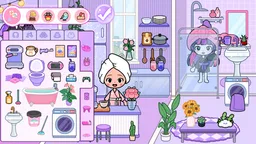
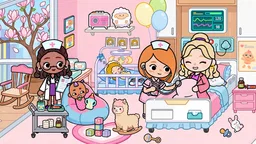
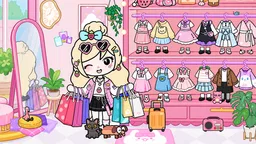
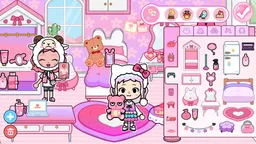
Mia World - Makeover Life is a free educational game from 31 Dress up Games, built around avatar creation, styling, and a dreamhouse theme. That mix makes it a natural fit for players who like visual play more than scores, timers, or competitive matches. I’d recommend it especially to children who enjoy choosing outfits and arranging a pretend home, and to adults looking for a low-pressure game to share or explore together.
The educational label is best understood as creative, open-ended play, not as a lesson-driven experience. The value is in practising choices: matching colours, deciding what suits a character, and imagining how a room should feel. Those activities can prompt useful conversations with a younger player, but I wouldn’t choose the game as a substitute for a structured learning app.
The overall mood is approachable, but it helps to arrive with the right expectations. This is not a deep life simulation where every action leads to a branching story, nor is it a competitive fashion contest. The fun comes from making and revising a scene at your own pace. If you want a clear sequence of missions or a strong narrative to follow, a story-focused game will probably hold your attention better.
The game has an average rating of 3.6 from around 38,000 ratings, with roughly 573 written reviews and more than 10 million installs. I take that as a sign of broad interest, not a promise that every player will love it. Its appeal is quite specific: people who enjoy dressing up and decorating can settle in, while players seeking action or complex strategy may find the choices too gentle.
A reassuring first session
For a first-time player, I’d avoid trying to perfect everything immediately. Pick a simple idea for Mia—perhaps a casual everyday look or a colour you like—and use it to guide the first few choices. A small theme makes the creative process easier than treating every item as a separate decision. Once the character feels coherent, move on to the home and choose a mood that supports the same idea.
This approach also works well when playing with a child. Rather than asking, “Which is the best outfit?”, try asking what the character is doing today or what kind of room would suit her. That turns the game into a shared imaginative activity without requiring rules or a right answer. It gives a first session a satisfying endpoint: one character with a look and setting that tell a tiny story.
Getting started without overthinking it
The game is free to download, and it is rated Everyone, which makes it easy to consider for family play. It runs on Android 6.0 and later, and the current version is 1.5.4. The developer is 31 Dress up Games. Those practical details are worth checking before installing, especially if you’re setting it up on an older device or choosing a game for a child.
Once it opens, give yourself a minute to understand the layout rather than tapping rapidly through every option. In a dress-up and decorating game, controls and choices are the main experience, so a little orientation can prevent the first session from feeling scattered. I’d start with the character-facing choices, settle on a look, and then explore the dreamhouse side. That sequence creates a simple before-and-after payoff without demanding a long play session.
One useful trick is to make decisions in passes. First choose the broad direction—bright, calm, playful, or more dressed-up—then refine individual details. If you change every choice as soon as you see another possibility, it becomes harder to judge whether the overall look is working. A short pause between the character and room stages helps you notice whether the two feel connected.
Another practical habit is to treat the first attempt as a draft. The point is not to build the most impressive room or find a perfect outfit on the first try. Make a complete scene, then decide what you would change if you were doing it again. That gives a beginner a natural next action and makes experimentation feel purposeful instead of like endless browsing.
The first satisfying result
A good first success is not unlocking something or reaching a particular score; it is finishing a small design that feels intentional. I’d choose one outfit idea, make the character’s appearance fit it, and then arrange the dreamhouse to suggest the same sort of day. For instance, a relaxed look can pair with a comfortable, homey atmosphere, while a more polished look can inspire a tidier setting. The exact choices matter less than having a reason for them.
This is also where the game’s gentle pace becomes a strength. A child can change their mind without having to defend a “wrong” answer, and an adult can dip in for a short creative break. If you’re playing together, let the younger player make the main choices and offer suggestions only when asked. That keeps the result personal and turns the session into their creation rather than a set of instructions to follow.
For a more satisfying repeat visit, give each session a small prompt: create a look for a particular kind of day, or make the room feel cheerful, cosy, or ready for a guest. These are not formal objectives; they are ways to keep your own ideas moving. A prompt also makes it easier to stop when the scene feels finished, rather than continuing to browse without knowing what you’re trying to make.
I’d use the game differently depending on the player’s age and attention span. A younger child may enjoy choosing one item at a time and narrating a story around it. An older child may prefer to build a full look and room independently. For a quick break, one character or one design idea is enough; there is no need to turn every visit into a long project.
Where new players can get stuck
The most likely source of confusion is expecting a conventional game loop. If you are looking for a map, a sequence of levels, or a clear win condition, creative play can initially feel aimless. My advice is to set your own tiny objective before you begin. “Make a look for a rainy afternoon” is more useful than simply opening every menu and hoping the game supplies a mission.
It can also be easy to confuse having many choices with needing to use all of them. A design often feels more coherent when you stop at the point where the character and room communicate the same idea. Leaving a scene simple is a valid choice, not a sign that you missed something. This is a small but important distinction for children who assume that more decorations or changes must always mean a better result.
There are in-app purchases, with individual items priced from $0.99 to $4.99. Since the game is free to start, I’d check the purchase prompts and the device’s payment settings before handing it to a child. It is sensible to decide in advance whether paid items are off-limits or require an adult’s approval. That boundary avoids turning a creative session into a negotiation over an unexpected purchase.
Another limitation is that personal taste does much of the work. Someone who loves fashion choices and home styling can find plenty of reasons to experiment, but a player who needs frequent new challenges may tire of the same broad activity. In that case, a puzzle game, a more structured educational app, or a story-led title may be a better match. Mia World is at its strongest when the player is happy to invent the purpose of a session.
Making the most of later visits
After the first complete look and room, I’d use small variations rather than starting from scratch every time. Change the character’s style while keeping a similar home atmosphere, or keep the look and imagine a different kind of day for it. Comparing two versions makes the creative decisions easier to notice and gives the player a reason to return without needing a formal progression system.
For parents, the game can be a useful shared screen-time activity when the goal is conversation rather than instruction. Ask the child to explain one choice, then let them revise it if they change their mind. That gently encourages planning and expression while keeping control of the scene with the player. It is not necessary to turn every choice into a lesson; the game works best when the play remains light.
On the other hand, if you are choosing something for a child who becomes frustrated by open-ended tasks, stay nearby and suggest a simple theme at the start. A blank creative space can be less inviting than a clear challenge for some players. If they still seem unsure after trying one small idea, a game with explicit goals may be more comfortable.
My overall view is that Mia World - Makeover Life is a pleasant choice for a particular kind of player: someone who likes dress-up, character styling, and imagining a home around a look. It is free, broadly accessible to players rated Everyone, and easy to approach with a short creative prompt. Its limits are just as clear: it is not the best pick for action, intricate simulation, or step-by-step lessons, and paid items call for sensible purchase boundaries.
If you install it, I’d begin with one character, one colour or mood, and one simple room idea. Finish that small scene before exploring every option, then decide whether the process itself is enjoyable. If making and revising a little world feels relaxing, the game has found its audience; if you want more direction or challenge, you will be better served by a more structured alternative.
What we like
- Lets players personalize characters with a wide range of style choices.
- Combines makeover activities with imaginative role-play.
- A colorful design makes the world inviting for younger players.
- Open-ended play encourages creativity without strict objectives.
- Easy-to-understand interactions suit casual play sessions.
What could be better
- Some content may require in-app purchases to unlock.
- Frequent prompts or ads can interrupt play.
- The open-ended format may feel lacking in goals for some players.
- Customization options can take time to explore.
- Performance may vary across older devices.







