Math Games: Math for Kids review
 Analysis by Appsdrops
The first thing I notice about Math Games: Math for Kids is how clearly it frames its purpose: this is a learning game for children, built around practicing arithmetic rather than exploring a story world or collecting elaborate rewards. That directness is useful. A parent can quickly see whether it suits a child who needs a little more time with sums, differences, multiplication, or division, and a child can get to the central activity without a complicated premise to learn first.
In my view, its strongest appeal is the way it makes short bursts of math practice feel more approachable. It is free, and its Everyone age rating makes it a reasonable candidate for a family device shared with younger players. RV AppStudios has made an educational game with a broad audience in mind, but that does not mean every child will respond to it equally. The best fit is a learner who enjoys answering questions and benefits from repetition; a child looking for a deep adventure or a parent seeking a full teaching curriculum may want something different.
A focused first impression
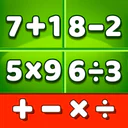
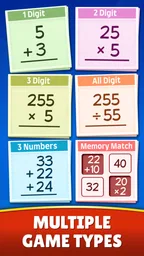
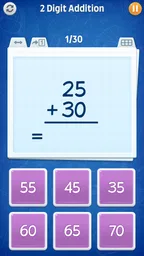
The game’s identity is easy to understand: it centers on four core arithmetic operations and invites children to practice them through play. That focus is a practical strength. Instead of asking a young learner to navigate a broad collection of unrelated activities, the experience stays close to the skills many children encounter in everyday schoolwork.
Its scale is notable. It has a 4.5 average from around 73,000 ratings, and it has passed 50 million installs. Those figures suggest that many families have tried it, though popularity alone cannot tell me whether a particular child will enjoy its pace or presentation. I would treat it as a promising practice option, then watch how the child reacts after a few short sessions rather than assuming it will fit every learner.
The game was released on August 25, 2020. That makes it an established choice rather than a brand-new experiment, and the developer is RV AppStudios. For a parent deciding what to install, the important point is less the history than the clear educational purpose: it is intended to turn arithmetic practice into something a child can engage with on a phone or tablet.
Who is likely to enjoy it?
I would start with children who already recognize the basic idea of a math problem but need practice becoming more comfortable and consistent. A child who hesitates before answering a simple addition question might find the game a less formal place to try again. It can also suit a family looking for a short activity between homework and dinner, provided an adult keeps the session purposeful rather than letting screen time drift without a goal.
For a younger child who is still learning what the symbols mean, the game may work best alongside an adult who can explain the question in plain language. A digital prompt can provide repetition, but it cannot always tell a caregiver why a child is confused. If a learner repeatedly misses the same kind of problem, I would pause and talk through the reasoning instead of simply encouraging more rounds.
How the visual language supports practice
The setting here is not the main attraction; the arithmetic is. That choice gives the game a straightforward mood: it is meant to keep attention on solving, not on a sprawling fictional world. For children who are easily distracted by lots of story details, a more focused presentation can be helpful. It makes the purpose of a session easy to explain: choose a type of math and practice it.
That same focus is a trade-off. Children who need a strong narrative, characters to follow, or a sense of exploration may find a practice-centered game less captivating than a math adventure with a larger fictional setting. I would not call that a flaw so much as a matter of learning style. The design is better suited to making arithmetic the activity than to disguising it inside a long story.
A useful way to approach the game is to connect each session to one small real-world question. Before opening it, I might say, “Let’s practice the kind of sums you’ll need when we count the fruit,” then follow up by asking the child to explain one answer aloud. This turns a screen activity into a conversation and helps reveal whether the player is guessing, recalling a fact, or understanding the operation.
Sound, mood, and session rhythm
For a children’s learning game, sound can either support concentration or compete with it. My preferred way to judge the audio is by the child’s attention: if the sounds make the activity feel lively without pulling focus from the numbers, they are doing their job. If a child is easily overstimulated, it is sensible to try a brief session in a quiet setting and see whether the overall presentation feels calming or distracting.
The most useful rhythm for this kind of practice is short and repeatable. I would not treat it as a replacement for a lesson or expect one long session to build fluency. A few focused minutes, followed by a break or a conversation about one tricky answer, is a more realistic routine for many children. That approach also lets a parent notice when enthusiasm is fading and stop before practice becomes a chore.
A practical everyday scenario is a quick review before homework: a child can spend a little time on the operation they are currently learning, then move to written work while the idea is fresh. Another is a low-pressure activity during a quiet wait, as long as the device is available and the child is not already tired. I would avoid presenting it as a reward that must be earned for every correct answer; keeping the tone relaxed makes it easier for a child to treat mistakes as part of learning.
Where the mechanics fit—and where they don’t
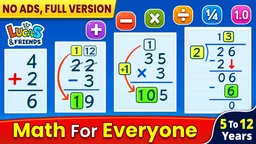
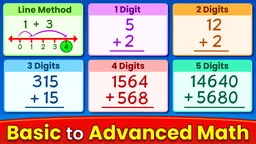
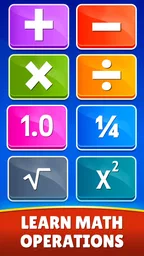
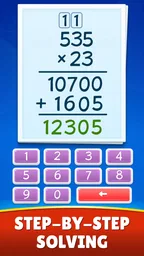
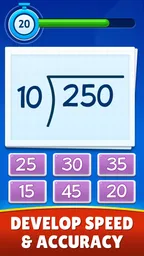
The four operations give the game a useful range for elementary arithmetic practice. The practical benefit is that a family can use one app for different kinds of number work instead of switching between separate tools for addition, subtraction, multiplication, and division. The limitation is that practicing an operation is not the same as receiving a complete math education. Children also need explanations, examples, written work, and opportunities to apply ideas outside a multiple-choice or screen-based routine.
One helpful workflow is to match the game to the child’s current classwork rather than letting the app decide the day’s study plan. If multiplication is the week’s challenge, focus on that area; if subtraction is causing frustration, make that the short practice goal. Afterward, ask the child to solve a similar problem on paper or explain how they reached an answer. This simple transfer check can show whether the game is reinforcing understanding or only encouraging quick responses.
Another useful tip is to observe the type of hesitation, not just whether an answer is right or wrong. A child may know the arithmetic but rush, or may be unsure about the operation itself. If you notice repeated errors, slow the session down and use objects, drawings, or spoken examples to make the idea concrete. That is where an adult’s guidance adds something a game cannot: personal feedback based on the child’s particular confusion.
Compared with a worksheet, the game can make repetition feel less like a stack of exercises, which is valuable for a child who resists paper practice. Compared with a full tutoring program, it is a lighter and more self-directed tool, but it should not be expected to diagnose learning gaps or create a personalized teaching plan. A workbook or teacher-led activity is likely better when a child needs careful explanation, a structured sequence, or practice showing their work. A story-driven math game may be a better choice for a learner who only engages when the arithmetic is woven into a richer adventure.
Parents may also wonder whether this is suitable for independent use. A child who can read the prompts and understand basic instructions may be able to play with little help, but younger learners may need an adult nearby to explain directions or discuss mistakes. I would introduce it together, then give the child a chance to continue independently once the routine is familiar. That offers a good balance: the game provides practice while the adult remains available to support understanding.
Because the game is free, it is easy to try without making it a major purchase decision. I would still make the first session an active test rather than an automatic addition to a child’s routine. Watch whether the child stays focused, whether the level of arithmetic feels appropriate, and whether they want to return to it. If the activity creates frustration or feels repetitive after a short trial, another format may be a better match.
Choosing it for the right learner
I would recommend giving it a try for a child who wants more practice with basic operations and responds well to a direct, game-based task. It may be especially handy as a supplement to schoolwork, a short warm-up before homework, or a way to revisit arithmetic without opening another worksheet. The large audience and strong average rating are reassuring signals of broad appeal, but the child’s own response matters more than any popularity figure.
I would skip it, or at least avoid relying on it as the main learning tool, if the child needs step-by-step instruction, has difficulty reading the prompts, or is already frustrated by repetitive drills. It is also not the best choice for someone looking primarily for a rich game world, a long progression system, or a broad curriculum covering subjects beyond arithmetic. In those situations, a teacher, workbook, or more narrative-led educational game may serve the child better.
A measured recommendation for family practice
My overall impression is that Math Games: Math for Kids is most useful when a family treats it as a focused practice companion rather than a substitute for teaching. Its clear arithmetic emphasis is easy to understand, and the free price makes it approachable for parents who want to see whether a child likes learning through short digital exercises. The central appeal is not an elaborate setting; it is the chance to make repeated number practice feel more inviting.
The best results are likely to come from using it with a small purpose: pick an operation, keep the session brief, and ask the child to explain an answer or try a related example away from the screen. That gives the practice context and helps adults spot when a learner needs more support. If the child enjoys the routine, it can become a useful addition to homework time; if not, there is no reason to force it just because it is popular.
For families seeking a simple way to encourage arithmetic practice, I think it is worth trying. For children who need deeper explanations, varied teaching methods, or a more immersive game, I would pair it with other resources rather than expect it to do everything. That balance is what makes the app easiest to recommend: it can make a specific part of learning more approachable, while leaving room for the human guidance and hands-on practice that math still needs.
What we like
- Colorful visuals make practice feel more inviting for young learners.
- Short activities suit quick study sessions.
- Covers several core math skills in one app.
- Game rewards can encourage kids to keep practicing.
- Simple controls are accessible for early learners.
What could be better
- Some activities may be too easy for older children.
- Repeated formats can feel less engaging over time.
- Children may need adult help to choose suitable exercises.
- Screen time may distract from offline learning activities.
- The app may require an internet connection for some features.







