




LEGO® Bluey review
 Analysis by Appsdrops
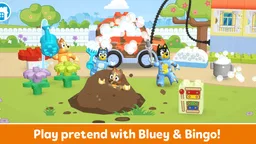
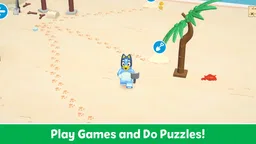
When I want a low-pressure game that a young Bluey fan can explore beside an adult or sibling, LEGO® Bluey feels like a natural fit. It brings the familiar characters into a playful building setting, so the appeal is less about beating levels and more about making things together. I would think of it as a shared activity for short stretches, rather than a deep construction game or a substitute for open-ended LEGO play.
Better as a shared play session than a solo project
The most useful way I can picture this game at home is on a tablet or phone passed between a child and a grown-up. One person can suggest what to build or where to explore, while the child makes the choices and handles the play. That small shift matters: instead of treating the game as a digital babysitter, it becomes a prompt for conversation about Bluey’s world and the things the child wants to create.
It also suits siblings who enjoy taking turns. A simple routine—one child chooses an idea, the other gets the next turn—can make a shared screen feel less like a contest. I would keep expectations relaxed, though. This is an educational game with a playful building premise, not a structured lesson plan or a competitive game designed around scoring.
That distinction helps set the right mood. If a child likes imaginative play but loses interest when a game asks for long stretches of concentration, this sort of experience may be easier to bring out for a short visit, a quiet afternoon, or a calm moment before dinner. I would not count on it to occupy a group for hours; its stronger use is as an easy starting point for shared pretend play.
What the building angle adds
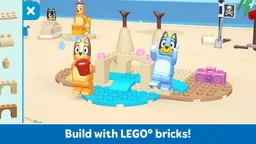
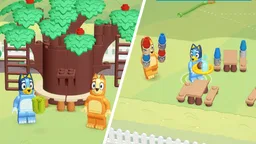
Bluey already lends itself to make-believe, and the LEGO setting gives that imaginative interest a building theme. The combination is the central reason to choose this game over a general children’s activity app: it connects recognizable characters with the pleasure of arranging and creating. For a child who enjoys both Bluey and LEGO, that crossover is more specific and inviting than a generic collection of puzzles.
At the same time, the familiar branding should not be mistaken for a full digital version of physical bricks. If your child’s favorite part of LEGO is handling pieces, testing whether a model stands, and rebuilding it with hands-on materials, a screen cannot replace that sensory experience. I see the game as a companion to real-world play: it can spark an idea, then the child can carry that idea over to blocks, drawings, or a story acted out in the living room.
The best household use is to play alongside the child at first, then let them take the lead. That gives you a chance to see whether the building style holds their attention and whether they can navigate it comfortably, without assuming the game will work the same way for every child.
Set expectations before handing over a shared device
Because a family phone or tablet may be used by several people, I would treat the first session as a quick check-in rather than immediately leaving the game with a child. See how the child responds to the play, whether they can follow what is happening, and whether the device is set up in a way that suits your household. Those are sensible steps for any child-focused game, especially when the device itself is shared.
The game is free to start, but it includes in-app purchases priced from $4.99 to $39.99 per item. That is worth discussing before a child plays independently. I would check the purchasing arrangement on the device and make sure the child knows that choosing something in the game is not the same as having permission to buy it. This is a practical boundary, not a reason to avoid the game; it simply makes the free entry point and optional spending easier to manage.
Shared devices also raise a less obvious question: whose progress or choices are being used? If several children take turns, agree on a simple routine—such as taking turns with the same session—rather than assuming each child has a separate space. I would avoid promising siblings that their play will be kept separate unless you have checked how the game behaves on your device. The useful approach is to observe the first session and decide whether a shared setup is comfortable for your family.
For a child who is not yet ready to manage a touchscreen independently, an adult can stay nearby and help with navigation. That can keep the experience enjoyable without turning it into a lesson about rules. For an older child who wants private, uninterrupted play, a family-shared screen may be a poor fit regardless of the game; another device arrangement may matter more than any particular feature inside the app.
Small coordination habits make turns easier
When two children want to play, I would make turns concrete before opening the game. A timer is not necessary; agreeing that each gets to choose a building idea or take a turn in sequence can be enough. This works especially well when one child is more confident with games and might otherwise take over. The point is to make room for each child’s imagination, not to rush toward a finished result.
Another helpful habit is to ask the child what they are trying to make before offering suggestions. A familiar character can prompt adults to lead the play, but children may have their own idea that has little to do with the obvious story. Letting them explain it gives the game a more collaborative feel and helps you judge whether the building activity is genuinely engaging them.
If the device has to be handed back for homework, a call, or another family task, give the child a brief warning before ending the session. I find that this is a better fit for a creative activity than stopping abruptly: a child can finish the thought they are working on, then move on. It is a simple household technique, but it makes a shared-device game easier to include in a normal day.
Age context and what parents can reasonably expect
The game is rated Everyone, which makes it broadly suitable for family settings, but an age label is not a personal recommendation for every child. The best guide is still whether a child enjoys the characters and can manage the style of play. A young fan who loves to invent stories may connect with it quickly; a child who prefers fast action, clear challenges, or a stronger sense of progression may not find the building focus compelling.
StoryToys is the developer, and the game sits in the educational category. I would interpret that as playful engagement rather than formal instruction. It may encourage creative choices and conversation, but I would not choose it expecting a curriculum, reading practice, or a measured learning path. Parents looking for a focused educational tool should compare it with apps built specifically around the skill they want to support.
For trust and age-appropriate use, I would pair the rating with ordinary supervision around purchases and shared-device habits. The game is free, but optional purchases mean a child should not be left to assume every on-screen choice is included. That is especially relevant in a household where several people know the device passcode or use the same app store account. A quick adult check before independent play can prevent an avoidable surprise.
The game has an average rating of 4.4 from around 16,000 ratings, and it has been installed over five million times. Those figures suggest that many players have tried it, but they do not tell me whether it will suit a particular child’s taste. I would treat them as useful background, then make the decision based on the child’s interest in Bluey, building, and imaginative screen play.
How it compares with other choices for children
Compared with a general educational game, the biggest difference is its specific Bluey-and-LEGO appeal. A child who already enjoys those worlds may be more willing to explore here than in an unfamiliar puzzle app. On the other hand, a generic learning game may be a better choice if your goal is to practice a particular skill, while a traditional building game may offer more freedom for someone who wants construction to be the main event.
Compared with physical LEGO, the trade-off is convenience versus hands-on play. The app is easy to bring out when bricks are not available or when a child wants a screen-based activity, but it cannot offer the tactile trial and error of real pieces. Compared with watching Bluey, it gives the child a more active role, though a child who simply wants to relax with an episode may prefer a show rather than interactive play.
I would skip it if your household avoids in-app purchases entirely and you do not want to manage purchase settings, if the child is uninterested in Bluey, or if you need a robust learning program with clear educational objectives. I would also look elsewhere for a game aimed at older children who want complex construction, elaborate challenges, or long-term goals. Its appeal is narrower than “a LEGO game for everyone,” and that is fine: it is most convincing when the child already likes the characters and enjoys making up ideas.
Practical details and my household verdict
The game is free to download, is rated Everyone, and has in-app purchases ranging from $4.99 to $39.99 per item. It was released on August 12, 2025, and the current version is 7.1.1, with minimum OS 9. Those details are worth checking against the device you plan to use, particularly if you are installing it on an older family tablet or managing purchases on a shared account.
My overall recommendation is for households with a young Bluey fan who likes creative play and can share a screen without needing a separate account or a highly structured activity. I would introduce it together, establish a clear purchase boundary, and see whether the child naturally starts inventing things rather than simply tapping through. If that happens, it can make a pleasant shared session and even provide a springboard for building with real toys afterward.
LEGO® Bluey is at its best as a small, supervised invitation to imagine—not as a complete replacement for physical building, a formal learning app, or a guaranteed solution to screen-time disputes. StoryToys’ game has a clear audience, and for a family already drawn to Bluey and LEGO, that focused appeal is its strongest reason to try it.
What we like
- Familiar Bluey characters make the game appealing to young fans.
- LEGO building activities encourage creative play.
- Simple controls are accessible to younger children.
- Play can be enjoyed at a relaxed pace.
- The playful setting suits family-friendly gaming.
What could be better
- The activities may feel repetitive after extended play.
- Younger children may need help with some interactions.
- The game may require substantial storage space.
- Compatibility can vary across devices.
- In-app purchases may be available.







