


Hello Kitty And Friends World review
 Analysis by Appsdrops
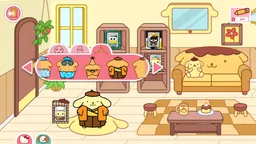
At first glance, Hello Kitty And Friends World has the easygoing appeal you would expect from a game starring Hello Kitty and her friends: play, decorate homes, dress up characters, and create stories. What interests me beyond the cute presentation is how approachable that invitation feels for different players and situations. An educational game can be welcoming without being complicated, but the details of reading, tapping, and sensory comfort matter just as much as its theme.
A gentle world with room for personal stories
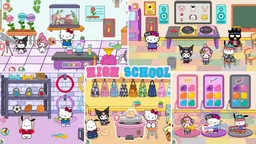
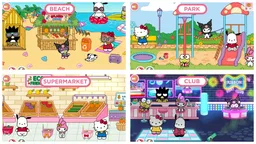
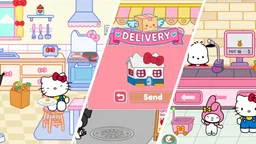
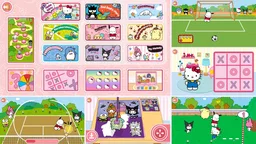
Made by TapTapTales, this free educational game is aimed at everyone and has drawn over a million installs. Its premise is straightforward: spend time with familiar characters through play, home decoration, dress-up, and storytelling. I like that these activities suggest several ways to engage rather than one narrow goal. A player who enjoys choosing outfits may approach it differently from someone who prefers decorating or making up little stories.
The familiar Hello Kitty setting gives the game an immediate point of recognition, especially for children who already know the characters. That can make the first impression feel friendly instead of demanding. The overall idea is also easy to explain to a parent or younger player: you can play, decorate, dress up, and invent stories with Hello Kitty and friends. That clarity is a useful starting point for an inclusive experience, even though it does not answer every practical question about how the interface works.
For context, the game carries an average rating of 3.8 from around 3,300 ratings, alongside 108 written reviews. Those figures offer a quick sense of its reception, but they cannot tell me whether the controls will suit a particular player. I would treat the colorful concept as an invitation, then judge the actual experience on the device and with the person who plans to play.
Readability and navigation
For a game built around visual activities, screen clarity can make a big difference. A player needs to understand where to go, what can be selected, and how to move between play, decorating, dress-up, and storytelling. The concept is easy to grasp, but a simple premise does not automatically mean every menu or instruction is equally clear. Younger children, emerging readers, and players who benefit from uncluttered screens may each need different levels of guidance.
I would look for whether important choices are visually distinct and whether the game gives enough context before asking a player to act. Familiar characters and recognizable objects can help communicate meaning without relying entirely on written instructions. At the same time, visual cues are most useful when they are consistent and not crowded by decorative detail. In a character-rich world, there is a balance to strike between charm and making the next step obvious.
Parents or caregivers can make a practical first check by opening the game together and seeing how quickly the player can identify the main activities. Watch whether the player can return to a familiar activity, understand what a button does, and recover from an accidental tap without frustration. This is not a formal accessibility assessment; it is simply a useful way to see whether the game’s presentation matches a child’s reading level and familiarity with touchscreens.
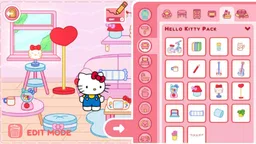
Because the central activities are open-ended, the game may be appealing to children who enjoy making choices at their own pace. Decorating and dress-up naturally invite selection, while storytelling can give a player a reason to connect those choices. That flexibility is promising, but it is still worth checking whether a child can navigate between activities independently or needs an adult nearby to explain the interface.
Touch, movement, and sensory comfort
On a touchscreen, the physical side of play matters. Selecting clothing, objects, or characters may involve tapping or dragging, and those actions can be easier for some players than others. Children who are still developing fine motor control may need larger, forgiving targets and time to make a choice. Players with limited dexterity can also find repeated small movements tiring. I would test the controls gently rather than assume that a cute, child-friendly theme guarantees effortless handling.
It can help to notice how the game responds when a tap lands slightly off target or a movement is imprecise. If an interaction feels frustrating, changing how the device is held or placing it on a stable surface may make a short session more comfortable. These are general ways to adapt touchscreen play, not claims about a special control mode in this game. The best setup is the one that lets the player focus on making choices instead of struggling to reach the screen.
Sensory preferences deserve similar attention. Bright colors and animated characters are part of the appeal of a Hello Kitty game, but visual intensity that delights one child may feel busy to another. Sound can also affect comfort, particularly in shared spaces or for players who are sensitive to sudden or repeated audio. I would begin with a brief session and observe the player’s response, adjusting the device’s general sound level when needed. This review does not treat the game as having specific sensory settings unless they are visible and usable on the device.
It is also worth considering how long a player wants to stay engaged. Open-ended activities can be relaxing for someone who likes to explore, while another child may prefer a clear stopping point. A caregiver can help by setting a comfortable session length and checking whether the player can pause or leave without losing confidence about what they were doing. A calm, shared introduction often tells you more than a quick glance at the game’s theme.
Playing in different situations
Access is not only about a player’s abilities; it is also about where and when they play. A child might use the game at home with an adult nearby, during a quiet break, or while sharing a device with a sibling. The activities described by the game lend themselves to casual play, and the mix of dressing up, decorating, and storytelling can give different children something to choose. Still, the most suitable setting depends on the device, the player, and the household’s routines.
For a family playing together, one person can help explain the choices while letting the child lead. That can be especially useful for a younger player who recognizes the characters but is still learning how to operate a game. Siblings can take turns choosing outfits or imagining what happens in a story, turning individual selections into a shared activity. If one player needs more time, agreeing on turns beforehand can help keep the experience comfortable for everyone.
In a quieter setting, a child may have more space to explore without being rushed. In a busy room, interruptions or competing sounds can make it harder to follow visual instructions or stay focused. A short, low-pressure trial helps identify whether the game fits the moment. If the child becomes distracted or uncomfortable, it may be better to pause and return later rather than push through.
The game is free to download, with optional in-app purchases ranging from $1.99 to $64.99 per item. That matters in shared-device situations, especially when a child is exploring independently. I recommend an adult review the purchase controls and household settings before handing over a device, and clearly explain which actions are okay. This is a sensible precaution for any family game with in-app purchases, not a judgment about how a particular child will play.
What families should keep in mind
Inclusive design depends on details that are easy to overlook: readable text, clear feedback, forgiving touch targets, predictable navigation, and options that let people adjust the experience. The game’s broad activities and familiar cast are encouraging foundations, but they are not enough on their own to establish that every player will find it accessible. A player who reads comfortably may move through an interface with little help, while someone who relies on spoken guidance, simplified screens, or alternative input may have a different experience.
That distinction is important for caregivers choosing an educational game. A welcoming subject and an everyone age rating do not guarantee that the controls, pacing, or sensory presentation will suit every child. I would avoid making assumptions based only on promotional imagery. Instead, try the game alongside the intended player and notice both what they enjoy and where they hesitate. The goal is not to make every child play in the same way, but to see whether the available activities support the way that child prefers to explore.
It also helps to think about the difference between independent play and supported play. A child may enjoy the game with an adult narrating choices, even if the menus are not immediately self-explanatory. Another may prefer to take the device and explore alone. Both can be valid ways to engage, but families should know which experience they are looking for. A few minutes of observation can reveal whether the game encourages confidence or creates avoidable friction.
The strongest inclusive feature is the variety in the basic invitation: players can choose among play, decorating, dressing up, and storytelling. Different activities can offer different kinds of engagement, which is helpful when a child’s interests or energy change. The important caveat is that choice only helps when the player can reach and understand those choices. A little adult support at the start may make the difference between a child feeling in control and feeling lost.
Age, platform, and practical details
The game is rated for everyone and requires Android 7.0 or later on Android devices. It is currently at version 8.5 and was released on October 30, 2025. These details are useful when checking whether a device can run it, but compatibility alone does not determine whether the experience will feel comfortable. Screen size, device responsiveness, and the player’s own needs all affect how easy it is to interact.
Its educational classification and creative activities make it a natural candidate for families looking for a light, character-led game. I would describe its learning value cautiously: dress-up, decoration, and storytelling can invite choice and imagination, but the central appeal is the chance to play with Hello Kitty and friends. The game’s short description, “Hello Kitty And Friends World,” captures that simple identity without asking players to master a complicated premise before they begin.
For families weighing a download, the practical routine is straightforward: check the device, open the game with the child, explore the main activities, and review purchase settings. If the player enjoys choosing outfits or creating stories but needs help navigating, decide whether that level of support fits your household. If sensory comfort is a concern, observe the visuals and sound in a brief session. Those small checks give a more useful answer than relying on a general label alone.
My inclusive verdict
Hello Kitty And Friends World has a friendly, flexible concept that could appeal to children with different interests. Playing, decorating homes, dressing up, and creating stories offer several routes into the experience, and the familiar characters help make the idea approachable. I can see why a family might choose it for casual creative play, particularly when a child already enjoys Hello Kitty and her friends.
My verdict on accessibility is positive but measured. The game’s range of activities is a strength, and its straightforward theme makes it easy to introduce. However, inclusive access depends on how clearly the interface communicates, how manageable the touch interactions feel, and whether the visual and audio presentation suits the individual player. Those are details families should check directly rather than assume from the game’s audience rating or cheerful design.
If your child likes character-based play and imaginative choices, this looks worth trying together. Give them time to explore, step in where navigation or purchases need adult attention, and notice which activities feel most comfortable. With that thoughtful introduction, the game may offer a pleasant shared or independent play session. For me, its appeal lies in the freedom to make small creative choices; its inclusive value ultimately comes down to whether those choices are easy for the player in front of the screen to enjoy.
What we like
- Bright character designs make the game appealing to Hello Kitty fans.
- Simple controls are approachable for younger players.
- Exploration offers a relaxed alternative to competitive gameplay.
- Familiar Sanrio characters add charm to the experience.
- The colorful world encourages casual play.
What could be better
- Some activities may feel repetitive over time.
- The game may require an internet connection for certain features.
- In-app purchases can limit access to some content.
- Younger players may need help navigating menus.
- Performance may vary across older devices.







