



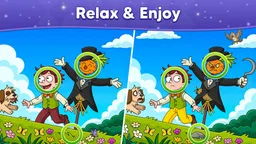
Find Differences: Spot it! review
 Analysis by Appsdrops
I can see the appeal of Find Differences: Spot it! within a few minutes: it turns a familiar picture puzzle into a short, focused test of observation. Instead of learning a complicated rule set, I scan two animated scenes and look for details that do not match. That makes it easy to pick up when I have a spare moment, while still giving my attention something concrete to do.
My first impression is that this is best treated as a small, repeatable pastime rather than a game to rush through in one long sitting. The pleasure comes from noticing a detail I initially overlooked, not from mastering a deep strategy system. If you enjoy visual puzzles and want something approachable, it makes a friendly first-week download. Whether it earns a permanent place on your device depends on how much you enjoy repeating that simple loop.
Why the first sessions work
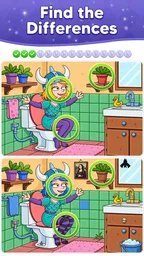
The basic challenge is instantly understandable: compare the pictures, spot what differs, and keep your eyes moving across the scene. That low barrier is useful when I am tired or do not want to spend time on a tutorial. It also means the game can suit different ages and levels of puzzle experience; its content rating is Everyone, and the format does not rely on trivia knowledge or fast reflexes to make sense.
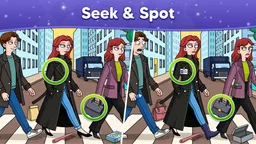
Because the images are animated, the task has a little more visual character than comparing two static panels. The movement can make a scene feel lively, but it also asks me to separate meaningful changes from everything else happening in the picture. My practical tip is to scan systematically: check the edges first, then the larger objects, and finally the smaller details. A consistent route helps more than repeatedly staring at the whole scene and hoping a difference jumps out.
This is a useful choice for brief breaks when a word game feels too demanding and a conventional action game would be awkward to pause. I can focus on one puzzle without needing to remember a story or manage several systems. On a commute, during a waiting-room pause, or while taking a short screen break between chores, that compact mental task is the main attraction. I would still avoid playing while walking or doing anything that needs my attention elsewhere; the whole point is careful looking.
There is a small but worthwhile distinction between “relaxing” and “effortless.” The rules are simple, yet a crowded or animated scene can make me slow down and inspect carefully. That gives the game enough friction to feel like a puzzle rather than a passive slideshow. If you want a game that plays itself while you glance at it, this is not that. If you like the quiet satisfaction of finding a detail with your own eyes, the opening sessions are likely to land well.
A practical way to play without turning it into a chore
I get more from this kind of game when I set a modest stopping point instead of trying to clear everything in one sitting. A handful of puzzles can make a good coffee-break routine; continuing after my attention starts slipping tends to make the scenes feel repetitive rather than challenging. If I find myself tapping around without really comparing the images, that is a good sign to pause and return later.
Another useful habit is to compare corresponding areas, not just scan one picture and then the other separately. I move across both scenes in the same direction and check each region as a pair. That reduces the chance of overlooking a subtle mismatch and gives the puzzle a more deliberate rhythm. It is a simple approach, but it makes the core activity feel less like guesswork.
What may keep it in rotation after the novelty
For long-term value, the important question is not whether the first few puzzles are easy to understand; they are. It is whether the act of looking closely remains satisfying once the format becomes familiar. This is where personal taste matters more than a feature checklist. Players who enjoy visual-search puzzles can return to the same basic activity whenever they want a low-pressure mental warm-up. People who need new rules, evolving tactics, or a strong sense of progression may find that the central loop does not change enough to hold their interest.
I would use it as a companion habit rather than a daily obligation. For example, it can sit alongside a crossword or a short logic puzzle: choose it when you want to exercise visual attention instead of vocabulary or deduction. That variety helps it retain a purpose without expecting it to become a full evening’s entertainment. It is also a reasonable option for a shared quiet moment, since comparing pictures is easy to explain to someone nearby. I would not assume every player will enjoy taking turns, but the task itself needs little setup or specialist knowledge.
Find Differences: Spot it! comes from Greyfun Games, and its current version is 1.0.13. The game is free to download, with in-app purchases listed at $9.99 per item. That makes it sensible to try the basic experience before deciding whether any paid option matters to you. I would approach optional spending as a personal choice rather than a requirement for enjoying the central picture-comparison idea.
The game has a 4.8 average from 577 ratings, with 100K+ installs. Those figures suggest that it has found an audience, but they do not tell me whether its particular rhythm will suit you. The more useful test is whether you enjoy the scenes and keep wanting to inspect one more pair after the first burst of curiosity. If not, popularity will not change the underlying repetition.
Low maintenance, with a few practical caveats
One advantage of a focused puzzle game is that it does not ask me to keep track of a complicated build, a long narrative, or a collection of daily tasks in order to understand what I am doing. I can return after a break and immediately recognize the activity. That makes it relatively easy to maintain as an occasional app: open it when the mood fits, play for a short spell, and leave it alone without feeling that I have fallen behind.
That simplicity cuts both ways. There is no reason to expect a visual-difference puzzle to supply the kind of varied upkeep that keeps a larger game feeling fresh. If your ideal mobile game offers several distinct modes or a changing social challenge, you may prefer a broader puzzle collection. Here, the best reason to return is the core act of careful comparison itself. I would judge it by that loop, not by expecting it to serve as an all-purpose game library.
Its age rating is Everyone, which supports its straightforward, broadly accessible premise. Still, suitability is not the same as universal appeal: younger players may enjoy spotting visual changes, while adults who prefer complex problem-solving may want a tougher logic game. The available minimum OS is 7.1, so it is worth checking your device’s compatibility before planning to install it. That is a practical step, especially if you are setting it up for someone else.
Where visual fatigue can set in
The main limitation is also the game’s defining feature: every session asks me to look for differences between pictures. If I already play several spot-the-difference games, this may feel familiar quickly. Animated artwork adds motion, but movement can also be tiring when I am trying to concentrate, particularly after a long day of looking at screens. I find the experience works better in short sessions than as a marathon, and taking a pause is more useful than forcing my eyes through another puzzle.
There is also a trade-off in choosing a visual puzzle over a trivia game. Trivia can test what I know and introduce facts or subjects; this game instead rewards attention to the images in front of me. If you came looking for general-knowledge questions, the category may sound adjacent, but the actual appeal is picture-based observation. Likewise, if you want a fast reaction challenge, a reflex-focused game will deliver a more energetic pace. This one asks for patience and a steady scan.
Another source of fatigue is the feeling that a puzzle has stalled. When I cannot see a remaining difference, random tapping is tempting, but it takes away the satisfying “I noticed it” moment. I recommend shifting to a fresh scan pattern: divide the scene into a few mental zones, compare matching areas, and deliberately inspect small background details. If that still feels frustrating, stop rather than turning a light pastime into an annoyance. Its strengths are most apparent when I am curious, not when I am determined to grind.
Compared with the usual alternatives, this sits closer to a calm visual-search puzzle than to a broad brain-training app. A general puzzle pack gives more variety from session to session, and a trivia title is better when you want questions with factual answers. A static spot-the-difference game may feel cleaner if motion distracts you. I would choose this one when animated imagery and a simple observation task sound appealing; I would choose another format when variety, deeper progression, or a quieter visual field matters more.
Who should keep it, and who should move on
I would recommend giving it a try if you want a free, approachable way to fill short pauses, enjoy examining illustrations, or share a simple puzzle with someone who does not play games often. It does not demand gaming experience, and the central task is easy to explain. For a person who likes small, self-contained challenges, it can earn a place in a rotation of casual games without requiring a strict schedule.
I would skip it if you need a strong long-term progression system, a wide range of puzzle types, or a challenge built around knowledge and strategy. It is also not the right pick when animated scenes make visual concentration uncomfortable. Those are not minor preferences: they change whether the repeated comparison loop feels soothing or monotonous. A varied puzzle collection, a trivia app, or a static image puzzle may be a better fit depending on what you want from a break.
My long-term verdict
After the first-week novelty fades, I think Find Differences: Spot it! earns space only for players who genuinely like visual comparison. Its lasting value is modest but clear: it offers a simple activity I can return to without relearning anything, and short sessions make it easy to fit around ordinary routines. The game is not something I would rely on for endless variety, and I would not recommend treating it as a substitute for more involved puzzles.
My advice is to try it with a light expectation: use it for a brief focus break, scan the pictures methodically, and stop when the task stops feeling enjoyable. If that small ritual suits you, the free entry point makes the experiment straightforward. If you want deeper systems or a constantly changing challenge, your time is probably better spent elsewhere. For the right player, this is a pleasant little exercise in noticing what is easy to miss.
What we like
- Offers a relaxing way to sharpen visual attention.
- Short rounds work well for quick play sessions.
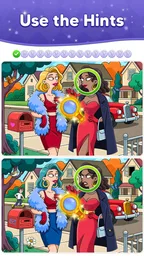
- Hints can help when a difference is hard to find.
- The simple controls are easy for new players to learn.
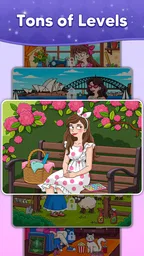
- Different picture themes help keep puzzles varied.
What could be better
- Some differences can be difficult to spot on small screens.
- Hints may be limited or require watching ads.
- Repeated puzzle formats can feel less engaging over time.
- Ads may interrupt play between levels.
- Players who prefer action may find the pace too slow.







