







Duet Tiles - Rhythm Music Game review
 Analysis by Appsdrops
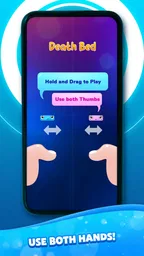
I like rhythm games best when they make me feel the beat rather than simply asking me to watch a note travel down a lane. Duet Tiles has a clear hook: I guide two vocal parts through a song by swiping and tapping piano-style tiles. That makes each attempt feel more like coordinating a small duet than following a conventional stream of notes. It is easy to understand why I might start a quick round while waiting for something, then try again because one mistimed move broke the harmony.
From the first tap to the first duet
The basic appeal is immediate: listen, react to the tiles, and try to keep both vocal lines together. The two-part setup gives the familiar tap-and-swipe rhythm format a little more to think about. I am not only chasing a beat; I am trying to keep two sides of the performance aligned. That extra coordination is the main reason this game feels distinct from a standard one-lane piano-tile game.
My practical advice is to begin by watching how a song’s pattern moves before trying to play as fast as possible. When the screen asks for different kinds of input, rushing can make a swipe land like a tap or leave one part of the duet unattended. A steadier first attempt helps me learn where the rhythm wants my attention. Once that pattern is familiar, I can focus on accuracy and flow instead of guessing at every change.
That learning curve is approachable, but it is not the same as saying every song will feel effortless. The two-voice idea adds a layer of coordination that can trip up someone expecting a purely casual, one-finger experience. If you enjoy rhythm games because they reward quick reactions, that added demand can be satisfying. If you want something almost passive, it may feel like more work than its bright presentation suggests.
Why the feedback keeps me moving
The satisfying part is the relationship between action and sound. A well-timed input helps the duet feel connected; a miss interrupts that sense of performance and makes the next attempt feel worth earning. Instead of treating failure as a distant score screen, I notice it as a break in the musical line. The clearest strength is how the two vocal parts turn timing into coordination, giving a successful run a small sense of musical accomplishment.
This also changes how I approach practice. When a section goes wrong, I try to identify whether I lost the beat or simply failed to switch my attention between the parts. Those are different problems: one calls for listening more carefully, while the other calls for a calmer, more deliberate response to the tiles. Thinking this way makes retries useful rather than just repetitive, especially for players who like improving through short, focused attempts.
There is a trade-off, though. A song can be enjoyable to hear without being easy to play cleanly, and the duet structure asks for attention even when I only wanted background entertainment. I would not choose it for a moment when I need to keep looking away from the screen. It works better when I can give the pattern a little focus, even if the session itself is brief.
The reward is a cleaner run, not just another song
For me, the immediate reward is getting further into a song without losing the relationship between its two parts. That makes improvement feel concrete: I can notice when I have become more comfortable with a transition or stopped reacting too late. The game’s appeal is less about treating a round as a long musical performance and more about making a compact challenge feel worth repeating.
A useful everyday scenario is a short break between tasks. I can play one attempt, spot the moment where my timing slipped, and decide whether I have enough attention for another. That is a better fit than opening a long-form music game when I only have a minute or two. On the other hand, if I am on a noisy commute and cannot hear the rhythm clearly, the audio-led nature of the experience may make a run less satisfying. I would save focused attempts for a setting where the beat is audible and the screen is easy to watch.
Duet Tiles is a free music game from AMANOTES PTE. LTD., and its audience is broad: it has passed 10 million installs. Its average rating is 3.6 from around 4,100 ratings, a mixed signal rather than a reason to assume it will suit everyone. I read that as a reminder that the unusual two-part control idea is a real point of difference, but also a possible source of frustration for players who prefer simpler rhythm inputs.
What to consider before making it a regular game
The game is free to download, but it includes in-app purchases ranging from $0.99 to $48.99 per item. I would treat optional spending as something to decide on only after I know how much I enjoy the core tapping-and-swiping loop. If I am merely curious, I can try the free game first rather than assuming that purchases are necessary to enjoy its basic premise. The presence of a broad price range also makes it sensible to check each purchase carefully before confirming anything.
Its Teen content rating is worth noting for families choosing music games. The current version is 1.9.73, and it runs on Android 7.0 or later. Those details are useful when deciding whether an older device can install it, but the main choice remains personal: does coordinating two vocal parts sound fun, or does it sound like an extra complication?
Compared with the usual piano-tile rhythm game, the duet framing gives this one a stronger sense of interaction between parts. Compared with music games built around elaborate instrument simulation, it is more direct: the emphasis is on reacting to tiles, not pretending to play a full keyboard. That makes it an appealing middle ground for casual rhythm fans who want something more involved than tapping a single stream, but not a deep music-making tool.
Retries, small resets, and the pull of another round
The reset is part of the design’s appeal. A missed beat gives me a clear reason to start over: I know the pattern a little better, and I want to see whether I can keep the duet intact next time. This creates a compact cycle of action, feedback, and retry. The game does not need a long session to make that loop understandable; a small improvement can be enough to make another attempt feel worthwhile.
That same loop can become tiring if I keep repeating a section without changing how I play. My best approach is to make one adjustment per retry: listen for the timing, watch the transition, or give the second part more attention. If I simply tap faster, I am likely to repeat the same mistake. Players who dislike restarting or who find repeated attempts stressful may prefer a rhythm game with a more forgiving pace or a less demanding input pattern.
Another practical trade-off is attention. The game’s central challenge is visual and rhythmic at once, so I would not recommend playing while walking, crossing streets, or splitting focus with another task. It is a better choice for a seated break where I can look at the tiles and hear the song. That small change in context makes the difference between a frustrating round and a satisfying one.
Who I would recommend it to
I would recommend Duet Tiles to someone who already enjoys quick rhythm challenges and wants a twist on the familiar piano-tile format. It is especially suited to players who like learning a pattern, correcting a mistake, and getting a cleaner run on the next try. The paired-vocal concept gives those retries a purpose beyond simply raising a score: I am trying to make two parts work together.
I would steer away from it if you want a relaxed music player, a hands-off listening experience, or a rhythm game that asks for little coordination. It is also not my first pick when I cannot hear the beat or keep my eyes on the screen. In those situations, a more forgiving rhythm title—or simply a music app for listening—would fit better.
Overall, I find the game’s loop easy to understand and genuinely distinctive: I respond to the tiles, feel the result in the duet, take the reward of a smoother passage, then reset with a clearer idea of what went wrong. Its most compelling moments come when that second try turns into a more connected performance. If that kind of small, skill-based payoff sounds appealing, it is worth trying; if coordination feels like a chore, the same feature is likely to be the reason you move on.
With 106 reviews and a Teen rating, it sits in a familiar casual-game space while asking for more attention than its simple controls might imply. I would give it a chance during a quiet break, keep spending optional, and judge it by whether the two-part timing makes me want to improve. For the right player, that is enough to turn a quick round into one more attempt.
What we like
- Quick rounds make it easy to play during short breaks.
- Simple controls are easy to learn for new players.
- Rhythm-focused play rewards timing and concentration.
- A wide range of songs can keep repeat sessions engaging.
- The two-tile format adds a distinct challenge to music games.
What could be better
- Fast sections may feel difficult for casual players.
- Accurate taps can be challenging on smaller screens.
- Some songs or features may require in-app purchases.
- Gameplay can feel repetitive after extended sessions.
- Ads may interrupt play depending on the version.







