






Dancing Cats - Cute Music Game review
 Analysis by Appsdrops
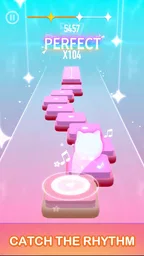
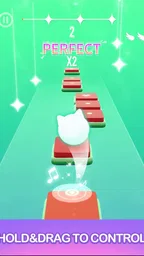
I find Dancing Cats - Cute Music Game easiest to understand as a rhythm game built around quick visual choices: follow the notes, tap in time, and enjoy the cat-themed presentation. That simple premise makes it approachable at first glance, but it also means the experience depends heavily on whether its timing and screen activity suit you. For me, the key question is not just whether the music is catchy; it is whether the game feels comfortable to read, control, and play in the moments when I actually have a phone handy.
What the cat-and-rhythm format feels like
This is a free music game from Cobby Labs, with optional in-app purchases costing $2.99 per item. It is rated for Everyone, and its store summary describes cat-themed play on piano tiles. The basic appeal is clear: the music gives each round its pulse, while the cute visual style makes the action feel lighter than a strict rhythm-training game. It is a good fit if you want a playful music break rather than a serious instrument lesson or a deep music library to explore.
The game has an average rating of 4.6 from around 159,000 ratings, and it has passed 50 million installs. Those figures suggest broad appeal, but they do not tell me whether the pace will suit every player. Rhythm games can feel friendly when you are in sync and abruptly demanding when you miss a beat. I would approach this one as casual entertainment, not assume that its cheerful presentation makes every level effortless.
Readability and getting around
The premise is easy to grasp without studying instructions: watch the musical cues and tap the tiles as the rhythm moves along. That lowers the barrier for someone who has not played many music games. The cat theme also gives the game a distinct identity, rather than presenting the action as a plain sequence of notes. I can imagine handing the phone to a friend who likes cute characters and letting them understand the general goal quickly.
There is an important difference, though, between understanding what to do and being able to follow every cue comfortably. Rhythm play asks you to read the screen while listening and reacting, often in a short window. If you have difficulty distinguishing visual elements, need more time to process movement, or find busy screens tiring, the cute art alone will not solve that. I would try a short session first and notice whether the tiles remain easy to track once the music is underway.
For a more comfortable first run, I would play somewhere with steady lighting and hold the device in a position that does not force a strained wrist angle. I would also avoid starting when distracted: a conversation or a notification arriving mid-song can make a simple timing task feel harder than it is. These are practical adjustments, not hidden settings, and they matter because this game asks for attention at the moment each cue appears.
Motor demands and sensory comfort
The central physical demand is repeated tapping in time. That is a manageable action for many players, but it can be less comfortable for anyone with limited finger mobility, tremor, hand pain, or fatigue. A useful way to test the fit is to play briefly with the finger you naturally use, then pause and check whether the motion feels relaxed. I would not push through discomfort just to complete a round; a rhythm game should be a small diversion, not a reason to aggravate a hand.
There is also a trade-off between sound and visual timing. Playing with audio makes the musical pulse part of the experience, while playing in a noisy place may make that pulse harder to follow. Headphones can help in some settings, but they are not automatically the right choice for everyone: some players need to hear people nearby, and others find close, continuous audio uncomfortable. If sound is not an option, the visual cues become especially important, so I would judge the game by whether they are clear enough for you rather than assume that music is essential in every situation.
Fast reactions can be tiring even when the taps themselves are easy. I find it sensible to treat a missed sequence as a signal to slow down or stop, not as a challenge that must be beaten immediately. Short sessions make it easier to notice whether the pace is enjoyable. This is particularly useful for younger players, who may be drawn to the cats and music but still need breaks from concentrated screen activity.
Where it fits into an ordinary day
A realistic use case is a few minutes of play while waiting for a ride or taking a short break at home. The game’s light, music-led idea suits those small gaps better than an experience that asks you to settle in for a long narrative. But the same timing focus makes it less suitable when you are walking, crossing a street, or meant to be paying attention to someone beside you. I would save it for a seated moment when I can look at the screen without needing to divide my attention.
It may work well as a shared choice for a family member who likes cats and wants a simple game to try. The Everyone age rating is reassuring as a broad content label, but it does not mean that the controls or sensory pace will suit every child or adult. I would let a new player try a round while an adult is nearby, especially if they are sensitive to music, quick visual changes, or frustration when timing is missed.
The game requires Android 7.0 or later, which is useful to check before considering a download on an older device. Its current version is 0.5.8. Since rhythm games rely on responsive taps, a phone that is already sluggish or has a damaged touch area may make the experience feel unfair. If a tap seems to miss, I would first test the device’s touch response elsewhere before deciding that the game itself is the problem.
How it compares with other music games
Compared with music games that emphasize instrument practice or complex track management, Dancing Cats is positioned around an immediately recognizable visual theme and tile-tapping rhythm play. That can be an advantage if you want a quick, cute distraction without learning a lot of systems. If you are looking for music-making tools, detailed song selection, or a way to practise an instrument, a dedicated app in that area would be a better match.
Against other casual rhythm games, the cats are the memorable hook, while the core appeal still depends on whether you enjoy matching taps to a beat. Players who want calmer play, longer decision windows, or a game that can be enjoyed without close visual attention may prefer a puzzle or word game instead. I would choose this one for a playful burst of concentration, not as a background activity to leave running while doing something else.
Optional purchases are another practical consideration. The game is free to start, but individual in-app items cost $2.99. I would treat spending as optional rather than necessary to decide whether the basic style suits you; try the free experience first and set a clear limit if you share the device with a child. That keeps the decision simple and avoids confusing the cheerful presentation with a promise that every extra is needed.
What may still get in the way
The biggest accessibility question is whether the notes and timing are comfortable for your own eyes, ears, and hands. I would not assume that a cute theme guarantees adjustable text, alternative controls, a reduced-motion mode, or other accommodations. If you rely on a particular accessibility option, check the current app experience before committing to a long session. The game is most promising for someone who can see the cues, make repeated taps, and enjoy music at the pace it presents.
It is also not an ideal pick for players who dislike time pressure. Missing a beat can interrupt the relaxed mood, and repeated attempts may turn a quick break into a frustrating loop. My practical tip is to decide in advance how long you want to play and stop when the game stops feeling fun. If you prefer games that reward careful planning over fast reactions, that is a good reason to choose something else rather than blame yourself for not enjoying this format.
On the other hand, the low-concept premise is a strength for people who want to understand the activity quickly. I would recommend it to someone who likes cats, enjoys tapping along to music, and is comfortable giving a screen their full attention for short stretches. I would be more cautious for anyone who needs slower input, depends on particular sensory accommodations, or wants a music game that can be played without sound or visual focus.
A considerate choice for the right player
My overall view is that Dancing Cats - Cute Music Game offers a cheerful, easy-to-grasp take on casual rhythm play, with a distinctive cat-centered feel and a free starting point. Its popularity is substantial, but the real deciding factor is personal comfort: can you follow the cues, tap at the pace, and enjoy the sound and visuals without strain? A short trial is more useful than judging from the theme alone.
I would recommend it to a friend who wants a light music game for seated breaks and likes cute presentation more than elaborate mechanics. I would steer a friend toward a slower or more configurable alternative if quick reactions, repeated finger movement, or sensory intensity are a concern. That is not a criticism of the game so much as a reminder that accessible play depends on the person and setting. For the right player, it can make a spare few minutes feel playful; for someone who needs more control over pace or input, another kind of game is likely to be kinder.
What we like
- Easy-to-learn controls make it welcoming for casual players.
- Cute cat designs give the game a cheerful visual style.
- Short stages suit quick play sessions.
- Music and movement create an engaging rhythm-game feel.
- Unlockable content can add motivation to keep playing.
What could be better
- Some tracks or content may require in-app purchases.
- Repeated stages may feel predictable over time.
- Ads can interrupt the flow of play.
- Precise timing may be challenging on smaller screens.
- The game may need an internet connection for some features.







