



Cocobi Baby Care - Babysitter review
 Analysis by Appsdrops
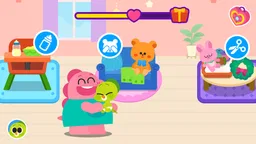
When a young child wants a quick game about looking after a little dinosaur, Cocobi Baby Care has an appealingly simple premise. I see it as a casual educational game for short, supervised play, rather than a deep learning tool or a game built around long sessions. Its baby-care theme gives children an approachable reason to tap and explore, while the dinosaur friends add a bit of character to the routine.
What play feels like, and who it suits
The game is made by KIGLE, and its central idea is easy for a parent to explain: spend time caring for a baby character in a playful setting. That makes it a reasonable choice for preschoolers who enjoy pretend play and familiar caregiving themes. I would introduce it when a child has a little time to fill and can use a phone or tablet with an adult nearby, rather than handing it over as an all-purpose activity.
The distinction matters because “educational” can mean very different things. This game’s value is in giving children a playful context to engage with, not in replacing a structured lesson, a storybook, or hands-on play. If your child enjoys pretending to feed, comfort, or look after toys, the theme may feel intuitive. If they are looking for a puzzle challenge, a reading exercise, or a clearly progressive curriculum, a more focused learning app will probably be a better match.
I also think the premise works best when an adult turns a few minutes of play into conversation. Asking a child what they think the dinosaur needs, or inviting them to describe what they are doing, can make the experience more engaging than simply watching them tap. That small bit of participation is especially useful for a child who is still learning to explain choices and follow a simple pretend-play idea.
Expect a casual pace, not a demanding challenge
From its straightforward concept, I would approach Cocobi Baby Care with modest expectations about pace: it is intended to be approachable for young children, not a fast reaction game. That is a strength when a child is still getting comfortable with touch controls. They can focus on the make-believe scenario without needing the timing, coordination, or competitive pressure common in action games.
For parents, the practical question is less “How quickly can my child finish?” and more “Will this hold their attention for a short stretch?” A simple care theme can be an easy starting point, but children vary widely. One child may enjoy returning to a familiar character, while another may quickly prefer a game with more varied puzzles or a clear sequence of goals. I would try it during a calm moment first, rather than relying on it to occupy a child for a long wait.
A useful approach is to keep the first session brief and see how the child responds. If they seem engaged, you can let them explore a little longer; if they begin tapping without interest or asking for something else, there is little reason to push through. This makes the game easier to use as an occasional activity instead of turning screen time into a negotiation.
Making short sessions work in everyday life
A realistic use case is a few minutes at home while an adult prepares a snack or waits for another family member. I would keep the device within sight and treat the game as a small activity, not a substitute for supervision. With a very young player, it also helps to explain the task in simple terms before handing over the device, so the child has an idea to follow rather than tapping randomly from the start.
Another useful moment is shared play with a parent or older sibling. Instead of taking turns only with the device, the adult can invite the child to narrate the pretend-care choices. That gives the game a social role and can reveal whether the child is following the theme or simply enjoying the characters. It is a low-effort way to make a casual game feel more interactive without assuming it includes a particular teaching mode.
I would avoid using it as a distraction in situations where a child needs to stay attentive to their surroundings, such as walking through a busy public space. A game on a handheld screen naturally draws attention inward. It is better suited to a settled place where an adult can remain available, especially for a child who may need help navigating the device or stopping when playtime is over.
What happens during longer or repeated play
The baby-care theme is naturally suited to brief visits, but repeated sessions are where parents should judge whether it remains worthwhile. A child who likes familiar pretend play may be happy to revisit the same sort of scenario. A child who wants new objectives, increasingly difficult tasks, or a strong sense of progression may lose interest sooner. I would not choose it on the assumption that it will provide hours of varied entertainment.
Heavy use also changes the practical trade-off. The longer a young child plays, the more important it becomes to set a clear stopping point and keep the session balanced with movement, conversation, and offline play. The game can be one option in a rotation, alongside toys, drawing, or a story, rather than the default response whenever a child is bored. That is a more realistic way to get value from a simple, casual title.
Families may also want to check the in-app purchase experience before a child plays independently. The game is free to download, with purchases listed at $1.99 per item. I would review the device’s purchase controls and explain that spending requires an adult’s permission. This is a practical precaution for any free children’s game that offers paid items, and it helps avoid an unexpected purchase during an otherwise ordinary play session.
Reliability and what I would monitor
I would not judge reliability by assuming every device or session behaves identically. The game’s current version is 1.0.33, but that alone cannot tell a parent how smoothly it will run on a particular phone or tablet. The sensible test is to open it before giving the device to a child, confirm that it starts and responds as expected, and make sure the child can use it without needing to move through unfamiliar menus.
For a young player, recovery from a pause or interruption is part of the experience. A call, a low battery, or an adult needing the device can end a session abruptly. I recommend trying the game once yourself so you know what the child sees when returning to it. If they are likely to become upset when interrupted, agree on a short play window beforehand and give them a gentle warning before stopping. That is more dependable than expecting a child to manage the transition alone.
Its audience is broad: the content rating is Everyone, and the game is aimed at children. That makes it suitable for family consideration, but an age label is not a substitute for checking whether the controls and pace fit an individual child. Some younger children will need a parent to guide them, while older children may decide that the simple premise does not offer enough challenge.
Device fit, cost, and alternatives
The game is free, and it requires Android 7.0 or later. That gives Android owners a clear compatibility point to check before installing. It is also available as a mobile game for families considering a phone or tablet, but I would still test it on the specific device the child will use. A device that is technically compatible may not be the most comfortable size or shape for a small child to hold for long.
Compared with common alternatives in children’s educational games, this one is more about imaginative care than practicing a defined academic skill. For example, if your priority is letter recognition, counting practice, or structured problem-solving, choose an app designed around that goal. If your child is more drawn to characters and pretend routines, Cocobi Baby Care is the closer fit. The right choice depends on what you want the screen time to do, not merely on whether an app is labeled educational.
Its reach is substantial, with over 10 million installs, and its average rating is 3.8 from around 7,800 ratings. I would treat those figures as context, not as a guarantee that a particular child will enjoy it. Ratings reflect many different expectations; a parent looking for a gentle, casual theme may value it differently from someone seeking a more ambitious learning experience.
My performance verdict
Overall, I would recommend Cocobi Baby Care to families looking for an uncomplicated dinosaur-themed activity that can fit into short, supervised play. The free download makes it easy to try, while the purchase option is worth managing before a child uses the device alone. The game’s strongest case is its accessible care-play premise; its main limitation is that this kind of casual theme may not satisfy children who want deeper challenges or a more explicit educational pathway.
For the best experience, I would test it first, keep sessions modest, and join in with a few questions rather than expecting the game to teach on its own. Choose something else if you need a structured lesson, extended variety, or a game that rewards advanced problem-solving. But if your child enjoys caring for characters and you want a light activity to share for a few minutes, this is a sensible option to consider. KIGLE’s game is best approached as a small part of a child’s play routine, not as a replacement for the toys, stories, and conversations that make learning tangible.
What we like
- Bright visuals make caregiving activities inviting for young children.
- Simple touch controls are easy for little hands to use.
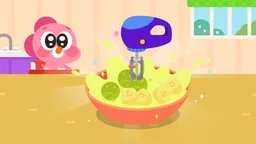
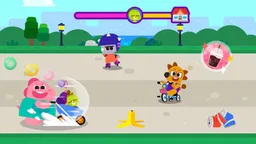
- Several care routines encourage pretend play.
- Short activities suit brief play sessions.
- The gentle theme is appropriate for preschoolers.
What could be better
- Gameplay may feel repetitive after a few sessions.
- Some content may require an in-app purchase.
- Frequent prompts can interrupt play.
- The app may show ads depending on the version.
- Young children may need help navigating menus.







