
BrainMax - Puzzle Earn Rewards review
 Analysis by Appsdrops
BrainMax - Puzzle Earn Rewards aims to make short brain-training sessions feel more rewarding. It sits in the trivia game space, with a promise that naturally catches the eye: sharpen memory and focus through brain games, while earning real cash rewards daily. That combination sounds appealing, but it also calls for realistic expectations. I’d approach it first as a casual puzzle experience, then see whether its reward side feels worthwhile in everyday use.
Getting started without getting stuck
The first hurdle with any new game is working out what to do next. BrainMax has a straightforward premise, but its short description leaves the finer details of play to be discovered in the app. I’d take a moment to explore the available screens and instructions before rushing through a session. That small pause can make the difference between understanding the activity and tapping around without a clear goal.
BrainMax is best approached as a casual brain-game app with a rewards angle, not as guaranteed income. The wording about daily cash rewards is part of its appeal, yet reward-based games can involve conditions and steps that matter. Read the explanations shown in the app carefully, and make sure you understand what counts as progress before assuming a particular session will lead to a payout.
If the opening experience feels unclear, try slowing down rather than repeatedly tapping buttons. Look for on-screen guidance, labels, and any explanation attached to a task. In a trivia game, a little context can help you distinguish between answering a question, completing an activity, and meeting a separate reward requirement. I find that taking this deliberate approach is more useful than treating every screen as self-explanatory.
Keep your expectations practical
BrainMax is free to download, which makes it easy to give the basic experience a try. It also offers in-app purchases, with items priced from $3.99 to $29.99. I’d avoid making a purchase just because a reward or progress screen creates urgency. First get comfortable with the game, understand what the purchase is for, and decide whether it genuinely adds value for you.
The game is rated Mature 17+, so it is not a fit for every player or household. That age guidance deserves attention before installing, especially if you’re choosing games for someone else. The listing also identifies Android 7.0 as the minimum operating system, so checking your device’s software version is a sensible first step if installation is the immediate obstacle.
Simple setup checks
When an app does not open or install smoothly, I start with the basics: confirm that the device meets the minimum operating-system requirement, check that the internet connection is working, and make sure there is enough free space for the installation. These are general checks, not special steps unique to this game, but they resolve many common setup snags before you spend time troubleshooting more complicated possibilities.
If the download seems stalled, give it a moment and check whether other apps or downloads are using the connection. If installation fails, restarting the device and trying again can be a reasonable next step. Keep the app store open to its own installation status rather than relying on a notification alone; sometimes a download is still running even when the screen appears unchanged.
For players who can install the game but cannot get past an opening screen, a connection check is a sensible first move. Switch to a stable network if one is available, then close and reopen the app. If the problem continues, restarting the device may clear a temporary issue. These suggestions are ordinary troubleshooting, not a guarantee that every loading problem has the same cause.
Making a session easier to follow
Once you are in the game, give each activity your attention instead of trying to race through it. The store summary emphasizes memory and focus, so a quiet moment and a comfortable pace make sense for that kind of play. I’d also keep track of what the app says about completing a task or qualifying for a reward, rather than relying on assumptions carried over from another game.
Trivia and brain-game sessions can be easy to interrupt. If you need to leave mid-activity, return to the app and check the screen before starting over or repeating actions. See whether your progress is still visible and whether the game provides a clear way to continue. If the screen appears frozen, wait briefly, then close and reopen the app once. Avoid rapid repeated taps, which can make it harder to tell whether an action registered.
If a reward does not appear when you expect it, first revisit the in-app explanation for the relevant activity. Check whether the task is fully complete and whether there are any stated steps between completion and receiving a reward. A visible change in progress, if the app shows one, can help you tell whether the session was recorded. If there is no clear update, restarting the app and checking again is more sensible than immediately repeating a long activity.
Recovering from interrupted progress
Temporary interruptions happen: a connection drops, another app takes focus, or the device needs to restart. When you return, look for the current state of the game before tapping through menus. If the app has retained your place, continue from there. If it has returned to an earlier screen, reread the activity instructions so you do not accidentally skip a step or confuse a new round with the one you were trying to finish.
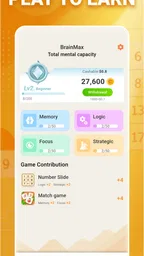
It is also helpful to distinguish between game progress and reward progress. They may not be the same thing, and the app’s own wording should guide you. I would not assume that finishing a puzzle automatically satisfies every reward condition. Keep the relevant instructions in view and follow the in-app process in order. That simple habit can prevent a lot of frustration when an activity has more than one stage.
For a recurring glitch, note what you were doing when it happened: opening the game, starting an activity, answering a question, or checking a reward. That gives you a clearer description if you decide to seek help through the app’s available support options. Before trying more drastic fixes, make sure you know how the app handles your progress, since uninstalling or clearing app data can affect locally stored information in many games.
When the app may not be the problem
Not every delay points to a fault in BrainMax. A weak connection can interrupt loading, while an older device or limited free space can make apps behave less smoothly. Background activity may also compete for device resources. Close apps you do not need, check the connection, and try again when the device is otherwise responsive. These basic steps help narrow down whether the issue is temporary or tied to the game itself.
If other apps are also struggling to connect, focus on the network rather than repeatedly reinstalling the game. If only BrainMax is affected, restart it and check that it is up to date through the app store. For purchase-related concerns, review the transaction information available through the store and the game’s own screens before trying to buy again. Repeating a transaction without checking its status can create unnecessary confusion.
It is worth keeping the difference between a technical issue and an expectation mismatch in mind, too. A reward that takes longer than expected is not automatically proof of a broken app; the task may have requirements you have not yet completed. On the other hand, if the game clearly indicates that an action succeeded but the corresponding status never changes, document what happened and use the support route available to you. Clear, specific details are more useful than a general report that something “doesn’t work.”
What to expect from the experience
BrainMax has attracted over 50,000 installs and holds an average rating of 4.2 from 298 ratings, alongside 29 written reviews. Those figures suggest that people are trying it and sharing opinions, but they cannot tell you whether its style, pacing, or reward approach will suit you personally. I’d use them as background, then judge the game by how clearly it explains its activities and how enjoyable the puzzles feel during your own sessions.
The developer is Golden Play, and the current version is 1.0.27. The game was released on April 28, 2026. These details can help identify the title when you are checking the correct app or comparing version information, but they do not replace a quick look at the instructions and age rating before you begin.
For searchers looking for a free trivia game or a brain-training game with rewards, BrainMax may be worth exploring if you enjoy short mental challenges. The key is to separate the puzzle experience from the promise of rewards. If the questions and activities are fun on their own, the reward angle can feel like an extra. If you would only play for cash, make sure the conditions are clear to you before investing time or money.
A grounded verdict
My practical take is that BrainMax is a casual option for people curious about memory and focus games, with a rewards pitch that deserves a careful read rather than blind trust. Start with the free experience, learn how the activities work, and take note of the app’s own reward instructions. If something goes wrong, work through the connection, device, and restart checks before assuming the game is at fault.
The Mature 17+ rating is important, and the in-app purchases mean “free” does not describe every possible cost. Keep spending optional, never treat a reward claim as guaranteed income, and make your decision based on the game you actually experience. With that approach, BrainMax is easiest to evaluate: try a few sessions, see whether the puzzles hold your attention, and keep the reward side in perspective.
Overall, BrainMax is a potentially appealing blend of trivia-style brain games and a daily-rewards concept, especially for players who like testing their concentration in short bursts. Its strongest case is the simple idea of making mental exercises feel more engaging. I’d recommend giving BrainMax a cautious try if that sounds fun, while paying close attention to the instructions and avoiding purchases until you know exactly what you want from the app.
What we like
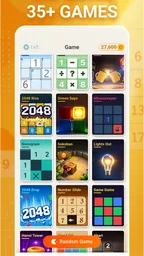
- Offers a range of puzzle challenges to keep play varied.
- Short rounds make it easy to play in spare moments.
- Progress provides a clear sense of achievement.
- Rewards give players an extra reason to complete puzzles.
- The puzzle format encourages logical thinking.
What could be better
- Reward value may be modest compared with time spent.
- Cash-out options may depend on location and eligibility.
- Some rewards may require meeting withdrawal thresholds.
- Ad viewing can interrupt the flow of play.
- Puzzle difficulty may feel uneven across levels.







