


Boddle: Math & Reading Game review
 Analysis by Appsdrops
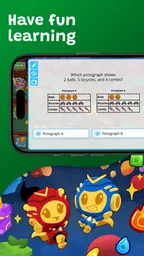
For a first-time user, Boddle: Math & Reading Game is easiest to understand as a playful learning activity rather than a full replacement for lessons or homework. It is an educational game from Boddle for children in kindergarten through grade six, with math, reading, and science activities presented in a kid-friendly format. I’d consider it when a child needs a more inviting way to spend a little time practicing, especially if ordinary worksheets tend to bring on groans.
The appeal is the mix of learning and play, but expectations matter. A game can make practice feel less like a chore; it cannot guarantee that a child will master a topic simply by opening it. I’d treat it as an additional activity that can help establish a routine, not as a substitute for a teacher’s explanation, a parent’s support, or a carefully chosen curriculum.
What to expect from the learning game
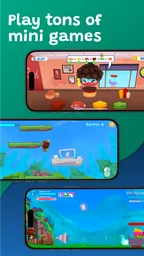
The store describes a K–6 experience spanning math, reading, and science. That broad range makes the game potentially useful in a household with children at different stages, or for a child who wants to switch between subjects. At the same time, a parent should not assume that every session will cover all three areas or that the app will match a particular classroom unit. It is better approached as a collection of learning games than as a tightly sequenced course.
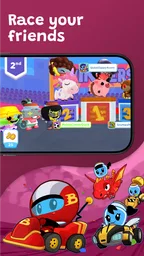
Its kid-focused presentation is part of the point: the educational material is meant to sit inside a game children will want to return to. In my view, that can be valuable for short stretches of practice, such as a quiet activity after school or a change of pace before starting homework. The practical test is whether the child stays engaged with the learning activity, not merely with the surrounding game elements.
The age rating is Everyone, and the intended school range runs from kindergarten through sixth grade. Those labels are helpful starting points, not a promise that the same activity will suit every child in that span. A younger learner may need an adult nearby to read prompts or help navigate, while an older child may prefer a more focused resource if they are working toward a specific skill or assignment.
The most useful expectation is modest and concrete: use it to make practice easier to start. If your child is already confident in a subject, the game may serve as light reinforcement. If they are struggling with a foundational idea, sit with them and notice where they hesitate; a playful format does not remove the need to identify and explain the underlying confusion.
Getting started without turning setup into a project
After installing it, I’d begin with the child who will actually use the game nearby. Let them explore the opening experience while you stay available to help with reading, choices, or unfamiliar controls. This keeps the first session low-pressure and gives you a chance to see whether the presentation feels comfortable for them before expecting a regular routine.
Rather than trying to sample everything at once, choose one subject that matches the moment. If a child has just finished math homework, a math activity can feel like a natural bit of practice; if they are tired of numbers, a reading or science activity may be a more appealing change. That small decision makes the app easier to introduce because it connects play to a familiar need instead of presenting a menu of tasks as another assignment.
I’d also agree on a simple stopping point before handing over the device. For example, decide together to play for a short break, then check in and ask what the child worked on. This is a useful way to keep screen time intentional without making the session feel like a test. It also helps a parent distinguish genuine interest in the learning from a desire to keep playing for its own sake.
The game is free to install, but it includes in-app purchases ranging from $0.99 to $69.99 per item. I would check the purchase prompts and account settings before a child plays independently, and make it clear that spending is an adult decision. The range means the free starting point should not be confused with a promise that every optional item or experience will remain free.
Finding the first meaningful win
For a first session, success does not need to mean completing a long sequence. A more useful goal is for the child to choose an activity, understand what it asks, and make a genuine attempt. If they can tell you afterward what kind of question they answered or what idea they practiced, that is a better sign of a meaningful start than simply spending time in the app.
Try a brief “show me how you figured that out” conversation after a round. Keep it curious rather than corrective. If the child explains their thinking, you learn whether the game is reinforcing a skill they understand or whether they are tapping through without much reflection. This is a practical way to make a game session more useful without adding a worksheet or turning play into a formal lesson.
A realistic routine might be a child taking a short device break while dinner is being prepared, choosing a subject, and then telling a parent one thing they practiced before putting the device away. That routine works best when the adult is nearby at the beginning and the child knows when the session ends. It gives the app a clear role: a contained opportunity to practice, rather than an open-ended answer to boredom.
For a parent choosing between this and a standard workbook, the trade-off is straightforward. A workbook makes it easy to see a written answer and can be better when a child needs focused, quiet repetition on one exact topic. Boddle is more appealing when motivation is the obstacle and a game-like setting helps a child begin. I would not assume the more entertaining option is automatically the more educational one; the child’s attention and understanding are what matter.
Where first-time users may get confused
The broad school-age range can make it unclear which activity is the right starting point. Avoid choosing solely because a subject sounds familiar or because an older sibling is playing it. Watch how the child handles the first few prompts: if they can work through them with reasonable independence, the level may be comfortable; if they are guessing or asking for help constantly, pause and try a different subject or offer support.
Another common misunderstanding is to expect the app to behave like a teacher assigning a lesson plan. The stated focus covers several subjects, but a parent should still guide the purpose of a session. Say, for instance, “Let’s try reading today,” or “Show me what you practiced in math,” rather than expecting the game to decide what schoolwork needs attention. That framing makes the child’s goal clear and helps you judge whether the activity fits.
Some children will be drawn to the game elements more than the academic task. That does not automatically make the app a poor fit, but it is a reason to check in. Ask what they learned, and notice whether they can describe the activity in their own words. If the answer is only about playing, redirect toward a specific subject or choose another learning method for that day.
There is also a difference between general practice and targeted help. If a child is preparing for a particular classroom test, needs repeated work on one narrowly defined concept, or benefits from a printed explanation they can revisit, a teacher’s materials or a focused workbook may be more direct. I’d use this game as a supplement when engagement is the main hurdle, not assume it covers every learning need just because it includes several subjects.
Who is likely to enjoy it, and who may prefer another option?
I can see this being a good fit for families looking for a playful way to add learning activities to a child’s device time. It may suit a child who responds well to interactive tasks, enjoys choosing among subjects, or needs encouragement to begin practice. It is also worth considering for parents who want a shared activity: sitting alongside a child for the first session can turn the game into a useful conversation about what feels easy and what needs more attention.
It may be a weaker choice for a child who becomes frustrated by game interfaces, strongly prefers books and paper, or needs a tightly structured lesson sequence. In those situations, a workbook, teacher-provided exercise, or adult-led explanation can be clearer. Likewise, if the goal is simply to occupy a child for a long stretch without supervision, I would not rely on an educational label alone; a parent should decide what screen-time boundaries and check-ins make sense for their household.
The app has an average rating of 4.4 from around 3,200 ratings, and it has been installed over 500,000 times. Those figures suggest that many families have tried it, but they do not tell me whether it will suit a particular child. I’d put more weight on a short, supervised first session than on popularity when deciding whether to keep it in the routine.
Making the next session more useful
Once the child has had a successful first attempt, repeat the process with a small variation: another subject, a different time of day, or a session where the child explains one answer. This helps you learn whether the appeal lasts beyond novelty. If they enjoy the activity and can talk about what they did, keep it as one option in a varied routine. If interest fades or the learning feels too easy or too difficult, change the approach rather than insisting on daily use.
Version 1.41.0 requires Android 9 or later. Boddle is free to download, with optional in-app purchases, so I’d treat the initial install as a chance to see whether the core experience works for your family before considering any paid items. The developer is Boddle, and the game was released on November 14, 2021; its current version and compatibility are useful practical details to check when deciding whether it will run on a device you plan to use.
My recommendation is to try Boddle: Math & Reading Game if your child likes interactive play and could use a more inviting route into K–6 practice. Start together, pick one subject, and end with a quick conversation about what the child tried. That approach makes the first meaningful success easier to recognize and helps keep expectations realistic. If your child needs a precise, teacher-led sequence or consistently learns better away from a screen, another resource may serve them better.
What we like
- Short game rounds make it easy to fit practice into a busy day.
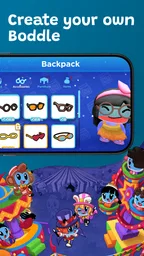
- A customizable avatar gives children a fun reason to keep playing.
- Progress tracking helps families see which skills need more practice.
- The kid-friendly interface is approachable for younger learners.
- Reading and math activities offer variety in one app.
What could be better
- Some content and features may require a paid subscription.
- Children may need adult help setting up an account.
- Rewards can distract from the learning activities.
- The experience depends on a reliable internet connection.
- The app may feel repetitive for children who prefer varied challenges.







