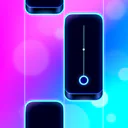
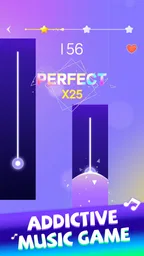
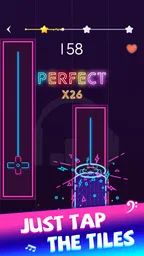
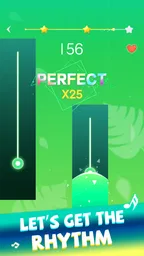
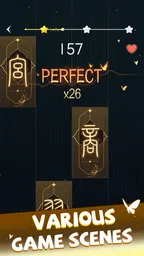

Beat Piano Dance:music game review
 Analysis by Appsdrops
I approached Beat Piano Dance as a quick music game to pick up between other tasks, rather than as a substitute for learning piano. Its appeal is immediate: follow the musical cues, keep your fingers moving in time, and try to stay composed as a song asks more of your attention. That simple premise makes it easy to understand, but whether it stays satisfying depends on what you want from a rhythm game—and how much repetition you enjoy.
Small goals make the first sessions easy to enter
There is little to learn before you can start playing. The central goal is to respond to the music with accurate, timely taps. I like that this gives a new player something concrete to focus on from the outset: listen, watch, and react. You do not need prior keyboard knowledge to make sense of the basic challenge, and a short session can still feel like a complete attempt rather than a lesson left halfway through.
That accessibility is useful in ordinary moments when I have a few minutes to spare—waiting for a ride, taking a break, or looking for a small distraction before getting back to work. The game’s music focus gives those moments more rhythm and intention than simply scrolling through a feed. It is also easy to hand to someone curious about music games, since the basic interaction is more approachable than learning instrument controls or navigating a complex simulation.
The early appeal comes from concentrating on one immediate task, not from a long-term promise. That is a strength for casual play, but it also sets expectations: players looking for a detailed career, elaborate instrument practice, or deep customization should not assume that a straightforward piano-themed rhythm game will provide those things. I would treat it as a quick test of timing and attention, not as a structured course or a full music-making tool.
What counts as progress
In a game built around timing, progress is most satisfying when I can feel myself responding more consistently. A useful personal goal is to focus on one improvement at a time: stay attentive through a full attempt, avoid rushing when the music becomes demanding, or recover calmly after a missed cue. Those small targets make replaying feel purposeful without needing to turn every session into a score-chasing exercise.
One practical tip is to play with a light touch and keep your hands relaxed. Tensing up can make quick responses feel less precise, especially when you are concentrating hard on the screen. I also find it helpful to give the music my attention rather than relying only on visual reactions. That makes the activity feel more like a rhythm challenge and less like an arbitrary tapping test, while still keeping the learning curve approachable.
The game’s identity is clear in its name and presentation: this is a music game from XGAME STUDIO, not a conventional piano tutorial. The distinction matters. A player may enjoy the sensation of matching actions to a musical flow without gaining the note-reading skills or keyboard technique expected from a teaching app. If your goal is actual piano practice, I would choose a dedicated learning tool; if you want a light rhythm game, this is a more natural fit.
Challenge depends on attention, not musical training
The most interesting challenge in this kind of play is maintaining a steady response as your attention shifts between the music and the cues. Familiarity with rhythm can help, but I would not make musical experience a requirement. Newcomers can learn by paying attention and adjusting their timing, while experienced musicians may appreciate the quick coordination test even if it does not offer the depth of a performance simulator.
For a fair personal test, I would avoid judging the game by a single hurried attempt. A noisy room, divided attention, or playing while someone is talking can make any rhythm task feel less forgiving. If a run goes poorly, try again when you can focus on the sound and screen together. This is a useful distinction for deciding whether the difficulty is enjoyable: a challenge that improves with attention can feel rewarding, but it may be frustrating if you want a game that works as background entertainment.
That focus also reveals a limitation. Rhythm games can become tiring when every session asks for the same kind of concentration, especially if you prefer open-ended play or a broader set of activities. I would use it in short bursts rather than expect it to fill a long evening. For longer play, a music game with a wider range of modes or a game built around exploration may suit you better.
Replay value without turning it into a chore
Whether the game keeps drawing me back depends on how I frame repetition. If I replay only to improve a result, the loop can feel narrow. If I set a smaller goal—be more composed, listen more carefully, or finish an attempt without letting one mistake derail the rest—the same basic action has a clearer purpose. That approach is especially helpful for casual players who want a little challenge but do not want a demanding daily routine.
It is also worth being realistic about the difference between a satisfying short session and a long progression system. The game’s premise supports quick rounds and personal improvement, but I would not choose it expecting a story-led campaign or a deep collection of unlockable content. Those expectations can make a simple rhythm game feel sparse, even when it is doing its core job well. If you need frequent new goals to stay interested, a more content-rich music title may be a better match.
Beat Piano Dance is free to download, with in-app purchases ranging from $2.99 to $24.99 per item. I would start by seeing whether the core tapping and timing feel enjoyable before spending anything. That is a sensible approach for a game whose appeal rests on a repeated play loop: first decide whether you like the activity itself, then consider any optional purchases in light of your own habits and budget.
Who should try it—and who should move on
I would recommend it to someone who wants an accessible music-themed game, likes short bursts of concentration, and is happy to improve through repeated attempts. Its Everyone age rating makes it broadly approachable, and its strong popularity—over 50 million installs and an average rating of 4.4 from around 304,000 ratings—suggests that many players have found the basic idea appealing. Those figures offer context, though they cannot tell you whether its particular rhythm and pacing suit your taste.
I would hesitate to recommend it to someone who wants a realistic piano experience, guided lessons, or a game that rewards exploration over timing. It is also not an ideal choice if you dislike repeating a core action or if you often play with your attention divided. In those cases, a piano-learning app, a creative music-making app, or a rhythm game with a broader range of activities would be a better use of your time.
The game is listed as released on May 7, 2023, and its current version is 2.2.4. It requires Android 7.0 or later, so it is worth checking your device’s system version before installing. Those details make the practical decision simple: if your device meets the requirement and you are curious about a focused, tap-based music game, trying the free download is a low-commitment way to see whether its rhythm suits you.
A measured verdict on its progression
For me, the strongest reason to try Beat Piano Dance is the clarity of its immediate goal. It gives you a direct way to engage with music, test your timing, and make a short break feel active. The best progress comes from building control and concentration, not from expecting a piano education or a sprawling progression system. That makes its simplicity both its biggest advantage and the main limit on how long it may hold your attention.
I would keep it installed if I wanted an occasional rhythm challenge that is easy to start and does not require a serious time commitment. I would move on if I found myself wanting richer musical instruction, more variety, or a longer-term sense of advancement. That is the honest trade-off: choose it for quick musical focus and approachable timing practice, not for deep piano training or an expansive campaign.
What we like
- Offers a simple way to practice rhythm and timing.
- Quick rounds make it easy to play during short breaks.
- Music-themed visuals add energy to each level.
- Touch controls are straightforward for new players.
- Progressive challenges can keep repeat sessions engaging.
What could be better
- Fast notes may feel difficult for younger or casual players.
- Some tracks or features may require in-app purchases.
- Ads can interrupt the flow between levels.
- Touch input may feel imprecise on smaller screens.
- The gameplay may become repetitive over longer sessions.







