





Avatar Maker Dress up for kids review
 Analysis by Appsdrops
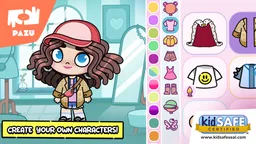
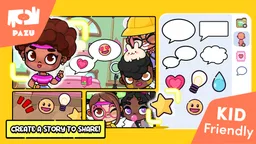
I see Avatar Maker Dress up for kids as a creative play space rather than a conventional game with levels to beat. Its appeal is in making a character feel like your own and using that avatar as a starting point for stories and an imagined world. That makes it an easy idea to understand, especially for children who already enjoy choosing outfits and inventing characters, but the experience is best approached as open-ended play rather than a structured lesson or a deep building game.
Getting past the first creative roadblocks
The basic concept is simple, yet open-ended apps can leave young players unsure what to do next. A child may make an avatar, look at it, and then wonder how to turn that character into a story. I’d help them begin with a small prompt: choose who the character is, where they are going, and what might happen there. That little framework gives the creative choices a purpose without turning play into a worksheet.
The game is made by Pazu Games and sits in the educational games category, though its educational value comes mainly from imaginative expression and making choices. I wouldn’t expect it to teach a specific school subject. Instead, it can give a child a low-pressure way to practice describing a character, sequencing an idea, and explaining why a particular look fits a story.
One useful habit is to let the child decide the story before spending too long on appearance. If they start with “my character is visiting a new place,” outfit decisions become part of the pretend scenario rather than an endless search for a perfect look. This can also help a child who gets stuck when faced with too many creative possibilities: a simple story goal narrows the choices.
Parents may also want to set expectations about the pace. This is not the right pick for a child who wants quick action, a score to chase, or a clear sequence of increasingly difficult tasks. Its value depends on whether the player enjoys making things up. If a child prefers a guided activity with an obvious finish line, a puzzle game or a more structured learning app will probably hold attention better.
Set expectations before handing it over
It is free to start, but it includes in-app purchases priced from $6.49 to $59.99 per item. I’d check the purchase controls on the device before a child plays independently and explain that not every tempting option necessarily belongs to the free experience. This is practical preparation, not a reason to avoid the game; it simply prevents a creative session from turning into an unexpected purchase conversation.
The age rating is Everyone, and the game is suitable for a broad family audience on that basis. Still, an adult’s first look is useful because children differ in how they handle optional purchases and open-ended screen time. I’d also agree on a simple stopping point, such as finishing one character or telling one short story, since there may not be a conventional level ending to signal that play is over.
The game has an average rating of 3.3 from around 123,000 ratings, so the public response is mixed rather than universally enthusiastic. That is worth keeping in mind when deciding whether to pay for anything: I’d let the child try the basic creative loop first and judge whether it genuinely suits them before considering optional spending. A large audience does not automatically mean every child will enjoy the same style of play.
Simple setup checks that save frustration
Before installing, check that the device runs Android 6.0 or later if you plan to use the Android version. The game is free, and its current version is 1.13. It has been available since January 5, 2022, and has passed 50 million installs. Those details suggest it is an established title, but they do not guarantee that every device or family setup will feel equally smooth.
If the app does not install or open as expected, I’d start with the ordinary checks rather than assume the game itself is broken: confirm the device has a compatible operating system, make sure the installation has completed, and close and reopen the app. If the device is short on storage or an update is pending, addressing that first can prevent confusing symptoms. These are general mobile troubleshooting steps, not special settings that the game requires.
For a child’s device, I’d also check how purchases are handled before opening the game. A parent can review the device’s purchase-confirmation options and make sure the child knows to ask before buying anything. Because the listed in-app items range in price, this small setup step is more useful than trying to explain purchase decisions in the middle of an excited play session.
Another practical check is whether the child can use the app comfortably without help. Younger players may need an adult nearby at first, not because the premise is complicated, but because a creative interface can present choices without telling a child which one to make. Watching the first session lets you see whether the player understands how to move from creating an avatar toward imaginative play, and whether they need a prompt or a break.
Recovering a session without losing the fun
If a child says the game has become confusing, I would avoid restarting everything immediately. First ask what they were trying to do: change the character, continue a story, or explore the world they imagined. Naming the goal often reveals whether the problem is a missed step, a choice that feels overwhelming, or simply that the child has finished with the activity for now.
A helpful recovery routine is to pause, describe the character aloud, and choose one next action. For example, a child might say the avatar is going to meet a friend, then decide what the friend needs or what happens on arrival. This gives the session a fresh direction without relying on any unverified feature or hidden shortcut. If the child wants to change the character instead, let that be the activity; the point is to restore a sense of agency, not force a story.
If the app freezes or behaves unexpectedly, close it and reopen it, then check for a pending app or device update. If the issue continues, use the relevant app-store support route rather than repeatedly tapping the screen or reinstalling as a first response. Before removing an app, consider whether the child has work they care about; I would not assume that saved creations or progress will be retained after a reinstall.
For a routine afternoon use case, I can see this working well during a short wait at home or while a parent is preparing dinner. The child can create a character and narrate a brief episode, while an adult occasionally asks a question that extends the story. That makes the screen time more interactive without requiring the adult to direct every choice. It is less suitable when the goal is a quiet, self-explanatory activity that needs no supervision at all.
When a technical problem may be elsewhere
Not every frustrating session points to a fault in the game. If a child is tired, distracted, or simply not in the mood to invent a story, the open format can feel like a lack of direction. I’d try a short break or offer a specific story idea before changing settings. If the child still seems uninterested, it is reasonable to switch activities rather than treat persistence as troubleshooting.
Likewise, if the app is slow only when the device is doing several things at once, closing other apps and restarting the device are sensible general checks. A weak or interrupted connection can affect mobile apps in different ways, but I would not assume a particular online requirement for this game. Focus first on what can be checked safely: whether the device is responsive, the installation is complete, and the problem repeats after a restart.
There is also a difference between a child wanting more content and a technical issue. If they ask for extra choices or complain that an option is unavailable, check whether it is part of an in-app purchase before troubleshooting. The clearest family rule is to pause and ask an adult, rather than tapping through purchase prompts. That protects the household budget and gives the adult a chance to decide whether the extra content is worth it.
For comparison, many dress-up games make outfit selection the whole activity, while some educational games focus on a defined task with a right answer. This title is a better match for a child who wants to connect avatar-making with pretend stories. If the main goal is fashion variety, a dedicated dress-up game may be more satisfying; if the goal is explicit reading, math, or problem-solving practice, a focused learning app is likely the stronger choice.
Who will enjoy it, and where it falls short
I’d recommend it to children who like inventing characters, narrating scenes, and returning to an idea in their own way. It can also work for a parent and child who want a shared prompt for conversation: ask what the avatar is like, what they hope to do, or how the story might end. The child stays in charge, while the adult can help turn a series of choices into a beginning, middle, and ending.
I’d skip it for children who need frequent rewards, a clearly guided campaign, or a lot of action to stay engaged. I would also be cautious if a child is likely to press purchase options without asking, unless the device is configured to prevent that. The game’s open-endedness is its defining strength, but it is also the main limitation: some players will find it freeing, while others will find that it gives them too little direction.
Its popularity is substantial, with over 50 million installs, but popularity alone is not a reason to expect a perfect fit. The more useful test is whether the child naturally starts making up stories after creating an avatar. If they do, the game has given them a starting point for imaginative play. If they only want a structured challenge, another kind of game will probably serve them better.
My practical verdict is that Avatar Maker Dress up for kids is worth trying as a free, low-pressure creative activity, provided an adult handles purchase expectations and helps a child who needs an initial prompt. I like the way it can turn character customization into storytelling, but I would not mistake that for a guided curriculum or a traditional progression-based game. Give it a short trial, watch how the child uses the freedom, and keep it only if the avatar becomes a springboard for ideas rather than a stopping point.
What we like
- Easy controls make character customization approachable for young children.
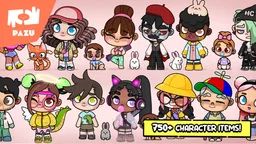
- A wide range of outfits supports creative dress-up play.
- Colorful artwork is appealing to its intended audience.
- Kids can experiment with different looks without time pressure.
- The simple format is suitable for short play sessions.
What could be better
- Some customization options may require in-app purchases.
- Advertising may interrupt play depending on the version.
- The dress-up format offers limited challenge for older players.
- Repeated use may feel less engaging once outfits are explored.
- Children may need supervision when navigating ads or purchase prompts.







