ABC Kids - Tracing & Phonics review
 Analysis by Appsdrops
When a young child is learning the alphabet, tracing a letter can turn a vague shape into something they can recognize and try to write. That focused idea is what makes ABC Kids - Tracing & Phonics worth a look: it is an educational game from RV AppStudios built around early letter practice, rather than a broad collection of unrelated preschool activities. I like that clear purpose. It gives a parent or caregiver a simple way to offer a short learning activity without expecting a toddler to sit through a lesson.
Why tracing is the central activity
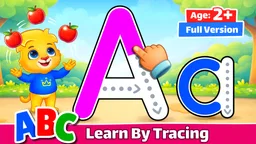
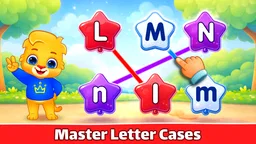
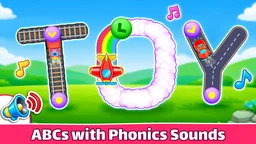
The game’s appeal is its combination of alphabet familiarity and tracing. A child can see a letter, follow its shape, and encounter phonics as part of the same early-learning experience. Those actions support different kinds of practice: recognizing a symbol, paying attention to its form, and beginning to connect letters with sounds. That does not make the game a substitute for conversation or teaching, but it gives a child an approachable place to start.
For preschoolers, tracing can be more inviting than being asked to copy letters on paper before they understand what the shapes are. On a screen, the activity feels like interaction rather than handwriting homework. I see that as a useful entry point, especially for a child who is curious about letters but not yet ready to use a pencil with control.
The balance matters. A tracing game can help a child notice the direction and outline of a letter, but touching a screen is not the same physical task as holding a pencil. I would treat it as a companion to paper, crayons, books, and everyday talk—not as proof that a child has mastered handwriting. The strongest use is short, supported practice that makes letters feel familiar before a grown-up invites the child to draw them elsewhere.
What the format does well
Because the focus is narrow, the app is easier to introduce than a large learning hub with many subjects and menus. A child who wants to revisit letters can spend time on that goal without needing a parent to invent a lesson from scratch. The store’s brief description calls it ABC Kids, while its full name points to the combination of tracing and phonics that gives the experience its particular focus.
That focus is also a sensible fit for the game’s young audience. It is rated for Everyone, and its educational purpose is aimed at toddlers, preschool children, and kindergarten learners. In my view, the age label should not be mistaken for a promise that every child in that wide range will use it in the same way. A toddler may mainly enjoy touching and watching; an older preschooler may be ready to pay closer attention to letter shapes and sounds.
How I would use it in an ordinary day
Imagine a child waiting while dinner is being prepared. They ask for a screen, but you want something that has a clearer purpose than another video. I would open the game, sit nearby, and make the activity a brief invitation: choose a letter, trace it, then look for that letter on a cereal box or in a picture book. The screen practice becomes a prompt for noticing letters in the room, rather than a self-contained babysitter.
A small routine can make the tracing more meaningful. Before starting, ask the child to name a letter they already know. After tracing, invite them to say its sound or find a familiar word that begins with it. If they lose interest, stop instead of turning the activity into a test. A few engaged minutes are more useful than insisting that a young learner complete a session when they are tired or restless.
I would also alternate screen tracing with a physical version. After a letter activity, draw the same shape in the air with a finger, make it in sand or on paper, or point it out in a favorite story. This is a practical way to address a limitation of touchscreen practice: the child gets the visual repetition the game offers, then encounters the letter through movement and real-world objects.
For parents, one helpful approach is to follow the child’s interest rather than work through the alphabet in a rigid order. If a child is excited by the first letter of their name, that can be a better starting point than insisting on a particular sequence. Keep the interaction conversational: ask what the letter looks like, notice whether it has straight or curved parts, and praise careful effort rather than speed. Those small choices make a simple tracing activity feel personal without requiring the app to do all the teaching.
It can also work as a low-pressure transition activity before a more hands-on task. A caregiver might use a short turn with the game, then bring out paper and invite the child to try a letter there. If the child is not interested in switching mediums, that is useful information, not a reason to push. The game is most helpful when it opens a door to curiosity; it cannot make every child ready to practice on demand.
Where it sits among alternatives
Compared with alphabet videos, tracing has a more active role for the child: they are asked to participate with the letter rather than only watch it appear. Compared with worksheets, the game can feel less demanding for a beginner who is still developing fine-motor control. Neither comparison means it replaces the other options. Videos can be easier for passive listening, while paper gives valuable pencil practice that a touchscreen cannot reproduce.
It is also narrower than a general preschool learning app. That is an advantage when your goal is specifically early alphabet familiarity, but a drawback if you want one app to cover numbers, puzzles, stories, or a wide curriculum. I would choose this game for a child who is drawn to letters and tracing. If the child mainly needs broad variety or a structured, adult-led literacy program, another resource may be a better match.
One practical tradeoff is that screen interaction can encourage a child to focus on completing the gesture rather than thinking about the letter. A nearby adult can counter that by slowing the moment down: name the letter, talk about its sound, and connect it to something familiar. Without that conversation, the activity may still be enjoyable, but its educational value can be more limited than a parent hopes.
What to expect from a free learning game
The game is free, which makes it easy to try as a first step before deciding whether it belongs in a child’s routine. RV AppStudios is the developer, and the app has an average rating of 4.6 from around 97,000 ratings. It has been installed over 50 million times, with roughly 3,900 written reviews. Those figures suggest that many families have encountered it, but popularity alone cannot tell you whether its style will suit your child.
It was released on March 3, 2016, so this is an established rather than newly launched app. That can be reassuring for someone looking for a familiar kind of early-learning game, though I would still judge it by how the child responds during an actual session. A rating does not tell you whether a particular toddler will enjoy tracing, whether a preschooler will stay engaged, or how much adult guidance your household prefers.
The clearest limitation is the gap between on-screen tracing and learning to write by hand. Another is the narrow subject: alphabet practice is the point, not a complete early-education plan. If your child resists touch-based activities, is already comfortable with letters, or needs more direct support with pencil grip and writing, I would spend more time on books, drawing, and adult-guided practice instead.
For a child who is just beginning to notice letters, though, that narrowness can be a strength. There is no need to turn every play session into a lesson or to measure progress against another child. Use the game when the child is receptive, stay close enough to talk about what they are seeing, and stop when attention fades. That keeps the activity light and leaves room for the many other ways children learn language.
Who is most likely to enjoy it
I would recommend ABC Kids - Tracing & Phonics to caregivers looking for a straightforward way to introduce letter shapes and early phonics to a toddler, preschooler, or kindergartener. It is especially suitable for families who can turn a brief screen activity into a conversation or follow-up activity away from the device. A child who likes to touch, follow shapes, and revisit familiar letters may find it more engaging than a worksheet.
I would skip it as the main choice for a child who needs a comprehensive learning curriculum, substantial handwriting instruction, or a more varied mix of activities. It may also be a poor fit if you are looking for an app that occupies a child without adult involvement: in my experience, the best value comes when a grown-up helps connect the traced letter to sounds, names, and objects the child already knows.
My overall view is that this is a useful, focused starting point rather than a complete literacy solution. The tracing-centered approach gives young learners a concrete way to interact with letters, and the free price makes it easy to test at home. Keep sessions relaxed, pair screen practice with real-world letter spotting and paper drawing, and let the child’s interest set the pace. Used that way, it can earn a place in a preschool routine without being asked to do more than it is designed for.
What we like
- Tracing activities help children practice letter formation.
- Phonics exercises introduce basic letter sounds.
- Simple controls are suitable for young learners.
- Activities can be used without an internet connection.
- The app includes content for both letters and numbers.
What could be better
- Activities may feel repetitive after extended use.
- Some children may need adult guidance to stay focused.
- Tracing accuracy can be difficult on smaller screens.
- The educational content is aimed at early learners only.
- Progress tracking may not meet parents' reporting needs.







