





zeta: AI Chat, Story, Play review
 Analysis by Appsdrops
zeta: AI Chat, Story, Play is an entertainment app built around conversations with fictional characters, and its appeal is easy to understand: it gives you a place to play out scenes, explore story ideas, or simply chat when you have a few spare minutes. My overall take is that it works best as a flexible imagination tool, not as a replacement for a carefully written novel or a dependable source of information. The fun comes from steering an exchange and seeing where it goes; the trade-off is that the quality and coherence of those exchanges can vary.
Character chat is the main attraction
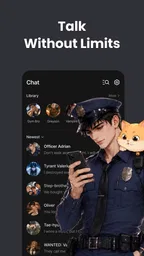
Scatter Lab, Inc. publishes zeta, which sits in the entertainment category. The app’s premise is less like opening a finished story and more like stepping into a conversation that can develop in different directions. That distinction matters. If you enjoy having some influence over a scene—choosing what to say, setting a mood, or nudging a character toward a particular response—you may find the format more engaging than passively reading a fixed narrative.
The character-centered approach also makes the app useful for different kinds of casual play. I can imagine opening it to improvise a lighthearted exchange, try a dramatic scenario, or test a story idea before writing it elsewhere. It is a low-pressure way to explore a premise because you do not need to plan a complete plot before starting. A short prompt can be enough to begin, while your replies shape the direction as you go.
That freedom comes with a practical caveat: an interactive chat is only as satisfying as the conversation remains. A character may respond in a way that is entertaining but not quite consistent with the scene you had in mind. When that happens, I would treat the exchange as collaborative improvisation rather than expect the app to preserve every detail like a human writing partner keeping careful notes.
Why the format can work well
The strongest use case is filling a small pocket of downtime with something more participatory than scrolling through a feed. For example, after a commute or while waiting for an appointment, you could start a brief fictional exchange and see whether it develops into a scene worth continuing. You are not committing to a long book or a multiplayer session, and you can stop when the moment has passed.
A useful way to get more coherent results is to give the conversation a clear starting point. Instead of asking for a vague, open-ended interaction, establish who is present, what is happening, and what kind of tone you want. Then make your next message specific to the moment. This gives the exchange a stronger direction and makes it easier to recover if the character wanders away from the scene.
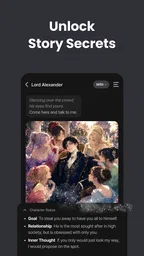
I would also keep an eye on continuity yourself. If a detail is important—where the characters are, what they agreed to, or why they are having the conversation—briefly bring it back into a later message rather than assuming it will remain central. That small habit can make a longer role-play feel more deliberate, while also showing the format’s limitation: the user may need to do some of the work a human co-writer would handle naturally.
What to expect from a large character pool
zeta presents itself as a place with a broad range of characters and stories, which makes browsing and experimentation part of its appeal. A large selection can help when you want a different tone or premise from one session to the next. It also means that finding a good fit may take some trial and error. A character’s opening exchange can set expectations, but the real test is whether the conversation stays enjoyable once you begin steering it.
My advice is to judge a character by the interaction you actually get, not just by an appealing setup. If the first responses feel flat or repeatedly miss the tone you want, it is probably more efficient to try another character or reset your premise than to spend a long time trying to rescue an exchange that is not working. This is one of the app’s less obvious trade-offs: variety can make discovery fun, but it can also make the experience uneven from one choice to another.
For people who like writing, the app can serve as a lightweight brainstorming partner, especially for dialogue or scene possibilities. I would not rely on it to deliver a polished story without editing. Instead, use it to generate a few directions, then keep the ideas that genuinely help. That approach makes the user an active editor rather than a passive audience and reduces frustration when a response takes the plot somewhere unintended.
Where it differs from familiar alternatives
Compared with a standard reading app, zeta offers more room to influence what happens, but less assurance that every scene will have the structure and finish of a completed book. Compared with writing a story in a notes app, it can provide an immediate conversational response, yet it gives you less precise control over every line. And compared with a conventional social chat, its focus is fictional interaction rather than keeping up with friends or coordinating plans.
That makes the choice fairly clear. Pick zeta when you want interactive, character-led entertainment and are comfortable improvising. Choose a conventional ebook or story platform when you want a complete narrative with a deliberate ending. Choose a writing tool when exact wording, reliable organization, or a carefully managed draft matters more than spontaneous back-and-forth.
Things to consider before settling in
The app is free to start, with in-app purchases ranging from $1.99 to $139.99 per item. I would check the purchase details in the app before spending, especially if you are only exploring whether this style of entertainment suits you. A free entry point is useful, but the presence of paid items means it is sensible to understand what you are buying and whether it improves the particular way you use the app.
Its age rating is Mature 17+, so it is not a suitable recommendation for younger users. That is worth treating as a real part of the decision, not a detail to skip because the app is presented as entertainment. If you are choosing an app for a shared device or a family member, consider the age guidance first and make sure the intended user is appropriate for it.
On Android, the current version is 3.51.94 and the minimum operating-system requirement is Android 7.0. The app has been available since May 17, 2022. If you are deciding whether it is established enough to try, it has more than five million installs; its average rating is 4.3 from around 240,000 ratings. Those figures suggest a substantial audience, though they cannot tell you whether the particular characters and conversational style will match your taste.
One other question a prospective user may have is whether the experience suits a very specific creative goal. For casual role-play and idea generation, it may. For a tightly plotted project where facts, character history, and exact wording must remain consistent across many scenes, I would use it only as a source of prompts and do the final writing elsewhere. That division of labor plays to the app’s spontaneity without asking it to be something it is not.
Who will enjoy it—and who may not
I would recommend zeta to adults who enjoy character conversations, collaborative make-believe, and experimenting with story premises. It is especially appealing if you like taking an active role in entertainment and do not mind guiding the exchange when it loses focus. People who want a quick creative diversion, or a way to explore dialogue ideas without opening a full writing project, are likely to get the clearest value from it.
I would be more cautious if you prefer stories that are carefully edited from beginning to end, or if you expect every response to respect all earlier details without reminders. It may also be a poor fit if you are looking for practical, factual answers rather than fictional conversation. In those situations, a book, a dedicated writing program, or a conventional assistant designed for information would be a better match.
The app’s popularity is reflected in its roughly 12,000 written reviews, but I would not treat popularity as a guarantee of consistency. Interactive entertainment is personal: one user’s favorite character or scenario may do little for someone else. Giving a few different conversations a fair try is a better test than deciding based on one exchange, provided you are comfortable with the age rating and mindful of optional purchases.
A playful tool, with the right expectations
My verdict is that zeta is worth trying if you want entertainment that responds to your input rather than simply presenting a finished story. Its best quality is the freedom to enter a scene quickly and shape it through conversation. Its main weakness is the same openness: you may need to guide the character, restate important context, or move on when an exchange does not click.
Go in expecting improvisation, not a flawless novel, and the app’s strengths become easier to appreciate. It is a good fit for adult users who like experimenting with fictional conversations in short sessions, and a less convincing choice for anyone who needs precise continuity or polished, authored storytelling. For that audience, zeta: AI Chat, Story, Play offers a distinctive way to turn spare time into a small, interactive story—provided you are happy to help steer it.
What we like
- Supports several AI models for different chat styles.
- Lets users create characters for interactive conversations.
- Includes roleplay and story creation features.
- Offers a simple interface for starting new chats.
- Provides a way to explore AI-generated entertainment.
What could be better
- AI responses may occasionally feel repetitive or inconsistent.
- Some features may require a paid plan.
- Conversations may not always retain context accurately.
- Character quality can vary between user-created profiles.
- Availability of features may depend on your region.





