

XBOX review
 Analysis by Appsdrops
I think of the Xbox app as a companion to playing on an Xbox, rather than a replacement for the console or a general-purpose gaming social network. Its strongest use is practical: it gives me a place to keep up with friends and gaming activity when I’m away from the television, then pick up the conversation when I’m ready to play. If your gaming life already revolves around Xbox, that continuity can make the app worth keeping close. If you want a broad community for games across every platform, it will feel narrower.
Keeping an Xbox routine connected
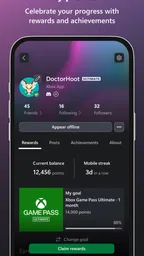
Microsoft Corporation’s XBOX is a free Entertainment app for Android and iOS. The idea is simple, but the value depends on whether you regularly use Xbox: it keeps your gaming community within reach when the console is not. I find that framing more useful than expecting a miniature version of the console experience on a phone. The app is most convincing as a companion for staying connected, not as a place to do everything I associate with gaming.
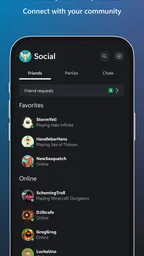
A useful baseline routine is to check in before a session, see whether friends are around, and use the app to keep in touch while making plans. That is especially handy when a group’s availability is scattered through the day. Instead of turning on the console just to see what is happening, I can use the phone for a quick social check, then move to the console when I’m actually ready to play.
The reverse workflow matters too. After a session, I can keep the social thread nearby rather than treating the end of play as the end of the conversation. That makes the app useful for people who play with the same friends repeatedly: arranging the next session can happen in the gaps between games, without making the phone app carry the whole experience.
In everyday use, I’d make it part of a small habit rather than leave it open all day. For example, if I expect to play after dinner, I can check in beforehand, find out whether friends are available, and avoid booting the console only to discover nobody is around. If plans change, the phone remains a convenient way to stay in the loop. This is a modest benefit, but it solves a real bit of friction for regular Xbox players.
What to check before relying on it
On a first visit, I’d take a moment to look through the app’s available settings and make sure its behavior suits my routine. In particular, consider how you want gaming-community activity to reach you on a phone. Notifications can be useful when friends are coordinating a session, but a stream of alerts can become noise if you only play occasionally. Choosing a restrained setup is often better than muting everything after the app becomes distracting.
I’d also check that I’m using the account I actually use on Xbox. A companion app is only helpful when its social context matches the console: otherwise, a missing friend or an unexpected profile can make it seem as if the app is failing when the problem is simply that I’m looking at the wrong account. This is a basic check, but it prevents confusion before I start troubleshooting.
Keep the phone’s own notification controls in mind as well. App-level choices and the operating system’s controls work together, so silencing alerts at the phone level can change what you notice even if you adjusted settings inside the app. If you want a quiet phone during work or overnight, decide whether you want to pause Xbox-related notifications altogether or allow only the ones that help you coordinate play. The best setting is the one you’ll continue to tolerate.
There is also a practical distinction between staying connected and being available. A notification can tell you that something merits attention, but it does not mean you need to answer immediately. I prefer treating the app as a check-in point, not a demand for constant presence. That keeps it useful without letting gaming chat compete with every other phone alert.
Small habits that make it more useful
The biggest improvement comes from making the app part of a repeatable sequence. I’d check it when deciding whether to play, rather than repeatedly opening it throughout the day without a reason. That turns the app into a quick planning tool: see whether friends are around, make a decision, and move on. It also makes missed activity less likely to feel like a problem, because I’m not expecting the app to replace being at the console.
For a group that plays together often, it helps to use the phone for the in-between moments and save the console for the actual session. If someone asks about playing later, I can respond when convenient, then use the console once the group is ready. That division keeps the phone’s role clear and avoids trying to manage a whole evening of gaming through a small screen.
Another useful habit is to separate a quick check from a longer browse. When I only need to know whether it’s worth starting a session, I can glance at the relevant community activity and stop there. If I have more time, I can catch up properly. This sounds obvious, but it prevents a companion app from becoming an automatic distraction every time I pick up my phone.
For parents and younger players, the Teen content rating is worth considering alongside the actual household rules for gaming and messaging. I would not assume that an app’s age label decides whether it is appropriate for a particular child. A parent should review the account and device settings that govern a young person’s use, and talk through what kinds of interactions are welcome. The rating is context, not a substitute for those choices.
Where it fits among gaming apps
Compared with a general chat app, Xbox has a more focused reason to be on my phone: it is tied to the Xbox community rather than every conversation I have. That focus is an advantage if my friends and gaming activity are already there. It is less compelling if my group coordinates through a different service or plays across several platforms. In that case, the app may add another inbox without making plans any easier.
Compared with opening the console, the phone is convenient for brief social checks and planning when I’m away from the screen. The console remains the natural place to play, and I wouldn’t expect the app to replace that experience. Compared with broad gaming communities, it is also more specific: people looking for a large cross-platform forum or a general-purpose place to discover unrelated gaming groups may be better served elsewhere.
That makes the decision fairly personal. If you regularly play Xbox with friends and want a companion for the spaces between sessions, the app has a clear job. If you mostly play alone, rarely coordinate online, or already have a dependable way to reach your group, the added convenience may be small. I’d install it for a real communication need, not simply because I own a console.
Limits to keep in view
The app’s usefulness is tied to its purpose, which is also its main limitation. It can help me stay connected to Xbox gaming, but that does not make it a universal hub for every game, platform, or social group. If a friend group is split across services, I may still need the other app everyone already checks. Adding a second place to look can create more coordination work instead of less.
There is a similar limit to phone convenience: a small screen is good for quick checks, but it is not automatically the best place for extended gaming activity. If I’m already sitting at the console, switching between the controller and phone may feel unnecessary. I use the app when being away from the console is the point, not as a rule that every interaction must pass through my phone.
It also depends on a sensible notification balance. Too few alerts can make the app feel inactive; too many can make it feel like another source of interruptions. I’d adjust expectations as well as settings: check in when I’m planning to play, and don’t treat a delayed reply as a sign that the app has failed. A companion works best when it supports a routine rather than trying to dictate one.
For people who need a place to meet entirely new gaming communities, an app with a broader discovery focus may be a better starting point. For people who want all gaming conversations consolidated into one service regardless of platform, a group’s existing chat tool may be more practical. Xbox is at its strongest when the connection it supports is already meaningful to you.
Who I’d recommend it to
I’d recommend it to regular Xbox players who coordinate with friends, want to stay in touch between sessions, or often make plans while away from their console. It is particularly convenient if a quick check can save you from turning on the television and controller just to find out whether anyone is available. It also suits people who like to keep gaming conversations close without needing to sit at the console for every update.
I’d be less likely to recommend it to someone who rarely plays online, has no Xbox friends to coordinate with, or already gets everything they need from a shared chat app. It is also not the right choice if your main goal is discovering gaming groups across many platforms. Those users may install it and then find that its central strength does not match their own routine.
The app has been available since November 19, 2013, and its current version is 2611.1.5. It requires Android 8.0 or later where applicable. On the app stores, it has a 4.6 average from around 2.3 million ratings, alongside about 140,000 written reviews and over 100 million installs. Those figures suggest that many players find a reason to use it, though the most important question for me is still whether my own friends use Xbox regularly.
My verdict is that the Xbox app is a worthwhile companion when it fits an existing gaming habit. I like it best as a low-friction way to check in, coordinate, and keep a familiar group connected outside a console session. It is not a replacement for the console, a universal gaming network, or a must-have for every Xbox owner. If you play with friends often, try a focused routine and tune notifications to your day; if your group lives elsewhere, stick with the tool they already use.
What we like
- Xbox supports cloud saves for compatible games.
- The app makes it easy to chat with Xbox friends.
- Remote play works with a compatible console and network.
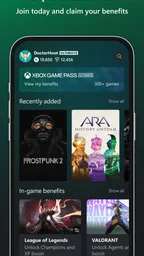
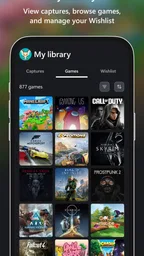
- Game Pass members can browse available titles in the app.
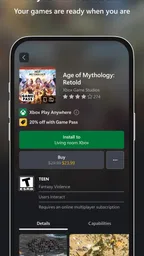
- You can manage your console downloads from your phone.
What could be better
- Remote play depends on a stable internet connection.
- Some features require an Xbox account.
- Cloud gaming availability varies by region and subscription.
- Not every game supports remote play or cloud saves.
- The app may use significant mobile data during streaming.





