






Netflix review
 Analysis by Appsdrops
I think Netflix is easiest to judge not by how many shows it carries, but by how well it fits into the uneven rhythms of ordinary life. I might want a familiar episode while making dinner, a film for a quiet evening, or something that works when I cannot give the screen my full attention. In those moments, the app’s value depends on more than its catalogue: I need to find a title, understand what I am choosing, and watch in a way that suits my circumstances.
Netflix is an entertainment app from Netflix, Inc., and it is free to install, with viewing offered through a subscription service. That distinction matters: downloading the app does not mean every show and film is free to watch. It has a Teen content rating, so families should still check whether a particular title is suitable rather than treating the app’s overall rating as a guide to every programme.
Finding a title without getting lost
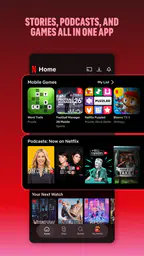
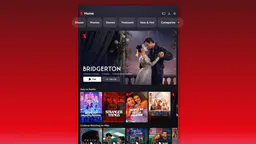
The home screen is designed around browsing rather than presenting a simple, fixed list. That can feel inviting when I am open to suggestions, but less efficient when I already know what I want. Rows of titles make it easy to scan visually; they can also turn a quick decision into a long session of comparing covers and previews. My practical advice is to search directly when you have a specific title in mind, and browse when discovery is part of the evening.
For anyone who finds dense screens tiring, the main challenge is not necessarily reading a single menu label. It is keeping track of changing rows, artwork, and recommendations while deciding what deserves attention. I find it helps to make the choice smaller: pick a genre or mood first, then compare only a few options. If you are choosing with someone else, agreeing on a broad direction before opening the app can prevent the familiar loop of scrolling and rejecting everything.
Recommendations are useful when they lead me toward a show I would not have searched for, but I treat them as suggestions, not a neutral map of everything available. A title pushed into view may be convenient, while something I want may take more deliberate searching. That is a meaningful trade-off for people who prefer predictable navigation or who find repeated visual choices overwhelming. Search is usually the better route for a known title; browsing is better when you have patience and want the app to help set the mood.
The app has a 4.8 average from around 17 million ratings, and it has been installed more than a billion times. Those figures show how widely people use it, but they do not tell me whether its layout will suit a particular person. I would put more weight on your own habits: whether you usually search, browse, watch one episode at a time, or leave something playing while doing another task.
Small choices that make browsing easier
A useful habit is to decide whether you are choosing for yourself or for a group before browsing. When several people are watching, a short shortlist is often kinder than handing everyone an open-ended catalogue. I also find it sensible to separate “I want to continue this story” from “I want something new”; those are different decisions, and treating them separately can reduce the time spent wandering through the home screen.
Another practical point is to check the title details before settling in. A programme’s content and tone can differ sharply from the app’s Teen rating, so I would not rely on the general age label as a substitute for a family decision. If a child is choosing, an adult can first narrow the options to titles they are comfortable with, then let the child pick among them. That approach keeps the choice manageable without assuming every programme is appropriate.
Comfort, control, and different ways of watching
People use streaming apps with very different physical and sensory needs. Some watch on a large television from across the room; others hold a phone close, use headphones, or glance at the screen between chores. Netflix supports a range of viewing situations simply by being available as an app, but that does not guarantee that every interaction will feel effortless for every person. Screen size, distance, lighting, and the device’s own controls all affect how comfortable it is to browse.
If small visual details are difficult to distinguish, a larger screen may make browsing easier than a phone, while a phone can be more convenient to hold and position. The right choice depends on the person and the room. I would test the interface in the setting where it will actually be used, not assume that a successful experience on one device will carry over unchanged to another. A bright screen in a dim room can also be uncomfortable, so adjusting the device’s display to suit the environment may matter as much as the app itself.
Sound brings its own trade-offs. Watching with headphones can help when other people are nearby, but it may not be comfortable or practical for everyone. Playing through a television or speaker can make dialogue easier to share, while creating a noise issue for someone else in the home. I would choose the listening setup around the people present, rather than treating one method as universally accessible. When dialogue is hard to follow, checking the title’s available language and subtitle choices before starting is a sensible step, though the options can vary by programme.
For someone who has difficulty with precise taps, repeated navigation can become a source of friction. I try to avoid unnecessary back-and-forth by deciding what I want before opening a title and by keeping a familiar programme in mind for low-energy moments. The app’s huge selection can be a strength, but it can also demand more attention and interaction than a person wants to give. If even choosing a show feels like work, a pre-agreed watchlist or a recommendation from someone you trust can be more helpful than another round of browsing.
When the room or routine changes
One of Netflix’s strongest everyday use cases is the split-attention evening: I can put on a familiar series while preparing food, tidying up, or waiting for someone to finish a task. Familiar episodes are often easier to follow than a new, intricate film when I expect interruptions. For a first-time viewing, though, I would choose a quieter moment. Missing a short stretch of a complicated story can make it harder to rejoin, and the app cannot remove the distraction of a busy room.
It also suits shared routines: a household can settle on a film after dinner, or one person can watch while another uses a different room. The tension is that a shared screen means shared control. If one viewer needs larger text, lower volume, captions, or a different pace, the group may need to agree on compromises. I find it more considerate to discuss those needs before pressing play than to discover halfway through that the chosen setup is uncomfortable for someone.
With more than 917,000 written reviews, Netflix clearly inspires plenty of discussion, but popularity is not the same as universal ease. I would recommend it to people who value a broad entertainment choice and are comfortable navigating a changing catalogue. It is less suitable for someone who wants a simple, highly predictable interface with no browsing decisions, or for a viewer whose preferred titles are not available in their region or at that moment.
Where it differs from other ways to watch
Compared with free, ad-supported video services, Netflix’s central appeal is a subscription-based viewing experience rather than a stream of short clips mixed with advertising. That may suit someone settling in for a series or film, but it is not automatically the better choice if you only watch occasionally or are trying to avoid another recurring entertainment expense. The app is free to download; the service’s viewing model still involves a subscription, so I would check the current plan options in the app store before committing.
Compared with broadcast television, the app gives me more freedom to choose a title and watch around my own schedule, but that freedom puts more responsibility on me to decide what to watch. Broadcast channels can be simpler when a person prefers to turn on the television and accept what is already playing. Compared with renting a single film, Netflix can be more convenient for someone who watches regularly, while a one-off rental may make more sense for an occasional viewer who has one specific title in mind.
Netflix has been around since May 5, 2011, and its familiar role in entertainment is easy to understand: it is a place to choose series and films for on-demand viewing. Its strength is not that every title suits every viewer, but that it gives regular watchers a single place to return to. Its weakness is the flip side of that breadth: a large, shifting selection can make choosing tiring, and a subscription is poor value if you rarely open the app.
Remaining barriers and my verdict
I would not call Netflix automatically accessible for every person or every situation. Navigation still asks viewers to scan, compare, and make decisions; a crowded room can make audio difficult; and a small screen may not be comfortable for someone who needs a larger view. The app’s overall Teen rating also cannot replace checking an individual title for its content. Those are not reasons to dismiss it, but they are reasons to consider the person, device, and viewing environment together.
My recommendation is strongest for people who regularly watch series or films and appreciate choosing their own time and title. It can work well for a relaxed solo evening, a familiar show during household tasks, or a shared film when the group agrees on what to watch. I would steer occasional viewers toward comparing the subscription with pay-per-title alternatives, and anyone who finds browsing demanding toward a more limited, predictable way of choosing.
Netflix is rated for Teen audiences, is free to install, and has a 1B+ install milestone; the app itself is published by Netflix, Inc. Those details speak to its reach, not to whether it is the right fit for an individual. I see it as a capable, familiar entertainment option with real flexibility, provided the subscription suits your habits and the interface works for you. The most useful test is a simple one: can you find something you genuinely want to watch without the process becoming more tiring than the show is worth?
What we like
- Downloads let you watch selected titles offline.
- Profiles help keep viewing recommendations separate.
- Parental controls can restrict mature content.
- Subtitles and audio options support many languages.
- A single subscription works across supported devices.
What could be better
- Some titles leave the catalog over time.
- Downloads expire and may have playback limits.
- The available catalog varies by country.
- Some plans include ads and restrict features.
- Streaming quality depends on your plan and connection.





