





Prime Video review
 Analysis by Appsdrops
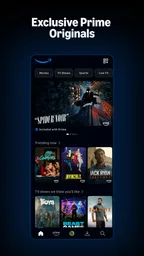
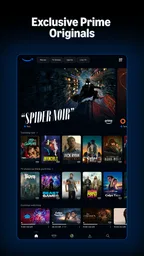
When I open Prime Video, I want a simple answer to one question: can I find something worth watching without turning my evening into a search session? The app is built for that kind of choice, bringing films, series, live programming, and sports into one entertainment space. My first impression is that it works best when I arrive with a rough idea—perhaps a film for dinner or a match I want to follow—rather than expecting every screen to reveal an obvious next pick.
Prime Video is a free app from Amazon Mobile LLC, although that does not mean every title or viewing option is free. It is rated for Teen audiences, and its in-app purchases range from a few cents to hundreds of dollars per item, so I would check the details shown for a particular title or option before confirming a purchase. The app has a 4.7 average from around 5.8 million ratings, and it has passed 500 million installs. Those figures suggest broad appeal, but they do not tell you whether its catalogue or viewing experience suits your habits.
What to expect when you open it
Think of Prime Video as a place to browse and watch, not as a guarantee that every item displayed is included at no extra cost. The catalogue can present different ways to access content, so I make a habit of checking the title’s own details before I settle in. That small pause helps avoid the familiar streaming-app disappointment of choosing something and only then discovering a separate charge or requirement.
The mix is a real strength. If you switch between a series, a movie, and live viewing, it is convenient to keep those options in one app instead of hopping between several services. It is particularly useful for a household where one person wants a film and another is looking for sports or a live programme. But the breadth can also make the first screen feel less focused than a service devoted to one kind of content.
Compared with a single-purpose sports app, Prime Video may be a more comfortable starting point for someone who wants entertainment beyond live events. Compared with a narrowly curated film service, its wider range can be more practical but may take more browsing to uncover a title that fits your mood. I would choose it for variety and convenience, not because I expect every recommendation to be a perfect match.
Get to a first good watch without overthinking it
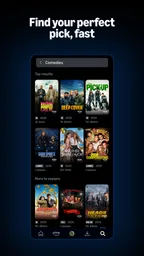
On your first visit, I recommend choosing a specific goal before browsing: a film for tonight, an episode to sample, or a live event you already know you want to see. Search or browse with that goal in mind, then open the title’s detail page and check how it can be watched. This is more reliable than scrolling through rows of suggestions and assuming that everything presented has the same access conditions.
For a first successful action, pick a title whose details make its viewing option clear and start it. That gives you a quick sense of the app’s basic rhythm—find a title, inspect its page, and begin watching—without requiring you to understand every part of the catalogue first. If you are setting up the app for someone else, I would do this together once, so they know where to look for title information before making a choice.
There is no need to treat the first session as a test of how much content the service has. A useful first session is simply one where you find something you actually want and understand how that item is offered. If a title does not fit, back out and try a different one rather than assuming that the entire catalogue works the same way.
First setup: make the choice yours
After installing, I would take a moment to look around before committing to a long watch. The app is entertainment software, so the main setup decision is less about technical tinkering and more about how you want to use it: casual browsing, a planned show, or live viewing. The app is listed for devices running version 9 or later of its supported operating system; if installation is unavailable, checking the device’s operating-system version is a sensible first step.
It helps to set expectations with anyone sharing the device. The Teen content rating is a useful general signal, but it is not a substitute for checking a specific title’s suitability for a younger viewer. I would browse the title information together when the audience matters, rather than relying on the app’s overall age label to answer every content question.
Before tapping any purchase-related option, pause on the title page and read the wording carefully. The free download and the presence of free viewing choices do not mean that every film, series, or event is included at no additional cost. Since individual in-app purchases can vary widely, I would be especially careful if a child can use the device or if you simply want to keep spending predictable.
Where new users can get confused
The most common misunderstanding is treating the app itself as a single all-access pass. In practice, the app is the viewing interface, while the way to watch can differ from one title to another. A title appearing in search or on a browsing screen is a reason to inspect it, not proof that it is available to watch at no extra charge.
A second source of friction is the amount of choice. When the catalogue offers films, television, live programming, and sports, the home screen can feel like a collection of directions rather than a personal shortlist. I handle that by starting with a genre, a known title, or a specific event. If I am undecided, I browse briefly and then switch to a clear search instead of repeatedly scanning the same rows.
Live viewing also asks for a different kind of planning than a film. A movie can wait until you have time; a live programme or match is tied to the moment you want to watch it. If live content is your main reason for installing, look at the event information first and make sure the option shown matches what you intend to view. If you mostly watch on demand, you can treat live programming as an extra rather than the centre of your routine.
Finally, do not assume the app’s popularity guarantees that it will replace every service you already use. A 4.7 average across millions of ratings tells me that many people find value in it, but personal fit depends on the titles you seek, how often you watch live content, and whether you are comfortable checking access details. I would compare the actual options you care about, rather than choosing by rating alone.
Small habits that make browsing easier
One useful habit is to decide whether you are browsing for something familiar or exploring something new. For a familiar title, go straight to search and confirm the viewing option. For discovery, browse with a simple limit: choose a category or mood, inspect a few candidates, and then commit to one. That keeps the app from becoming the activity instead of the thing you use to choose what to watch.
If you are planning a shared evening, check the title before everyone gathers. This avoids spending the first part of the evening debating options only to find that the chosen item is not available in the way you expected. The same approach works for sports: identify the event first, then check its details rather than relying on a general sports section to explain every viewing choice.
I also find it helpful to distinguish “I want something now” from “I want to see what is available.” The first calls for a direct search and a quick decision. The second is better suited to relaxed browsing, when a recommendation may catch your eye. That simple distinction is especially useful on a service with several kinds of programming competing for attention.
Who will enjoy it—and when another option is better
I would recommend Prime Video to someone who likes having several kinds of entertainment in one place and is willing to check the details of individual titles. It is a sensible option for a household with varied viewing tastes, for a viewer who alternates between on-demand programmes and live content, or for anyone who prefers one familiar app for several kinds of watching.
I would be less enthusiastic if your priority is a tightly curated catalogue, a very simple browse-and-play experience, or certainty that every result is included without an extra decision. In those situations, a focused service may feel easier, even if it offers less variety. If you only want to follow live sports, a dedicated sports option may also make the schedule and event choices feel more direct.
The key trade-off is breadth against clarity. Prime Video gives you multiple types of content to explore, but a newcomer may need to pay closer attention to the individual title page and the way access is described. Once you adopt that habit, the app becomes easier to navigate; if you would rather never think about those distinctions, another service with a narrower purpose could suit you better.
What to do after your first watch
Once you have finished your first film or episode, use what you learned to make the next visit quicker. If you enjoyed searching for a known title, keep using that direct route. If browsing led you to something good, return with a narrower mood or category rather than starting from the entire catalogue again. For live viewing, make checking the event details part of your routine before the start time.
Prime Video was released on August 28, 2017, and it remains a familiar choice in the entertainment category, but the practical question is still personal: does its mix of viewing options match what you actually watch? I like it most when I use it with a clear intention and take a moment to verify how a title is offered. That makes the experience feel less like wandering through a crowded shelf and more like a useful way to get to tonight’s entertainment.
My overall advice is straightforward: install it if you want a broad viewing hub, start with one specific title or event, and read the title details before you press play or confirm a purchase. That quick check is the difference between a reassuring first session and an avoidable surprise. If you want a single focused service with fewer choices to weigh, choose accordingly; if variety matters more, Prime Video is worth trying.
What we like
- Offline downloads let you watch selected titles without an internet connection.
- Profiles help keep watchlists and recommendations separate for each viewer.
- X-Ray provides cast details and trivia while compatible titles are playing.
- Parental controls can restrict access to content based on age ratings.
- Rentals and purchases offer access to some titles beyond the included catalog.
What could be better
- Downloads expire and may have limits on how many titles you can store.
- Some movies and shows require an extra rental fee or channel subscription.
- Ads appear during many titles unless you pay for the ad-free option.
- The available catalog varies by country and can change over time.
- Streaming quality depends on your device and internet connection.





