
PlayStation App review
 Analysis by Appsdrops
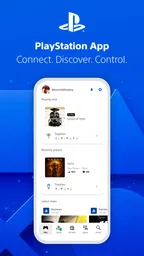
I use the PlayStation App as a companion to the console, not as a substitute for playing on one. Its main value is having a convenient place on my phone to keep up with PlayStation activity and handle small tasks when I am away from the television. That makes it useful in brief visits throughout the day, though it is less compelling if I rarely use a PlayStation or expect a mobile entertainment app to stand on its own.
What it is like to use day to day
PlayStation Mobile Inc. publishes this free entertainment app. It has been available since January 11, 2011, and its current version is 26.11.0. The app is rated Teen. Its average rating is 3.5 from around 1.1 million ratings, with roughly 69,000 written reviews, and it has passed 100 million installs. Those figures suggest a widely used companion app, but they do not guarantee that every user will find it smooth on every phone.
Speed expectations: useful for quick checks, not a console replacement
I would approach the app with modest expectations about speed. It is best suited to short, focused visits: checking what is happening in your PlayStation circle, browsing relevant content, or controlling compatible console activity from your phone. These are tasks where convenience matters more than having a richly detailed, uninterrupted experience. For longer browsing or anything that depends on a large screen, I would still rather use the console itself.
How fast it feels can depend on more than the app. A phone’s connection, the state of the console, and the responsiveness of the PlayStation services all affect a companion workflow. If something takes a moment to appear, I would not immediately assume the app has failed; I would first check the connection and whether the console is available. That distinction is practical: the app is a remote doorway into a broader PlayStation setup, not an independent source of everything it displays.
One useful habit is to open the app before you need it urgently. If you want to check something while travelling or make a quick decision during a break, signing in and confirming that the app is working ahead of time is less frustrating than discovering a connection issue at the moment you are in a hurry. I treat it as a convenience layer, rather than a guaranteed shortcut for time-sensitive tasks.
Heavy-use moments: where the phone companion earns its place
The app makes the most sense when you already have a reason to stay connected to PlayStation but cannot sit in front of your console. For example, I can imagine checking in during a lunch break, then deciding whether it is worth setting aside time to play later. It is also handy when friends are discussing what they are doing and I want to keep the PlayStation side of that conversation within reach rather than switching repeatedly between unrelated apps.
A less obvious benefit is reducing small interruptions around a shared television. If someone else is using the screen, a phone can be a quieter place to catch up on PlayStation-related activity or prepare for a later session. This does not make every console task possible on mobile, and I would not assume that phone controls can replace a controller. But it does make the app useful in the gaps around play, which is where a companion app can justify taking up space on a phone.
There is a trade-off when you use it heavily: the app is only as helpful as the account and console connection behind it. If you switch between accounts, share devices, or have a console that is not currently reachable, a quick mobile check may become a small troubleshooting task. I would keep expectations clear: this is most comfortable for someone whose PlayStation setup is already in regular use, not for someone hoping the app will solve a disconnected or unfamiliar setup by itself.
Reliability: distinguish a slow refresh from a real problem
My practical standard for reliability is not whether every screen updates instantly; it is whether the app remains useful across ordinary check-ins. Companion apps can feel inconsistent when the phone connection changes or the console is asleep, offline, or otherwise not ready to respond. In those moments, closing and reopening the app or checking the connection is a sensible first step before changing account settings or reinstalling anything.
If the app seems stuck, I would work from the simplest causes outward: confirm that the phone has a working connection, give the screen a moment to refresh, and check whether the console itself is available. That approach avoids treating every delay as a software fault. If the same issue continues across repeated attempts, then updating the app and restarting the phone are reasonable next steps. I would avoid making account changes in a rush, since that can create more friction than a temporary refresh problem.
For a household with more than one PlayStation user, it is worth being deliberate about which account is signed in. That small check can save time when the app’s activity does not match what you expect. It is a practical point that is easy to overlook: a phone is personal, but the console may be shared, and the account context determines what the companion experience is connected to.
Device constraints: consider your phone and your habits
The stated minimum operating system is Android 8.0, so an older device below that threshold is not a suitable starting point. Even on a supported phone, performance can vary with its age, available memory, background activity, and network conditions. I would not judge the app’s speed from one brief delay on an older or heavily loaded device, but I also would not expect a new phone to eliminate delays caused by a weak connection or an unavailable console.
Resource use is worth considering if your phone is short on storage or you keep many apps running. I would leave enough room for updates and avoid keeping the PlayStation App open in the background if I am trying to conserve battery or simplify a busy phone. That is ordinary housekeeping, not a promise that the app is unusually demanding. The sensible test is whether it remains responsive during your normal use on your own device.
It is also important to decide whether you want a companion app at all. If you mainly play offline, rarely interact with PlayStation features beyond starting a game, or prefer doing everything from the console, this may add little to your routine. Likewise, someone seeking a broad streaming or social platform may be better served by an app designed specifically for that purpose. The PlayStation App is most worthwhile when its connection to your PlayStation account and console is the point.
How it compares with other ways to stay connected
The usual alternatives are checking the console directly, using a phone’s general social apps, or simply waiting until you are back at your setup. The console is the better choice for focused browsing and anything that benefits from a controller and television. General messaging apps may be easier if your friends do not all use PlayStation, but they will not provide the same PlayStation-centered context. The phone companion sits between those options: more convenient than turning on the console for a quick check, but narrower than a general social or entertainment app.
That narrower purpose is both its strength and its limitation. I would not install it expecting an all-purpose gaming hub for every platform. I would install it because I use PlayStation often enough that having its companion tools close at hand saves small amounts of effort. If you are deciding whether to keep it, try using it for a week during the moments when you would otherwise reach for the console. If it does not make those moments easier, it may not deserve a permanent place on your home screen.
Who I would recommend it to
I would recommend the PlayStation App to regular PlayStation users who want a phone-based way to stay in touch with their console experience between sessions. It is particularly suited to people who check in briefly, share a PlayStation setup with others, or like to keep console-related activity accessible while away from the television. Its large install base shows that many people use it, but the middling average rating is a useful reminder to judge it by your own routine rather than popularity alone.
I would be more cautious about recommending it to occasional players. If you only turn on a console once in a while, the extra app may become another thing to update without delivering much everyday value. I would also steer anyone who needs a guaranteed instant response toward handling important tasks directly on the console when possible. A phone companion is convenient, but it introduces another device and connection into the chain.
Performance verdict: convenient when the setup is ready
My verdict is that this is a practical companion rather than an essential app for every player. Its strongest case is convenience: it lets a PlayStation user make small checks and carry some of the console experience beyond the television. Its weak point is that the usefulness of those checks depends on the wider setup, and occasional delays or connection friction can undercut the quick-access promise.
If you already play regularly, I think it is worth trying because the cost is nothing and the phone can be a helpful second screen for everyday PlayStation routines. Keep the app updated, make sure you are using the intended account, and test it when your console and phone are both connected before relying on it away from home. If you rarely use PlayStation or prefer to manage everything at the console, skipping it is a perfectly reasonable choice.
What we like
- Receive notifications about game invitations and party requests.
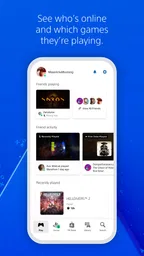
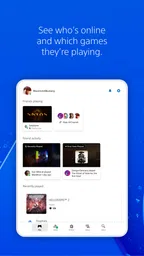
- Browse your friends list and see who is online.
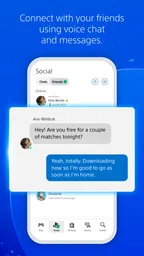
- Use your phone to enter messages more easily.
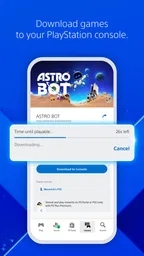
- Manage downloads to your linked PlayStation console.
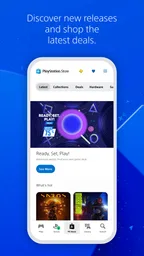
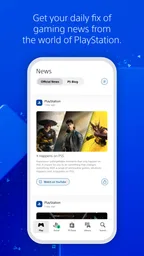
- Find add-ons and games through the PlayStation Store.
What could be better
- Some features require a PS5 or PS4 console.
- Remote downloads require the console to be connected to the internet.
- Store availability and prices vary by region.
- Certain account features are easier to access on a console.
- The app may send frequent notifications unless you adjust its settings.





