
YoLink review
 Analysis by Appsdrops
When I judge a smart-home app, I care about more than whether it can put controls on a phone screen. I want to know what role it plays in the home, how much attention it demands, and whether I can make sensible choices about using it. YoLink is a free House & Home app from Yosmart Inc., intended for people building a home around YoLink devices. Its appeal is practical rather than flashy: it gives that device setup a place to be managed, but it is most useful when you are already committed to the system.
Trust starts with knowing what you are choosing
I would approach YoLink as the companion to a particular smart-home ecosystem, not as a universal controller that will automatically gather every brand of gadget under one roof. That distinction matters for trust as well as convenience. Before installing, I would first check that the YoLink products I intend to use are the ones the app is meant to manage, then consider what I am comfortable placing under app-based control.
The app has an average rating of 3.2 from around 529 ratings, with 322 written reviews. That is a mixed reception, not a reason by itself to reject it or a guarantee that it will suit you. I read a middling score as a prompt to be realistic: smart-home apps depend on both the software and the devices, network conditions, setup choices, and the routine a household expects. If you need a smooth experience for a complicated installation, it is sensible to start with a small, low-stakes setup and judge it in your own home.
Its reach is substantial enough to suggest that it is not an obscure one-off utility: it has over 100,000 installs. YoLink was released on June 18, 2019, and the current version is 1.55.1. The age rating is Everyone, and the minimum Android requirement is version 7.0. Those details help with basic suitability, but they do not tell me how the app handles personal information or what access it requests on a particular phone. I would check the permission prompts and privacy choices that actually appear during installation and use, rather than assume anything from the app’s category or audience rating.
A focused system is both a strength and a commitment
Unlike a general-purpose smart-home hub app, YoLink makes most sense when the devices you want to use belong to its ecosystem. That focus can be useful: instead of trying to make a mix of unrelated products behave alike, you can keep the YoLink part of the home in a dedicated place. The trade-off is that this is not the obvious pick if your priority is consolidating many existing brands into one interface. I would compare compatibility before buying devices, not after the installation has become part of a daily routine.
That ecosystem connection also changes how I think about data-sensitive decisions. A smart-home app may sit close to information about a household’s routines, even when the purpose is simply controlling equipment. The sensible question is not whether an app sounds reassuring, but what it asks to access, what account choices it presents, and whether those choices fit the way you intend to use it. I would pause at each permission prompt and ask whether the requested access makes sense for the task I am trying to perform.
I would also separate account setup from device setup in my own planning. First, I would decide who in the household needs to use the app and which phone should be used for initial configuration. Then I would review any account and sharing controls that are visible in the app before inviting other people or relying on it for something important. This is a modest precaution, but it avoids treating a household control system as if it were just another personal app.
Build a routine around low-stakes checks first
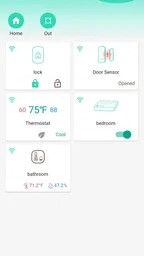
A realistic way to begin is to choose one everyday job that is easy to verify. For example, if you have a YoLink device intended to help monitor a part of the home, you could add it, check that the app shows the state you expect, and compare that with what you can observe directly. Repeat the check at different times before relying on it as the only way to notice a problem. This is not a special feature claim; it is a practical way to test whether the app and device fit your home before making them part of a critical routine.
One useful trade-off is convenience versus dependence. A phone-based control is handy when you are already carrying your phone, but it can become a source of frustration if everyone assumes that one person will manage it. I would decide early who is responsible for routine checks and what the household will do if that person is away or the phone is unavailable. Keep a simple manual alternative for anything whose failure would cause serious inconvenience. That is especially important when a smart-home setup is being used to support a routine rather than merely make it more convenient.
Another practical tip is to keep the initial setup deliberately small. Add the device or devices that solve a clear problem, learn the app’s visible controls, and only then expand. If you configure several pieces of equipment at once, it becomes harder to tell whether a problem comes from the app, a particular device, the home network, or an unclear household routine. A staged approach makes troubleshooting less stressful and gives you a better basis for deciding whether the system is worth extending.
Look for choices instead of assuming what the app does
For a cautious user, the important details are the controls that are actually presented: permission requests, account settings, any device-sharing options, and the ability to change choices later. I would review those screens during setup and revisit them if the household changes. If a permission is optional, I would consider whether the feature I want depends on it before allowing access. If a setting is unclear, I would avoid making a broad assumption about what it means and seek an explanation from the app’s own support or official materials.
This is also where I would draw a line between using the app and endorsing every possible use of it. A household may want one person to handle setup while other residents simply need a clear understanding of what the system controls. I would talk through that arrangement before using connected devices in shared spaces, particularly where another person might reasonably expect to know when a device is active or what information it can expose. The app’s presence on a phone does not replace household consent and communication.
I would not treat a general age rating as a privacy assessment. Everyone is a content rating, not a detailed statement about permissions, account protections, or data handling. Those are separate questions, and they deserve a direct look in the app’s prompts and settings. For someone who is especially privacy-conscious, that check should happen before connecting devices, not after the household has come to depend on them.
Who is likely to appreciate YoLink?
I can see YoLink working best for someone who has already chosen YoLink hardware, wants a dedicated place to manage that equipment, and is willing to spend a little time checking setup and account choices. It may suit a practical household that values having device controls close at hand, provided the app’s available options match the intended routine. The free price makes it easier to try the software, though the overall commitment is still tied to the devices and ecosystem you choose.
I would be more hesitant to recommend it to someone who expects one app to control a house full of unrelated brands, or who wants a setup that requires almost no planning. If you are starting from scratch and have not chosen hardware, compare the ecosystems first. Think about compatibility, who will maintain the system, and what happens when a phone or network is unavailable. A familiar general smart-home platform may be a better fit if broad cross-brand coordination is your main requirement.
For a renter or someone who moves often, I would also consider how much of the setup is easy to take along and how much effort the next installation might involve. I would not buy into an ecosystem solely because the app is free. The more useful question is whether the devices solve a real problem in the home you have now and whether you are comfortable maintaining the account and controls over time.
My cautious verdict
My view of YoLink is that it is best approached as a focused companion for a particular smart-home setup, rather than a universal answer to home automation. Its free availability and broad adoption make it reasonable to investigate if YoLink devices are already on your shortlist, while its middling average rating argues for testing your own workflow rather than expecting a frictionless experience. I would begin with a low-stakes use case, review permissions and account options as they appear, and avoid depending on the system until it has behaved reliably in your home.
The app is not the right choice simply because you want smart-home control on a phone. It is the right candidate when its ecosystem matches your equipment, its visible controls make sense to your household, and you are comfortable with the care that connected devices require. If those conditions fit, a small, deliberate trial is a sensible next step. If you want broad compatibility or prefer not to manage accounts and device settings, I would look at alternatives built around those priorities instead.
What we like
- Supports local control through the YoLink Hub during internet outages.
- Long-range communication helps reach sensors across large properties.
- Device sharing lets household members manage the same smart home.
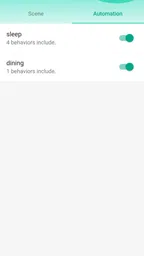
- Automation rules can connect compatible YoLink devices.
- Many sensors offer long battery life for low-maintenance use.
What could be better
- A YoLink Hub is required for most devices.
- The app depends on internet access for remote monitoring.
- Device compatibility is limited to the YoLink ecosystem.
- Some advanced automations may require a paid service plan.
- The interface can feel crowded as the device list grows.





