


Wyze - Never Wonder review
 Analysis by Appsdrops
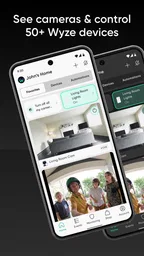
I judge a home-control app not only by how much it can do, but by whether I can find the right control quickly when I’m tired, distracted, or away from home. Wyze is a lifestyle app from Wyze Labs Inc. built around connected-home use, and its appeal is easy to understand: it gives people a single place to interact with Wyze products rather than making every device feel like a separate project. In my view, that can make everyday routines simpler, though the experience depends on owning compatible Wyze hardware.
Finding your way around the app
The first thing I would consider is how much you want your home controls gathered in one app. If you already use Wyze devices, having a shared place to check and manage them is more convenient than switching between several manufacturer apps. If you are starting from scratch, the app itself is only part of the decision: you will also need to choose and set up the devices you want to control.
The app’s basic purpose is straightforward, but a smart home can become complicated as it grows. Every additional device creates another thing to name, locate, and remember. I recommend giving devices clear names based on their actual location, such as “hallway” or “back door,” rather than labels that only make sense to the person who set them up. That small bit of housekeeping can make a real difference when another household member needs to find a control quickly.
It also helps to decide on a simple mental map before adding lots of hardware. Think in terms of rooms and routines: which devices belong together, and which ones do you need to reach most often? That approach is more practical than treating setup as a checklist of gadgets. It gives you a better chance of making the app understandable to guests or family members who did not configure it.
Wyze is free to download, and the app is rated for Everyone. Its overall rating is 4.4, based on around 192,000 ratings, while its reach extends to more than 10 million installs. Those figures suggest that many people use it, but they do not tell me whether the interface will suit a particular person. For that, the useful test is whether the controls you depend on are easy for you to recognize and reach in your own setup.
Readable controls are only part of usability
For someone who benefits from clear labels, consistent organization, or fewer steps, a central app can be easier to manage than a collection of unrelated controls. Still, I would not assume that one interface automatically works well for every person. A person with low vision may need larger system text or a different screen arrangement, while someone who finds busy screens tiring may prefer to keep the setup limited to essential devices.
My practical advice is to test the app with the person who will actually use it, not just the person installing it. Ask them to locate a commonly used device and carry out an ordinary task without coaching. If they hesitate, adjust the device names and organization before adding more. A system that makes sense to its owner can be confusing to everyone else.
Motor and sensory needs in daily use
Connected-home controls can reduce the need to walk across a room or reach a physical switch, which may be valuable for people with limited mobility, fatigue, or pain. The benefit is not automatic, though: the relevant device must be installed and configured, and the person must be comfortable using the app. I see Wyze as potentially helpful when it removes a repeated physical step, rather than as a substitute for checking whether the full setup is manageable.
Motor needs vary. A person who finds precise touch interaction difficult may prefer fewer, clearly named controls and a short route to the task they use most. Someone who can use a phone comfortably but has trouble moving around the home may gain more from remote control than from a complex collection of settings. Keep the setup focused on those dependable actions; a crowded screen can turn a convenience into extra work.
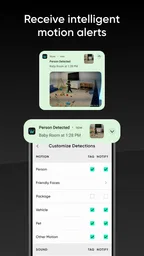
Sensory preferences matter too. Some people want frequent information and active notifications; others find repeated alerts distracting or stressful. I would review notification choices carefully and keep only the signals that help with a real decision. For example, a household may care about being notified of an important event but not want an alert every time someone opens the app to check a device. A quieter setup is often easier to live with than one that reports everything.
One useful trade-off is that remote access can reduce the need to be physically near a device, but it also asks the user to trust a phone-based control process. If someone is uneasy about using a screen under pressure, I would keep a familiar physical option available where possible and practise the app’s routine when there is no urgency. That way, the phone is an extra route rather than the only route.
Access at home and away
The app’s value changes with context. At home, it can put controls in reach without requiring a walk to the device. Away from home, it can provide a way to stay connected to the setup, which may be useful for people checking in during a trip or coordinating household responsibilities. I would treat that convenience as one part of a plan, not a reason to rely on a phone for every situation.
Consider a realistic evening: one person is already in bed, another is still out, and a household device needs attention. A shared, clearly named setup can make it easier for the person at home to find the relevant control and for the person away to understand what is being discussed. The key detail is preparation. If devices have vague names or the household has never agreed on who manages them, the app cannot solve that confusion at the moment it matters.
For shared use, I recommend agreeing on naming and basic routines before a busy day or trip. Show another household member where the important devices are and let them try the steps themselves. This is more reliable than assuming that familiarity with a smartphone means familiarity with a particular home setup. It also helps uncover labels or workflows that only the original installer understands.
The app is less compelling for someone who wants a simple, standalone utility with no interest in connected-home products. It is also not the obvious choice if your household already relies on another ecosystem and you do not want to maintain a second place for controls. In that case, staying with the system everyone already knows may be easier than adding Wyze just for the sake of having another option.
Where the convenience can become friction
The main limitation I would keep in mind is dependence on the wider setup. Downloading the app alone does not make a home smart; its practical value comes from pairing it with devices that work with the Wyze environment. That means there may be hardware decisions, installation steps, and ongoing household learning before the convenience becomes apparent. Anyone expecting a useful home-control experience from the app by itself should pause and consider what they intend to connect.
There is also a learning cost when a household adds devices faster than it establishes habits. A person may have to remember which screen contains a control, what a device is called, and which actions are safe to use. To prevent that, start with one or two needs that matter every day, then expand only after the basic arrangement feels natural. This is a better approach for accessibility as well as general usability.
Wyze is free, but in-app purchases range from $2.99 to $629.99 per item. That broad span is a reminder to distinguish the free app from the possible cost of building out a setup or choosing paid items. I would decide what problem I want to solve first, then compare the cost of the relevant hardware or purchase with simpler alternatives. A purchase is worthwhile only if it addresses a genuine need in the home.
The current version is 3.25.1.1037, and the app requires Android 10 or later. If you are setting it up for someone else, check that their phone can run it before making plans around app-based control. A person who has an older device, limited storage, or a strong preference not to manage home controls on a phone may be better served by a simpler physical arrangement or a system they already use.
Who I would recommend it to
I would consider Wyze for people who already own compatible devices or are deliberately building a Wyze-based home setup and want a common control point. It is also worth considering when remote access or reducing repeated trips across a room would make a meaningful difference. The app may be especially useful when a household is willing to spend a little time on sensible naming, shared routines, and notification choices.
I would be more cautious for someone who needs a highly simplified interface, has difficulty using touchscreens, or depends on a particular accessibility behavior. Rather than assume the app will fit, have the intended user try the actual setup and the tasks they need. The same caution applies to anyone who wants all household controls in an existing smart-home system: a different option may be better if it avoids extra apps and keeps the family’s routine familiar.
Wyze was released on October 18, 2017, and it has grown into a widely used lifestyle app. That history and its 42,000 reviews provide context, but my recommendation remains practical rather than automatic: choose it for the role it can play alongside compatible home devices, and judge its value by whether it makes your own routines easier.
My inclusive verdict
I see Wyze as a useful route into connected-home control for people who want to bring compatible devices together and are comfortable maintaining a phone-based setup. Its strongest inclusive possibility is straightforward: when configured thoughtfully, it can make some household tasks reachable without having to be beside the device. Clear names, a restrained set of notifications, and practice with the people who will share the setup can make that benefit more dependable.
But I would not call it a universal fit. Accessibility depends on the person, the phone, the chosen devices, and how the household organizes them. If a different system is already familiar, or if a screen-based control adds stress rather than removing effort, staying with that alternative may be the kinder choice. My recommendation is to start small, test the real tasks with everyone who will use them, and expand only when the app genuinely makes daily life easier.
What we like
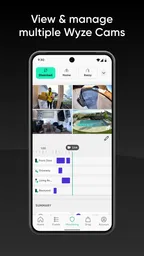
- Live video lets you check compatible Wyze cameras remotely.
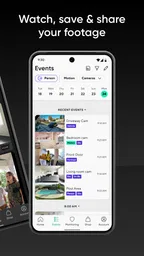
- Motion alerts can notify you when a camera detects activity.
- Two-way audio supports conversations through compatible devices.
- Device controls are easy to access from the app dashboard.
- Shared access lets other household members use connected devices.
What could be better
- Some features require a paid subscription.
- Cloud recording options vary by device and plan.
- Camera performance depends on a reliable internet connection.
- Notifications may arrive late during network disruptions.
- The app offers limited value without compatible Wyze devices.





