


WiZ Connected review
 Analysis by Appsdrops
Smart lighting feels effortless when a tap changes the room as expected; it feels less clever when a connection gets in the way. That is the lens I use for WiZ Connected, a free house-and-home app from Signify Netherlands B.V. It is made to manage the WiZ smart-light system, so its usefulness depends on both the lights you own and how reliably your phone can reach them.
My overall impression is that WiZ Connected makes the most sense for someone who wants everyday lighting control from a phone without turning the home into a complicated automation project. It has a 4.4 average from around 64,000 ratings, and more than a million installs. Those figures suggest that it has found a substantial audience, but the practical question is whether its connected approach fits your home and habits.
When lighting control depends on a connection
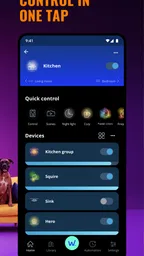
The appeal is straightforward: instead of walking to a switch, you use the app to control compatible WiZ lighting. That can be useful when you are already settled on the sofa, getting ready for bed, or adjusting the atmosphere without interrupting what you are doing. In practice, the phone becomes part of the lighting setup, rather than merely a tool for configuring it once and forgetting it.
That convenience also makes connectivity visible. If the app is slow to communicate or your home network is having a bad day, a light command may not feel as immediate as a physical switch. I would treat phone control as an added layer of convenience, not as a reason to remove the ordinary controls you rely on. Before buying into any app-led lighting system, think about who needs to operate the lights and what they will do if a phone is unavailable.
A useful way to judge the system is to consider the command you make most often. If it is a simple adjustment while you are at home, the app can be a comfortable alternative to reaching for a switch. If you expect every light to respond instantly in every situation, you may be happier keeping dependable physical controls central to your routine and using the app for adjustments that are convenient rather than essential.
Everyday routines, not just room-wide changes
Consider a realistic evening: you come home carrying groceries, switch on the kitchen lighting from your phone, then later settle down and adjust the living room without getting up. This is where connected lighting feels worthwhile. The benefit is not a dramatic transformation; it is removing small interruptions. It is especially appealing if you already keep your phone close and want lighting control to follow the way you move through the home.
There is a trade-off when other people share that space. A household member who prefers a wall switch may not want to learn an app for a basic task, and a guest is unlikely to know how your lighting is arranged. I recommend keeping the system understandable for everyone: use phone control where it saves effort, but avoid making routine lighting dependent on one person’s device or familiarity with the app.
Using it away from your lighting setup
On a phone, the app is handy because you can make adjustments without being beside the light. But mobile convenience is not the same as dependable access from every location. Your experience can depend on the connection available to the phone and the home setup, so I would not plan an important routine around a command working at a specific moment when you are away.
This is a key distinction from a conventional switch or a basic local control: those options are simple and immediate in the room, while an app offers flexibility but brings a network into the interaction. If your main goal is to switch a light on while standing beside it, an ordinary switch may be the better primary tool. If you value being able to adjust lighting from your phone as part of a broader connected home routine, WiZ Connected has a clearer purpose.
For travel or a busy day, think through what you actually need before relying on remote interaction. Do you want occasional control, or are you expecting to manage the home as if you were standing in it? That expectation matters more than the mere presence of an app. I would start with low-stakes use and see whether the connection behaves consistently in your own home before building habits around it.
What to do when a command does not work
When a light does not respond, it is tempting to keep tapping. I find it more useful to pause and work through the simple causes first: check that the phone has a working connection, confirm that the light has power, and try the command again. This separates a network hiccup from a switched-off light without turning a small delay into a long troubleshooting session.
It also helps to avoid making the app your only route to basic lighting. If a command fails while your hands are full or you are heading out, a familiar physical control can be a sensible fallback. That is not a knock on the app; it is a practical way to live with connected devices. Smart lighting should reduce friction overall, not force everyone at home to troubleshoot before turning on a room.
If a problem persists, change one thing at a time rather than repeatedly changing settings. Check the phone connection, then the light’s power, then whether the home network is behaving normally. This simple order makes it easier to identify what is actually wrong. I would also avoid assuming that reinstalling the app or resetting a light is the right first move, since those steps can create extra setup work without addressing a temporary connection issue.
Keeping phone use intentional
A connected-lighting app is another reason your phone interacts with devices in your home. If you are careful about household technology, it is reasonable to ask how much you want lighting control to depend on an app and a network. I would keep the setup focused on the lights and routines you genuinely use, rather than adding complexity just because connected control is available.
WiZ Connected is free to download, while in-app purchases are listed from $0.99 to $3.99 per item. That makes it worth checking what a particular purchase does before committing; the free download does not mean every possible option has no cost. The app is rated for Everyone, which is useful context for households, though it does not replace your own judgement about how devices are managed at home.
The version available is 1.38.6, and the minimum operating-system requirement is version 9. If you are setting up an older phone, check that it meets that requirement before choosing the app as the household’s main control. That small check can prevent an avoidable surprise after you have invested time in selecting lights and planning how the family will use them.
Who will get the most from it?
I would recommend it to people who already use compatible WiZ lights, keep a smartphone nearby, and want an easier way to make small lighting adjustments around the home. It is also a reasonable fit for someone who enjoys connected devices but does not want lighting to become a major technical hobby. Signify Netherlands B.V. is the developer, and the app’s focus is clear: it is a companion for WiZ lighting rather than a general-purpose home-control hub.
I would be more cautious if you dislike relying on a phone, have an unstable home connection, or need a control method that works for every visitor without explanation. In those cases, a standard switch or a simpler lighting arrangement may be more satisfying. If your household needs lighting to remain easy to operate without opening an app, make that a requirement before choosing a smart-light system.
Compared with ordinary bulbs and switches, WiZ Connected offers phone-based flexibility at the cost of adding a connected step to some interactions. Compared with broader smart-home platforms, its value is more focused: it is intended for WiZ lighting, not for replacing every control in the home. That narrower role can be a strength if lights are your main interest, but a drawback if you want one app to manage a wide range of unrelated devices.
A measured connectivity verdict
For me, the best reason to use WiZ Connected is convenience in ordinary moments: changing the lighting without crossing a room, or making a small adjustment while settling in for the evening. Its weakest point is the same thing that enables that convenience: a phone command introduces dependence on connectivity and on a device being available. I would treat it as a useful control option, not a replacement for every familiar way of operating a light.
The app is free, carries an Everyone rating, and has been available since October 5, 2022. Those details make it easy to consider, but the decision should come down to your lighting and network habits. If you already have WiZ lights or are choosing them specifically for app control, it is a sensible companion to try. If you want lighting that is entirely independent of a phone and network, stick with simpler controls or make sure those remain central to your setup.
My practical advice is to begin with one room and use the app for a week in the situations that matter most to you. Notice whether commands feel convenient, whether other people can operate the lights comfortably, and whether your connection is dependable enough for your routine. That small trial will tell you more than a feature checklist: connected lighting is worthwhile when it quietly removes effort, and frustrating when it becomes another thing you have to manage.
What we like
- Control compatible lights from anywhere with an internet connection.
- Group lights by room for easier everyday control.
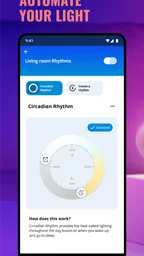
- Set schedules to automate lighting routines.
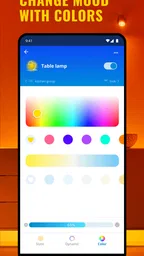
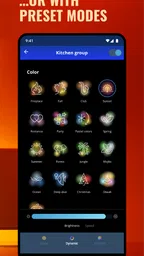
- Adjust brightness and color on supported bulbs.
- Works with voice assistants for hands-free control.
What could be better
- Only works with compatible WiZ lighting products.
- Some features may require a stable Wi-Fi connection.
- Smart-home setup can take time for new users.
- Available controls vary by bulb model.
- Remote access may require account sign-in.





