



Wishlist Maker - Listful review
 Analysis by Appsdrops
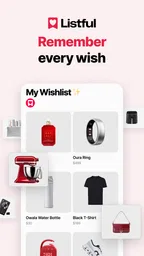
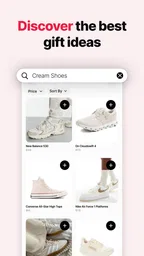
I like the idea behind Wishlist Maker - Listful: instead of sending friends a scattered collection of screenshots and product names, I can keep gift ideas together and share them in one place. That makes it especially useful when a birthday, holiday, or group gift is approaching and people want to know what I would actually enjoy. It is a free lifestyle app from Listful, and its focus is practical rather than decorative: collect items from different shops, then give others a simpler way to browse them.
Where a useful wishlist can still get stuck
The main benefit is also the first point to get right: a shared list only helps if its items are clear and current. When saving something from a shop, I would check that the saved entry points to the intended product and that its name or image makes the choice recognizable. A vague listing can leave a gift-giver unsure whether they have found the right size, color, or version. The app can organize ideas, but it cannot resolve an ambiguous product choice for you.
That matters most when a list includes items from several retailers. A friend may have to move between the wishlist and a shop to check details, so I would keep each entry specific and remove ideas I no longer want. If a product has several variants, adding a short note about the preferred one—where the app’s available controls allow it—is more helpful than expecting people to infer it from a thumbnail.
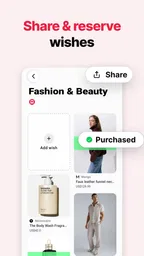
The shared-link approach also changes the social side of gift planning. A single destination is easier to send than a long message, but it is still worth choosing the right audience. A list meant for close family may include personal or expensive ideas that are awkward in a workplace exchange. I would make separate lists for different occasions or groups rather than sending one catch-all collection to everyone.
For a realistic example, imagine I spot a few useful things over several weeks before a housewarming. I can save them as I find them instead of trying to remember every shop later, then share the list when guests ask what would be useful. Before sending it, I would review the items for duplicates, outdated choices, and anything that could be mistaken for a different model. That quick check is a small effort that prevents much of the avoidable confusion.
Setup checks that save time later
I would begin by making one test list and adding a couple of items from different stores before building a large collection. This is a practical way to learn how the app handles the links and product information I actually use. If one item does not appear as expected, I can correct that entry while the list is still small instead of repairing a long collection later.
When a saved item looks incomplete, first reopen the original shop page and check that it is still available and that the chosen option is the one you intended. Then try saving it again using the app’s normal flow. Product pages sometimes change, and retailer links can behave differently from one store to another; those issues do not necessarily mean the whole wishlist is broken.
It is also sensible to test sharing with someone you trust before relying on the list for a time-sensitive occasion. Ask them to open the shared list and tell you whether the items are understandable. This catches practical problems—such as a confusing title or a missing preference—while there is still time to fix them. I would not treat “I sent the link” as the final check; confirming that the other person can use it is more reassuring.
Listful is rated for Everyone, and the app is free to start using. Its current version is 1.24.0, with a minimum operating-system requirement of version 8.0. Those details make it broadly approachable, but I would still check that my device’s software is compatible before troubleshooting a download or launch problem. A mismatch between an older device and the app’s requirements can look like an app fault when it is really a device constraint.
Recovering a wishlist without starting over
If a list stops looking right, I would avoid immediately deleting it or rebuilding everything. First, check whether the problem affects one saved item or the whole list. If only one product is wrong, revisit that product and repair or replace that entry. If the entire list seems unavailable, close and reopen the app, then check the shared view again. Small, reversible checks are safer than making several changes at once.
For a link that a friend says will not open, I would resend the share option from inside the app rather than copying an old message. That gives me a fresh chance to confirm I am sharing the intended list. I would also ask the recipient to try opening it in a different way, such as from their usual messaging app or browser, if they have trouble. The point is to isolate whether the issue is the list, the message, or the way their device handles shared content.
When a retailer page no longer works, replacing the saved item is often more useful than repeatedly tapping a stale entry. Search for the current product at the shop, save the updated choice, and remove the old one once the replacement is clear. This is particularly helpful for seasonal products or items whose listings are revised. A wishlist is most reliable when it reflects what can be bought now, not just what was interesting when first saved.
I would keep a simple backup of especially important gift choices while a big event is close: a note with the item names and preferred variants is enough. That is not a substitute for the shared list, but it gives me a reference if a link or shop page temporarily misbehaves. It also makes it easier to answer a quick question from someone who is shopping and does not want to navigate several entries.
When the app may not be the cause
Many wishlist frustrations begin outside the wishlist itself. A retailer can remove a product, change its page, or sell out of a particular option. In those cases, the list may still be doing its job as an organizer even though the destination has become less useful. I would check the shop directly before assuming that a saved item has vanished because of an app problem.
Sharing can also be affected by the recipient’s device or messaging setup. If one person cannot open a list, ask whether another recipient can. If others can view it, the next step is to check how the first person opened the shared content, rather than rebuilding the list. Conversely, if nobody can access it, return to the app and create a fresh share using its built-in sharing flow.
There is a broader limitation to the concept: a wishlist is not the same as a complete shopping or gift-coordination system. It helps communicate preferences, but I would not assume it handles every detail of group purchasing, delivery timing, stock changes, or keeping multiple people from choosing the same gift. For a coordinated group present, one person may still need to manage the conversation and confirm who is buying what.
People who prefer to keep all gift ideas private may also find a share-focused tool less suitable. Likewise, if I only want to remember one or two purchases for myself, a basic note-taking app may be quicker. The value here rises when I have several ideas to gather and want other people to browse them without asking me to repeat the details.
How it compares with familiar alternatives
Compared with a notes app, Wishlist Maker is more naturally suited to presenting gift choices as a collection rather than a private reminder. Notes can be faster for rough brainstorming, especially when I am the only person who needs the information. But once friends or relatives need to see the choices, a dedicated wishlist is the more fitting place to organize and share them.
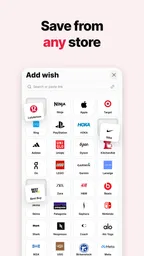
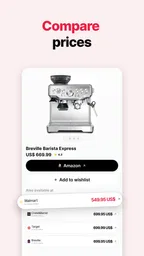
Compared with making a separate wish list on each retailer’s site, Listful is appealing when ideas come from different shops. I do not have to make one store the center of every gift conversation. The trade-off is that the retailer remains responsible for its own product page and availability, so I still need to check that a saved choice is current when the occasion gets close.
Messaging screenshots are the easiest alternative for a one-off suggestion, but they become messy as ideas accumulate. People can lose the context, ask which item is preferred, or miss a later update. A single organized list is cleaner for an ongoing occasion. Still, if a friend is already buying a specific item, a direct message may be clearer than asking them to navigate a larger collection.
The app has reached more than 100,000 installs, and its average rating is 4.7 from around 2,600 ratings, alongside 252 written reviews. I read that as encouraging evidence that the basic idea is meeting a real need, though ratings cannot tell me whether it fits every person’s habits. The useful test is whether I genuinely want a dedicated place for gift ideas and whether the people I share with will use it.
Who should try it, and my practical verdict
I would recommend Wishlist Maker - Listful to someone who regularly gets asked for gift suggestions, shops across different stores, or wants to collect ideas gradually instead of assembling them under pressure. It suits people who are comfortable sharing a list and willing to keep entries tidy. The app’s uncomplicated purpose is its strength: it makes a common social task easier to organize without requiring a complicated planning routine.
I would skip it if I rarely make wishlists, prefer not to share gift ideas, or need a tool that actively coordinates purchases among a group. I would also choose a simple note for a tiny, private list. For a larger set of ideas, though, a shared collection is easier to maintain than screenshots and old chat messages—provided I check product details and refresh dead links before relying on it.
The app is free, with in-app purchases ranging from $9.99 to $29.99 per item. I would start with the free experience and decide whether any paid option is relevant to my own use, rather than assuming I need one to make a basic list. With an age rating of Everyone and Listful as its developer, it is an approachable option for ordinary gift planning, while the choice to pay remains a separate consideration.
Overall, I see this as a focused convenience rather than an all-in-one shopping solution. Its best use is turning scattered product ideas into a list people can understand and act on. My advice is to make a small test list, confirm that its entries and shared view make sense, and then use it for an actual occasion. If that simple workflow saves you repeated explanations, Listful is likely worth keeping; if your needs are only occasional or private, your existing notes may be enough.
What we like
- Create separate wish lists for different occasions.
- Share lists with friends and family.
- Keep gift ideas organized in one place.
- A simple interface makes lists easy to manage.
- Useful for birthdays and holiday planning.
What could be better
- Requires manual entry to add most gift ideas.
- Shared lists are less useful if others do not use the app.
- A long wishlist can take time to organize.
- Some features may require an account.
- Availability may vary across Android and iOS.





