

WidgetClub:Widget, Theme, Icon review
 Analysis by Appsdrops
I like changing the look of a phone, but I don’t like spending an evening tweaking every icon only to find the result awkward to use the next morning. WidgetClub is aimed at that familiar trade-off: it gives you a place to coordinate widgets, wallpapers, app icons, and themes, so your home screen can feel deliberately put together rather than assembled from unrelated downloads. My impression is that it suits people who enjoy visual customization and are willing to spend some time arranging it, more than people who want a single tap to transform everything perfectly.
What customization feels like in practice
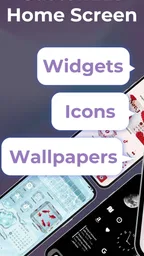
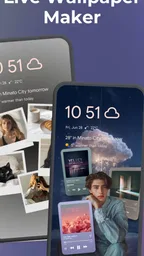
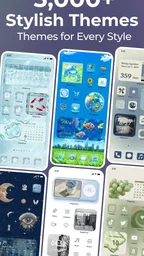
WidgetClub:Widget, Theme, Icon is a free personalization app from Liume Inc. Its central appeal is the chance to build a consistent look across several parts of the home screen. Instead of finding a wallpaper in one place, a widget somewhere else, and icons from another source, you can work toward a shared aesthetic within one app. That makes it easier to explore a particular mood—soft colors, a cleaner monochrome look, or a more playful arrangement—without starting each piece from scratch.
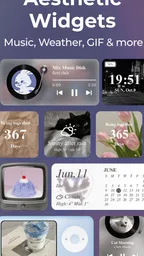
The practical benefit is not just visual variety. A coordinated screen can make a phone feel more personal, and a widget can give a useful glanceable element a place in the layout. But the app’s value depends on how much you enjoy making those choices. If you only want your wallpaper to change, a built-in wallpaper picker is likely simpler. If you want the wallpaper, icons, and widgets to look as if they belong together, WidgetClub has a more appealing role.
I would approach it as a small design project rather than a quick maintenance tool. Pick the look you want first, then decide how much of the screen you actually want to change. Replacing every visible element can be satisfying, but a restrained setup often looks more intentional and is easier to keep usable. A practical tip is to choose a wallpaper with enough open space for icons and widgets before committing to a busy theme; otherwise, attractive artwork can make the home screen harder to scan.
Why the first setup can take longer than expected
Customization apps often feel speedy when you are browsing and slower when you are making decisions. The likely time sink here is not necessarily waiting for a screen to load; it is comparing styles, deciding which pieces work together, and arranging the result around your habits. I would not judge the experience only by how quickly I can open a theme. The more useful question is whether I can reach a look I like without having to redo the same choices repeatedly.
To keep the process manageable, I recommend changing one layer at a time. Start with a wallpaper, check that your usual apps remain easy to find, and then add a widget or adjust icons. This makes it easier to spot what is improving the screen and what is simply adding decoration. It also gives you a straightforward way to back away from a look that feels attractive in a preview but too crowded in daily use.
For a realistic everyday example, imagine wanting a calmer phone before a busy week. I would choose a less distracting background, keep the most-used apps in familiar positions, and add only the widget elements that help me check something at a glance. That approach uses customization to improve the feel of the phone without turning the home screen into a project I have to maintain every day.
When browsing and editing become heavier use
The most demanding session is likely to be the one where you explore lots of visual options and repeatedly revise your layout. That is also when the app is most useful: browsing different combinations can help you discover a style you would not have assembled from separate tools. The trade-off is that more choice can create decision fatigue. I would set a rough limit before browsing—perhaps a color palette or a particular mood—so that a search for a coherent look does not become an open-ended scroll.
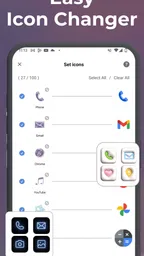
There is another practical trade-off: visual coordination can make a screen look better while making individual icons less immediately recognizable. If a theme changes their appearance substantially, familiar positions become more important. I would keep frequently used apps in the same places and avoid prioritizing a perfect grid over quick access. That is especially useful if you unlock your phone often for short tasks and rely on muscle memory.
WidgetClub is a stronger fit for someone who enjoys occasional redesigns than for someone who expects the app to choose a finished layout on their behalf. I would also be cautious about changing several parts of the screen at once if I use my phone for work or navigation. A gradual refresh lets me see whether the new arrangement remains practical through ordinary use, rather than discovering later that the prettiest version is the one I least want to use.
Reliability, upkeep, and a sensible fallback
A home-screen design is only useful if it remains convenient after the novelty wears off. I would treat the first arrangement as a draft: use it for a while, notice which elements I actually look at, and remove anything that creates clutter. This is a more reliable way to judge a widget or theme than deciding from appearance alone. It also helps separate a lasting improvement from a setup that looks good only while I am actively experimenting.
If a change does not feel right, keep the previous arrangement in mind before making another round of edits. For example, note which apps you moved and which parts of the screen you changed. That small habit makes it easier to restore a familiar layout without turning the whole process into guesswork. I would not assume every customization will suit every device or personal setup; the sensible recovery plan is to make changes incrementally and preserve the parts that already work.
For stability and speed, I prefer to be careful about claims that depend on a particular phone, operating system, or session. The experience can feel different depending on the device and how much visual browsing or editing I am doing. Rather than expecting a guaranteed instant transformation, I would allow time for choosing and arranging, and judge performance during normal use. The app’s current version is 3.14.32, and it requires at least OS 11, so checking that basic compatibility before installing is worthwhile.
Who should use it—and who may prefer another route
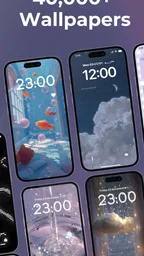
I think the app makes the most sense for people who enjoy matching visual details and want more control than a standard wallpaper change offers. It may also suit someone who likes refreshing a phone for a new season, a personal project, or simply a change of mood, while keeping their most-used apps accessible. If you are happy to experiment and refine the result, having wallpapers, icons, themes, and widgets in one personalization experience is a real convenience.
On the other hand, I would skip it if you want a completely hands-off setup, dislike spending time comparing designs, or care more about a familiar, uncluttered home screen than a coordinated aesthetic. A built-in launcher or system customization option may be the better choice if you only need basic appearance changes and want fewer decisions. Likewise, if your priority is maximizing quick access, changing icon appearances may not be worth it unless you are comfortable relying on stable app positions.
The app is free to install, with in-app purchases ranging from $3.49 to $64.99 per item. I would explore the experience and decide what I actually want before considering any purchase; the key question is whether a particular customization is worth paying for to me, not whether I can collect more options. Its Teen age rating is also useful context for households choosing apps for younger users.
How it compares with ordinary customization tools
The simplest alternative is to use the phone’s own wallpaper and appearance settings. That route is usually more direct when I only want a background or a basic system-level change. WidgetClub is more interesting when I want several visual elements to share a style, but that broader scope brings more decisions and more opportunity to overdecorate. It is not automatically better than the built-in option; it is better suited to a different goal.
Using separate apps for wallpapers, icons, and widgets can also provide flexibility, but it means switching between sources and trying to make their styles fit together. WidgetClub’s appeal is the more unified creative process. The trade-off is that a single app cannot remove the need for taste and restraint. I still have to decide what belongs on the screen and what makes it harder to use.
Final performance verdict
WidgetClub:Widget, Theme, Icon is worth considering if customizing your phone is enjoyable in itself and you want to bring several parts of the home screen into a more coherent look. It has a 4.7 average from around 19,000 ratings, and it has been installed over a million times; those figures suggest a substantial audience, though they do not tell me whether a particular style or workflow will suit you. For me, its strongest case is the combination of visual exploration and practical personalization, provided I keep everyday access ahead of decoration.
My performance verdict is deliberately measured: I would expect the most time-consuming part to be browsing and refining, not assume that every device will behave identically. Keep the layout changes gradual, check that your OS meets the minimum, and judge the result by how the phone feels during ordinary tasks. If you enjoy designing a screen and can resist filling every empty space, this app offers a useful way to make that process more cohesive. If you want a fast, no-effort change or value consistency above appearance, your phone’s standard tools may be the better fit.
What we like
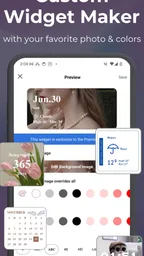
- Personalize your home screen with widgets and themed icons.
- Choose from a wide range of visual styles.
- Mix and match elements to create a coordinated look.
- Preview designs before applying them.
- Make your home screen feel more personal.
What could be better
- Some designs may require a paid plan.
- Availability of features can vary by device.
- Setting up a full theme may take time.
- Some widgets may offer limited customization.
- Frequent visual changes can affect home screen consistency.





