


Neon Love Theme review
 Analysis by Appsdrops
A keyboard can change the feel of everyday typing without changing what you say or how you use your phone. Neon Love Theme is a personalization app built around that simple idea: it offers a neon-inspired look for an Android keyboard. I’d consider it if I wanted a more colorful typing experience, but the main thing to keep in mind is that a theme is about appearance. It won’t, by itself, fix typing problems caused by a keyboard app, device settings, or a connection issue.
Getting the theme to show up
The first point where people can get stuck is expecting an installed theme to appear immediately in every text field. Installing a personalization app and applying its look are separate steps in many Android setups. If the design isn’t visible after installation, I’d start by opening the app and looking for its theme or setup instructions, then check whether the keyboard associated with the theme is selected and active.
That distinction matters because Android devices can have more than one keyboard available. A phone may continue using its default keyboard even after a new theme has been installed. When that happens, the theme can seem ineffective even though the app itself opened normally. I’d check the keyboard currently in use from the device’s keyboard settings or the keyboard chooser that appears while typing, then try a text field again.
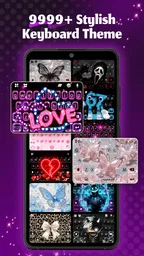
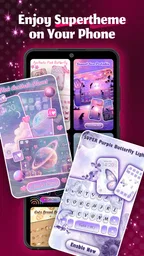
The app’s store description invites users to install a stylish keyboard with a Neon Love look. That makes the intended appeal clear: a decorative treatment for typing, rather than a general phone makeover. Neon Love Theme is most useful when you want your keyboard’s appearance to feel more personal. If you’re expecting changes to icons, wallpapers, or the entire system interface, it’s better to keep those expectations separate from what a keyboard theme is meant to do.
Check the basics before retrying
If the look doesn’t appear, I’d avoid repeatedly tapping through setup screens without checking the basics. First, confirm that the installation finished and that the app launches. Then check whether the relevant keyboard is enabled and selected. Finally, reopen a text field and see whether the appearance has changed there. This simple sequence helps separate an incomplete setup from a display or keyboard-selection issue.
It can also help to close and reopen the app or the screen where you’re typing. A fresh launch is a reasonable general troubleshooting step when an interface hasn’t updated as expected. If the theme appears in one place but not another, I’d check whether the second app is using a different input method or presenting its own text-entry interface. Not every typing screen behaves identically.
Neon Love Theme is listed as free to install, with in-app purchases offered. That makes it straightforward to try the basic installation without treating the initial download as a purchase commitment. I’d still read any purchase prompt carefully before proceeding, especially if I’m only looking to test the theme’s appearance. The useful question is whether the visual style suits you, not whether you need to buy anything to solve an unrelated keyboard problem.
Recovering a typing workflow
When a keyboard seems to disappear or stop responding, it’s easy to blame the most recently installed app. I’d first check whether the keyboard is still selected and whether the issue happens across more than one app. If the problem appears only in one place, closing and reopening that app is a sensible first attempt. If it happens everywhere, checking the device’s keyboard settings is more relevant than changing the theme repeatedly.
For a temporary return to normal typing, switch to another available keyboard using the phone’s keyboard controls. That can help establish whether the difficulty is tied to the selected keyboard or to the app where you’re typing. Once the basic workflow works again, you can revisit the theme setup at your own pace. I prefer this approach because it avoids confusing a visual customization issue with a broader input problem.
If a change doesn’t take effect, a restart of the affected app or device can sometimes clear a temporary interface state. I’d treat that as a general troubleshooting step rather than a guaranteed fix. Before changing multiple settings at once, note what you changed and test after each adjustment. That way, if the keyboard returns to normal or the theme appears, you have a clearer idea of which step helped.
It’s also worth checking that you’re testing the keyboard in a regular text-entry field. A search box, password field, or app-specific input area may behave differently from an ordinary message field. If the look appears in one standard text box but not in a particular screen, the difference may come from that screen’s design rather than from the theme failing altogether.
When the theme may not be the cause
Typing problems can come from several parts of a phone’s setup. A keyboard may lag because the device or the app receiving text is having trouble; a theme cannot be assumed to cause or repair that. Likewise, a missing visual change can stem from the wrong keyboard being active, a screen that uses a different input method, or a temporary app hiccup. I’d test the same basic typing task in another app before deciding that Neon Love Theme is responsible.
For connection-related trouble, the theme is usually not the first place I’d look. If an online service is slow or a message won’t send, changing a keyboard’s colors is unlikely to address the underlying issue. I’d check the relevant app and connection separately, then return to the theme only if the keyboard’s appearance or selection is still the problem.
Device compatibility is another sensible check before installation. Neon Love Theme is listed for Android devices running version seven or later, so I’d compare that requirement with the software version on the phone. If the device is below that minimum, trying to troubleshoot the theme as though it had installed normally would not be a useful first step.
The app is categorized as personalization and carries a Teen content rating. Those details help set expectations: this is a cosmetic customization choice, not a productivity suite or a messaging service. Its audience is anyone who wants a more expressive keyboard presentation and is comfortable following the setup needed to make that presentation active.
A focused customization, not a keyboard overhaul
The strength of a themed keyboard is also its limit. A visual style can make typing feel less plain, but appearance alone doesn’t guarantee a better typing experience, faster input, or different keyboard behavior. I’d judge the app on whether the Neon Love design is appealing and whether I can apply it comfortably on my device, rather than expecting it to change how every keyboard function works.
That focused scope is helpful for users who know what they want. If you’re searching for a neon love keyboard theme for Android, the app’s purpose is easy to understand from its name and short description. If you’re trying to fix missed keystrokes, slow responses, or a keyboard that won’t open, start with the active keyboard and the app or device involved. A theme can be part of a personalized setup, but it isn’t a general repair tool.
The scale of its audience suggests that it has attracted substantial interest: it has more than one hundred million installs, an average rating of 4.6, and hundreds of thousands of ratings. Those figures provide context, but they can’t tell me whether I’ll personally like the look. A quick installation and careful setup check are more useful for deciding whether this particular style fits my phone and habits.
Practical verdict
I’d recommend Neon Love Theme to Android users who want a bright, decorative keyboard style and don’t mind checking that the right keyboard is active. The setup is easiest to understand when you treat the theme and the selected keyboard as related but distinct parts of the experience. If the look fails to appear, verify the selection, test a normal text field, and restart the affected app before making broader changes.
For everyday use, the best approach is to keep expectations specific: install it for the Neon Love appearance, then judge whether that look feels right while you type. If the keyboard itself is unresponsive or a single app has trouble accepting text, troubleshoot that issue separately. With that distinction in mind, Neon Love Theme is a clear, free-to-install personalization option for people who want their Android keyboard to look more expressive, with optional in-app purchases available.
What we like
- Bright neon accents give the interface a lively look.
- The romantic design suits users who enjoy heart-themed visuals.
- Matching icons create a more coordinated home screen.
- Dark backgrounds help the glowing colors stand out.
- Theme elements add a personal touch to device appearance.
What could be better
- The vivid colors may be tiring during extended use.
- Some icons may not match every installed app.
- Dark visuals can make small details harder to see.
- The romantic style may not suit users seeking a neutral look.
- Theme compatibility may vary across devices and launchers.





