







Yandex Browser with Alice AI review
 Analysis by Appsdrops
I judge a browser less by how many extras it advertises than by whether it makes ordinary browsing feel easier without getting in my way. Yandex Browser is a free personalization app from Direct Cursus Computer Systems Trading LLC, and its appeal is a mix of voice search, data compression, and a more customizable feel than a bare-bones browser. I would consider it if I wanted a different everyday browser, but I would not choose it solely on the promise of a particular AI experience: the name “with Alice AI” does not tell me enough about which assistant features are available in a given version or region.
What you get without paying
The clearest value point is straightforward: the app is free. That makes it easy to try as a second browser before deciding whether it deserves a place in your daily routine. I would treat “free” as the cost of installing and using the app, not as a guarantee about every possible service, content item, or future feature; those can have their own terms.
For someone who mainly wants to open pages, search, and move between websites, the lack of an upfront purchase is useful. You can test whether Yandex Browser suits your habits without first paying for a browser subscription or buying a new device. If you already use another browser, keeping both briefly is a practical way to compare them with the same searches and sites.
There is no need to turn the decision into a price calculation: the app itself is free, while its actual value depends on whether its tools solve problems you encounter. I would not assign a monetary value to its voice search or compression without knowing how you browse, how often you rely on mobile data, and what your current browser already does well.
Where its tools can make a difference
Voice search is useful when typing is inconvenient rather than as a novelty I would use for every query. For example, if I am cooking and want to look up a substitution with messy hands, speaking a short search can be quicker than unlocking the keyboard and typing. In a quiet office or on public transport, though, typing may be more comfortable and private. The best approach is to use voice when the situation calls for it, not to assume it is always the faster option.
Data compression has a more specific payoff: it can matter when pages are heavy and I am trying to conserve mobile data or browse on a weak connection. I would use it as a practical aid for reading and searching on the go, while remembering that compression may affect how some pages appear or behave. If a site looks incomplete, reloading it without the compression-related benefit is a sensible troubleshooting step; I would not expect every site to respond identically.
The personalization angle is also relevant to value. A browser is part of the phone’s daily interface, so small choices about its appearance and behavior can make it feel more comfortable. Still, customization is worthwhile only if it helps me find things or browse more naturally. I would avoid spending time tuning settings just for the sake of having more settings.
How I would fit it into a normal day
Imagine I am commuting, searching for a nearby place, then opening a few pages to compare opening times and directions. Voice search could help when taking the phone out to type feels awkward, while compression could be helpful if the connection is slow or I am trying to limit data use. Later, at home, I could decide whether the browser’s look and everyday handling suit me better than the browser I normally open by habit.
That is the kind of routine where I can see the app earning a place: several small conveniences that add up without requiring a complete change in how I use the internet. I would test it with the sites I actually visit, including any work, school, shopping, or banking pages I depend on. A browser that handles my real routine reliably is more valuable than one that sounds appealing in a feature summary.
There is a useful way to compare browsers without relying on vague impressions. For a few days, try the same searches in both, revisit the same pages, and notice which one makes it easier to return to what you were doing. Check whether voice search fits your environment and whether compressed pages remain readable. This short, ordinary test will tell you more than switching everything over at once.
What to weigh against familiar alternatives
Compared with a browser that focuses on a minimal interface, Yandex Browser’s combination of personalization, voice search, and compression may feel more feature-oriented. That can be a plus if you like having options and want practical tools built into your browsing routine. It can be a drawback if you prefer a very plain browser and would rather keep the interface and settings as simple as possible.
It is also worth comparing it with the browser already installed on your phone. That default option may be the better fit if it already handles your bookmarks, saved logins, and familiar browsing habits in the way you want. Switching browsers can add friction: you may need to adjust settings, learn a different interface, or decide how to manage saved information. I would switch only if Yandex Browser offers a noticeable everyday benefit, not simply because trying a new app sounds interesting.
For readers considering the Alice AI wording, I would keep expectations measured. The verified product description emphasizes voice search and data compression, so I would evaluate those concrete benefits first instead of assuming that every AI capability I might want is included. If an assistant is the main reason for installing a browser, check what the current app experience actually offers before making it your primary tool.
Small frictions that affect the experience
Voice search is not equally useful in every setting. Speaking a query can feel conspicuous in a shared room, and names or specialist terms may be easier to type accurately. I would keep the keyboard option close at hand rather than treating voice as a replacement. That flexibility matters more than the novelty of hands-free searching.
Compression is similarly a trade-off, not an automatic improvement. It is most attractive when data use or a sluggish connection is a concern; on a fast, dependable connection, I may notice little benefit. Some pages can rely on complex layouts or interactive elements, so I would check an important page carefully if it appears different from what I expect. The feature is useful when it helps, but it should not become an obstacle to reading or completing a task.
Personalization can create its own maintenance burden. If I change several settings at once and later dislike the result, it may be hard to tell which adjustment caused the annoyance. I would make one change at a time and give it a day or two. That is a simple way to keep customization useful rather than turning a browser into a project.
Who is most likely to appreciate it
I think Yandex Browser is most appealing to people who want a free alternative to their current browser and are curious about voice-led searching, compression, or a more adjustable browsing experience. It may be especially worth testing for someone who often browses on the move, deals with variable connections, or simply wants to see whether another browser feels more natural.
It is less compelling for someone who is already happy with a minimal browser and has no need for the highlighted tools. It may also be the wrong choice if a particular AI assistant function is essential and the app does not provide the exact capability that person expects. In those cases, I would choose based on the specific task rather than on the product name or a broad category label.
The app is rated for Everyone, which makes its intended audience broad, but that does not mean every browsing choice is suitable for every family or situation. I would still use ordinary judgment about what a device is used to access and what settings make sense for its user. The age label is helpful context, not a substitute for personal oversight.
What its audience says—and what I would still test
Yandex Browser has a 4.3 average from around three million ratings, with roughly 5.9 thousand written reviews. That is a substantial audience signal, but it is not a promise that the browser will fit my habits. Reviews can reflect different devices, regions, expectations, and versions, so I would use the broad reception as a reason to investigate rather than as a reason to skip a hands-on trial.
It has over 100 million installs and has been available since June 17, 2013. That long presence and wide adoption suggest it is not an obscure experiment, but popularity alone does not settle questions such as whether its interface suits me or whether compression helps on my connection. I would still test it with my own pages and routine before moving over completely.
My verdict after weighing the value
I would recommend trying Yandex Browser if you want a free browser that brings voice search and data compression into the mix, especially if you browse on mobile connections that are not always ideal. Its value is practical rather than automatic: the tools matter when they solve a real inconvenience, and otherwise a familiar default browser may be simpler.
My advice is to install it as a trial, compare it against your current browser using the same everyday tasks, and keep it only if you notice a genuine improvement. Do not assume compression will help every page, do not force yourself to use voice in awkward settings, and do not treat the “Alice AI” label as a substitute for checking the specific assistant functions you want. If those trade-offs suit you, the free entry point makes it an easy option to explore; if not, skipping it costs nothing.
What we like
- Built-in ad blocking reduces interruptions on many websites.
- Alice can answer questions and help with everyday tasks.
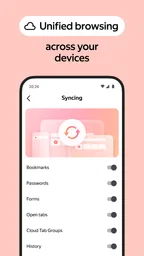
- Sync keeps bookmarks and settings available across devices.
- A reader mode makes long articles easier to read.
- The interface offers customizable backgrounds and themes.
What could be better
- Some Alice features may require an internet connection.
- AI answers can be inaccurate and should be checked.
- Ad blocking may affect how some websites work.
- Sync requires signing in with a Yandex account.
- The browser may collect usage data for personalized services.





