

Lidl Plus review
 Analysis by Appsdrops
When I consider a shopping app, discounts are only part of the decision. I also want to know when I’ll need my phone, what choices I can make, and whether the app fits the way I actually shop. Lidl Plus is Lidl’s free shopping app, built around advantages and discounts. Its appeal is clearest if Lidl is already one of your regular stops; it is less compelling if you want a store-neutral tool for comparing offers across retailers.
Useful when Lidl is already part of your routine
The basic trade-off is straightforward: this app focuses on Lidl rather than trying to serve as a general shopping assistant. That narrower scope can make it worthwhile for people who often buy groceries there, because checking Lidl-specific offers can become part of planning a visit. If you shop there only occasionally, the extra step of opening a dedicated app may not pay off.
In everyday use, I would treat Lidl Plus as a companion to a shopping trip, not as a replacement for a list or a careful look at what I need. Before leaving home, I’d check the available offers, then decide whether any genuinely match the week’s meals or household essentials. That order matters: an attractive discount is not useful if it persuades you to buy something you would otherwise leave on the shelf.
The app is published by Lidl and sits in the shopping category. It is free to download, has an Everyone age rating, and has reached over 100 million installs. Its average rating is 3.8 from around 1.8 million ratings. Those figures suggest broad use, but they do not tell me whether a particular offer will suit your local shopping habits or whether you will find the app’s routine convenient.
Make the offer check serve your list
A practical way to use it is to start with your usual list, rather than browsing discounts first. Compare the offers with items already on that list, and let the app influence the choice only when the product and timing make sense. This keeps the savings side of the experience grounded in what you planned to buy, instead of turning a quick grocery run into an invitation to add extras.
It can also help to check the app at a calm moment before shopping, rather than while navigating a busy aisle. That gives you time to understand which offers are relevant and remember what you intended to use. If you wait until checkout to explore, you may feel rushed, and a phone-based step can become one more thing to manage when you are already handling payment and bags.
One realistic example: if I’m heading to Lidl for a planned weekly shop, I can review the offers before I leave and adjust the list only where a deal fits a meal I was already considering. For a last-minute stop to pick up one forgotten item, I may skip that check entirely. The app is most useful when a little preparation can shape a larger shop; it need not become a ritual for every visit.
Where it differs from broad shopping tools
Compared with a general grocery list app, Lidl Plus has a different job. A list tool helps organize what you need across shops; Lidl’s app is centered on Lidl’s own advantages and discounts. Compared with retailer-agnostic deal browsing, it is more focused, but that focus also means it is not the place I would rely on to compare every nearby store’s prices or promotions.
That distinction helps set expectations. If you split your shopping among several supermarkets, you may still need each retailer’s own app or a separate way to compare your options. If Lidl is your main grocery destination, a dedicated app may be easier to justify because its purpose aligns with your normal route. The best choice depends less on the number of discounts shown than on how often you shop at Lidl and how much you value checking offers in advance.
Trust starts with what you can actually see
For any shopping app, I think about trust in concrete terms: what permissions the phone asks for, what information is collected, what account controls are available, and which choices are visible in the app. I don’t treat a discount-focused purpose as proof of how data is handled. Those details should be judged from the permission prompts, privacy information, and controls presented to you, rather than guessed from the app’s name or its offers.
That makes the moments around setup and use worth slowing down for. Read the permission request when it appears and consider whether it makes sense for the action you are taking. If you are asked to create or use an account, review the choices shown there and in the app’s settings. A careful glance is more useful than approving every prompt automatically, especially if you prefer to keep shopping activity separate from other parts of your digital life.
I would also distinguish between a control being visible and a particular privacy outcome being guaranteed. A switch or account option can show that the app gives you a choice, but it does not by itself explain every consequence of that choice. When a setting affects information use, read its accompanying wording before changing it. If the explanation is unclear, it is reasonable to pause rather than assume the setting does more than it says.
Keep your own choices in the foreground
The most useful form of agency here is deciding how much the app should shape your shopping. You can make the list first, use the offers as a secondary check, and ignore promotions that do not fit your needs. That simple routine helps prevent the app from becoming the reason for an unplanned purchase. It also means you can still shop normally if you do not want to browse every available deal.
For data-sensitive choices, I’d take the same deliberate approach: review prompts, use the controls that are clearly presented, and revisit them if your preferences change. Avoid treating sign-up or permission screens as formalities. The point is not to be suspicious of every feature; it is to make choices with an understanding of what the screen says, rather than relying on assumptions about what a shopping app must or must not do.
There is a convenience trade-off, too. A phone can make offers easier to check, but it can also add friction if you prefer to shop without opening apps or managing an account. If you share shopping decisions with someone else, a Lidl-focused app may not replace the shared list or household planning method you already use. I would keep those tools in place and use this app only for the part it handles well: checking Lidl-related advantages.
Who is likely to get the most from it
I’d recommend trying it if Lidl is a regular stop, you like checking promotions before shopping, and you are comfortable managing a retailer’s app on your phone. It is also a reasonable fit for someone who enjoys planning around offers but can keep a firm distinction between a useful discount and an unnecessary purchase.
I’d skip it if you rarely shop at Lidl, want one app to compare all grocery retailers, or find phone-based shopping steps more irritating than helpful. It may also be the wrong fit if you prefer not to create or manage shopping accounts, or if the permission and account choices you see do not match your comfort level. In those cases, a paper list and the store’s ordinary in-person shopping experience may suit you better.
The current version is 17.14.7, and the app requires Android 9 or later on Android devices. It was released on June 30, 2026. If you are deciding whether to install it, check that your device meets the requirement and consider whether you will use it often enough to justify keeping another shopping app on your phone.
A measured recommendation
My view is that Lidl Plus makes the most sense as a small, purposeful part of a Lidl shopping routine. Its free price removes the cost barrier, while its focused role keeps the decision simple: frequent Lidl shoppers have a reason to check it; shoppers who mainly want cross-store planning have a reason to look elsewhere. The large number of installs shows that many people have tried it, but personal usefulness still comes down to your habits.
I would start with a single planned shopping trip, check whether the offers are relevant to items you already need, and pay attention to the account and permission choices presented along the way. If that workflow feels easy and the discounts genuinely support your plans, keep it in your routine. If it adds more tapping, account management, or temptation than value, there is no need to force it. That is the fairest way to judge this app: not by the promise of savings alone, but by whether it helps you shop at Lidl on your own terms.
What we like
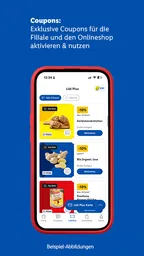
- Digital coupons can reduce the cost of selected items.
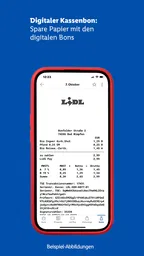
- The app stores receipts for convenient purchase history.
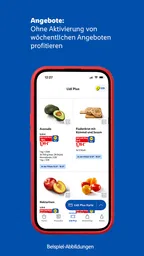
- Weekly offers make it easier to spot limited-time deals.
- A shopping list helps keep planned purchases organized.
- Store locations can help you find a nearby Lidl.
What could be better
- Many discounts require activating coupons before checkout.
- Some offers apply only to specific products or quantities.
- Deal availability can vary by store and region.
- The app may require location access for nearby store features.
- Digital receipts may not replace paper receipts for every purpose.





