

Alibaba.com - B2B marketplace review
 Analysis by Appsdrops
I would describe Alibaba.com as a place to explore wholesale buying, not as a bigger version of a typical online shop. It connects shoppers with suppliers offering goods in bulk, so the useful question is often not “Can I buy this one item?” but “Can I find a supplier and order quantity that makes sense for my needs?” That difference shapes the whole experience. Alibaba.com is most useful when you have a specific product idea, a reason to buy more than a single item, and time to compare offers carefully.
The app is free and comes from Alibaba Mobile. It is a shopping app with a Teen content rating, and its scale is striking: more than 500 million installs, a 4.4 average from around 3.1 million ratings, and roughly 54,000 written reviews. Those figures suggest a widely used marketplace, but they do not remove the need to check individual listings and communicate clearly with suppliers. I would treat the app as a tool for researching and arranging a wholesale purchase, rather than a guarantee that every listing will suit my order.
What to expect from a wholesale marketplace
On a familiar retail app, I might search for a product, pick a size, and expect a straightforward checkout for one item. Alibaba.com calls for a different mindset. Listings are aimed at business-to-business purchasing, and offers can be organized around quantity, product specifications, and supplier conversations. A search result is a starting point for evaluation, not necessarily a ready-made retail deal.
That makes the app a better fit for small businesses, sellers testing a product line, event organizers sourcing supplies, or anyone coordinating a sizeable order. It can also help a curious buyer understand what wholesale options exist, but browsing is not the same as finding a sensible personal purchase. If I only need one inexpensive household item soon, a conventional retail marketplace is usually less work.
The main benefit is being able to investigate many supplier offers from a phone instead of beginning with scattered searches across unrelated shops. The trade-off is that comparison takes more thought. Two listings that look alike may not describe the same material, finish, packaging, or order terms. I would slow down before treating a low displayed price as the whole cost or assuming that a product photo answers every practical question.
Set up around a real buying need
For a first visit, I would begin with a clear description of what I want to source. “Reusable drink bottles for a school event,” for instance, gives me a better search starting point than “bottles.” I would note the intended quantity, material, size, and any branding or packaging needs before searching. This small preparation makes it easier to judge whether a listing is relevant and to ask a supplier useful questions.
After installing the app, I would explore the search and product pages before committing to a purchase. Alibaba.com is currently at version 26.38.0 and supports Android 7.0 and later. Those details help Android users check basic compatibility, while the free price means trying the app does not require an upfront app purchase. The marketplace itself still requires careful consideration of the order and its terms.
I would also decide in advance what would make an offer a “no.” Perhaps the minimum quantity is too high, the specifications are unclear, or the supplier cannot answer a necessary question. Writing down those limits prevents attractive photos or a low headline price from pulling me away from the actual purpose of the search. For a first-time buyer, that is a more useful setup step than browsing without a plan.
Turn a search into a meaningful first step
A realistic first success does not have to be placing an order. It can be narrowing a broad search to a few plausible listings and learning what details matter. Suppose I am sourcing tote bags for a community fundraiser. I would compare the material and dimensions, look for the order quantity that fits the event, and identify whether the listing addresses printing or packaging. Then I would contact a supplier with one concise message covering the intended quantity and the exact questions that could change my decision.
That workflow is more reliable than sending a vague “How much?” message. I would ask for clarification on the specifications I care about and make sure the response refers to the same product and quantity as the listing. If the answer leaves a key point ambiguous, I would ask again before moving forward. The app’s value is not just exposing products; it gives me a place to investigate whether an offer matches the job I need done.
One useful habit is to keep a short comparison note outside the browsing session: product specification, minimum order, supplier response, and unresolved concerns. This prevents me from mixing up similar-looking offers after opening several listings. Another is to compare like with like. A cheaper option may differ in material or included customization, so I would not rank offers by the first price impression alone.
For a small retailer, a sensible first milestone might be finding a supplier whose listed product appears to meet the requirements and receiving a clear answer about an unresolved detail. For an individual planning a group purchase, it might be confirming that the order quantity is practical before involving other people. In both cases, the win is reducing uncertainty—not rushing to checkout.
Where first-time users can get confused
The biggest adjustment is that “shopping” here can involve negotiation and supplier communication rather than simply choosing a familiar retail option. A listing may look complete while still leaving important questions open. I would check the product description closely and ask about any detail that affects use, such as dimensions, materials, variants, or how customization is handled. A product image is useful for orientation, but I would not rely on it as a substitute for written specifications.
Quantity is another common source of misunderstanding. A wholesale offer may be unsuitable if its minimum order exceeds what I can use, even when the unit price looks appealing. Before getting attached to a listing, I would find the order quantity that applies and compare it with my actual demand. For a one-off personal need, this can quickly show that a standard retail shop is the better option.
It is also easy to treat supplier responsiveness as proof that every other detail is settled. I would separate the questions: Is the item the right specification? Does the order size fit? Are the terms clear enough for me to proceed? A helpful conversation matters, but it does not replace reading the listing and confirming the details that affect the purchase.
Another practical limitation is the effort involved in evaluating options. Alibaba.com can be valuable when the order matters enough to justify research, but it is less convenient for quick impulse shopping. Comparing several suppliers, clarifying requirements, and keeping track of responses takes attention. If I cannot spare that time, or if the purchase is too small to benefit from wholesale sourcing, a familiar local or retail marketplace will likely be simpler.
Choose the right alternative for the job
Compared with ordinary consumer shopping apps, Alibaba.com is oriented toward sourcing rather than a frictionless single-item purchase. Retail platforms are generally more suitable when I know exactly what I want, need a modest quantity, and value a straightforward buying journey. Alibaba.com becomes more compelling when I need to compare wholesale offers, explore product variations, or speak with suppliers before deciding.
It is not automatically the best choice for every business purchase, either. If I need a locally available item quickly, a nearby wholesaler or retailer may be more practical. If my specifications are still vague, I would first define them rather than hoping a marketplace search will make the decision for me. And if I am not prepared to assess quantity and listing details, the breadth of supplier options can feel like extra work rather than an advantage.
I would use it when the potential benefit of sourcing directly is worth the extra comparison. For example, a small shop considering a new accessory could use the app to understand the range of available designs and ask suppliers about details before deciding whether a trial order makes sense. The app supports research and contact; the buyer still has to judge whether the offer fits their business and risk tolerance.
Build confidence before placing a larger order
Once I have found a promising listing, I would move from broad exploration to a focused check. I would reread the exact item details, confirm the quantity and any requested variations, and make a note of what the supplier has actually answered. If I still have a concern that could make the goods unusable, I would resolve it before proceeding rather than assuming it will work out later.
For someone new to wholesale, it is sensible to treat the first purchase as a learning exercise, not merely a hunt for the lowest price. The right choice may be the offer whose specifications and communication are clearest, even if another listing initially appears cheaper. I would also keep expectations realistic: supplier contact can clarify an offer, but it cannot make a product suitable if the quantity, timing, or requirements do not match my situation.
Alibaba Mobile’s app has been available since October 17, 2012, and the current version reflects an established product rather than a new experiment. Still, longevity and popularity are context, not a substitute for evaluating a particular supplier or order. I would use the broad reach as a reason to explore, then make the decision based on the details in front of me.
My recommendation for a first-time user
My advice is to install Alibaba.com only if you can name a sourcing task it might help with. Start with one product, define the quantity and must-have specifications, compare a handful of relevant listings, and send a precise question to a supplier when something important is unclear. That path makes the first session manageable and gives you a meaningful result even before you buy.
I recommend Alibaba.com to people who are willing to research wholesale options and communicate before committing. I would steer casual shoppers toward a standard retail app when they need a single item quickly, and I would tell any first-time buyer not to let a tempting listing outrun their checklist. Used with that discipline, it is a useful sourcing workspace; used as if it were an ordinary one-click shop, it can be confusing and unnecessarily time-consuming.
What we like
- Connects buyers with suppliers across many industries.
- Supports bulk orders and wholesale sourcing.
- Offers supplier profiles and business verification details.
- Built-in messaging helps buyers contact suppliers directly.
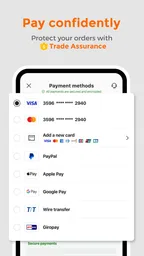
- Trade Assurance can add protection to eligible orders.
What could be better
- Minimum order quantities may be too high for small buyers.
- Supplier response times and service quality can vary.
- Product listings may include inaccurate or outdated details.
- Shipping costs and import duties can raise the final price.
- Some features may require a paid membership or extra fees.





