






Temu: Shop Like a Billionaire review
 Analysis by Appsdrops
I treat shopping apps differently from games or social feeds: the useful question is not just whether browsing is enjoyable, but whether I can make a considered choice when products, prices, and recommendations compete for attention. Temu is a free shopping app developed by Temu, and its appeal is easy to understand: it puts a broad range of low-cost-looking items in one place and makes browsing feel like an activity in itself. My main advice is to approach it as a discovery and comparison tool, not as a reason to buy something simply because it has appeared in front of you.
Browsing, trust, and the shopping mindset
The scale of the app is striking: it has passed one billion installs, with an average rating of 4.4 from around 13 million ratings and roughly 621,000 written reviews. Those figures suggest that many people have tried it, but they are not a guarantee that every product will suit every buyer. I would use the ratings as context, then judge individual listings on their own evidence, especially when a purchase depends on fit, finish, or exact specifications.
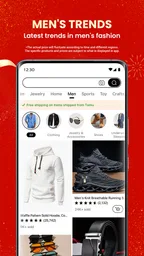
Temu is firmly in the shopping category, but the experience can feel closer to browsing a constantly changing catalogue than searching the tightly curated shelves of a familiar retailer. That is useful when I have a flexible need—small household items, craft supplies, or accessories—and am open to alternatives. It is less reassuring when I need a particular model, a dependable brand, or a product whose quality is difficult to assess from pictures.
The app is rated Teen, so it is not presented as an adults-only shopping service. Still, a family should not treat that age label as a substitute for discussing spending, account use, and purchase decisions. Shopping involves real money and personal choices, even when the interface makes browsing feel casual. I would set expectations before handing a device to a younger user, rather than relying on the rating to do that work.
Temu was released on August 25, 2022, and the current version is 4.92.0. It supports Android 6.0 and later, making it accessible to many older Android devices as well as newer ones. The developer is also named Temu. Those basics help identify the app, but trust is built through what a person can inspect and decide while using it—not by a large install count alone.
How I would judge a listing before buying
My first practical rule is to read a product page as a collection of claims that need checking, not as a promise that the item will match my expectations. I compare the displayed details with the actual need: dimensions, materials, compatibility, included pieces, and any other specification that matters for the intended use. If the listing leaves an important point unclear, I would avoid treating a low displayed price as compensation for that uncertainty.
For example, if I were looking for storage organizers, I would measure the shelf first and compare those measurements with the item details. For a phone accessory, I would confirm the exact device fit rather than rely on a similar-looking image. These are small steps, but they prevent a common shopping mistake: buying the right kind of thing in the wrong size or configuration.
Written buyer feedback can help reveal practical details that a polished product image may not convey. I look for comments that address the same use I have in mind, rather than treating a general positive reaction as proof of suitability. A reviewer discussing how an item fits a specific space or works with a particular device is more useful to me than a vague statement that it is “great.” I also pay attention to whether the product shown and the details described seem consistent.
Controls, account choices, and personal information
When I assess trust, I separate what I can verify in the app from what I might be tempted to assume. A responsible review should not guess at permissions, data handling, or account controls that a person has not actually inspected. My approach is to pause at the app’s own permission prompts and privacy or account settings, read the choices shown there, and grant only what makes sense for the way I intend to shop.
This matters most when a shopping app asks for access that is not obviously necessary to the immediate task. I do not approve a prompt automatically just because it appears during setup or while I am browsing. If I am unsure why a permission is being requested, I stop and consider whether I can continue without it or review the relevant controls first. That habit is more useful than making broad assumptions about what an app does behind the scenes.
Account creation is another moment to slow down. Before entering personal details, I would check what information the screen is asking for and whether I am ready to maintain an account with the service. I also avoid using a shopping session as an excuse to share more than I need to. The practical point is simple: make each permission and account choice deliberately, instead of clicking through prompts just to reach the catalogue faster.
Likewise, I would review the available account and privacy controls directly rather than relying on memory or hearsay. Settings can change between app versions, and a person’s own priorities differ: one shopper may prefer a persistent account for convenience, while another may want to keep shopping activity more limited. If a particular control is important to you, confirm that it is visible and works as expected before making the app part of your regular routine.
Where Temu fits into an everyday shopping routine
A realistic use case is planning a small home project. I might already know I need drawer dividers, labels, or a few basic accessories, but not care about a particular brand. I can use Temu to explore options, compare dimensions and item details, and build a shortlist. The key is to start with a list of actual needs and a spending limit, then stop browsing once those needs are addressed. That keeps the app useful without turning an errand into an open-ended search for extra purchases.
A second good use is finding inexpensive items where a little variation is acceptable. Hobby materials or simple decorative pieces can be easier to evaluate visually, and a shopper may be comfortable choosing among several plausible options. By contrast, I would be more cautious about anything safety-critical, expensive, or difficult to return, and I would prefer a specialist retailer when I need strong product support or a clear, familiar brand standard.
Compared with a local shop, Temu can be convenient for scanning many kinds of products in one app, but a local store lets me inspect an item before paying and may make it easier to get immediate help. Compared with a large established online retailer, Temu may feel more discovery-led, while a retailer with a narrower catalogue can make brand, specification, and delivery expectations easier to manage. Neither alternative is automatically better; the right choice depends on whether variety and price exploration matter more than inspection, certainty, or support.
I would also avoid using it as my only source when timing is essential. If I need something for a specific event or repair, I choose a retailer whose delivery and availability fit that deadline. For non-urgent browsing, the trade-off is easier to accept. This distinction—urgent versus flexible—is one of the most useful ways to decide whether opening Temu makes sense in the first place.
Keeping the experience intentional
One useful workflow is to research first and purchase later. I can note the item’s key specifications, compare a few listings, and leave the app before deciding. Returning with a clear purpose reduces the pull of unrelated products and gives me room to ask whether I still want the item after the initial browsing session. It also makes it easier to compare against alternatives outside the app instead of treating the first appealing listing as the default choice.
Another is to separate “looks appealing” from “meets my need.” For a decorative object, appearance may be the main requirement. For a charger, organizer, or wearable item, a missed specification can make the purchase useless. I would write down the non-negotiable details before searching, then discard listings that do not make those details clear. That simple filter is more dependable than trying to remember every product while scrolling.
There is a real trade-off in the app’s bargain-oriented feel: it can make discovery entertaining, yet that same abundance can blur the line between useful shopping and impulse browsing. I find it best when I enter with a task, compare carefully, and leave when the task is done. If someone dislikes frequent product discovery or tends to add unplanned items to a basket, a search-focused retailer or a physical shop may be a calmer fit.
Temu is not the right choice for everyone. I would skip it when I need to verify an item physically, when a precise brand or specialist guarantee matters, or when I cannot tolerate uncertainty about whether a listing matches my expectations. I would also avoid browsing it casually if spending limits are difficult to maintain. Those are not reasons that every shopper should avoid the app; they are reasons to match the tool to the purchase.
My cautious verdict
After weighing its strengths and friction points, I see Temu as a useful place to explore everyday goods when I have time to compare and can remain selective. It is free to install, broadly accessible on supported Android devices, and has attracted a large audience. But popularity is not a substitute for checking product details, and low-cost browsing is not the same as a guaranteed good deal. I would use it with a short list, a clear budget, and a willingness to walk away from unclear listings.
If you enjoy comparing varied items and are comfortable making careful judgments from the information shown in a listing, it is worth trying. If you value hands-on inspection, dependable brand continuity, or specialist assistance above breadth and discovery, another retailer may serve you better. My recommendation is therefore measured: use Temu as one shopping option, make permission and account decisions consciously, and let the product’s suitability—not the excitement of browsing—decide whether it belongs in your basket.
Temu works best for me when I know what I am looking for and treat every purchase as a decision to verify. That approach preserves the convenience of browsing without asking the app to provide certainty that only careful comparison can offer.
What we like
- Frequent coupons can make many items affordable.
- Product pages include customer photos and reviews.
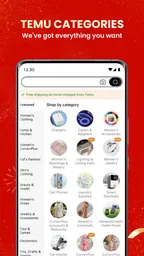
- The app offers a broad range of everyday product categories.
- Order tracking helps you follow shipments in one place.
- Wishlist features make it easy to save items for later.
What could be better
- Product quality can vary between sellers and listings.
- Delivery may take longer than shopping from local retailers.
- Some low-cost items may not be worth the shipping wait.
- Frequent promotions can make prices harder to compare.
- Returns may require extra time and effort to complete.




