

Vivint review
 Analysis by Appsdrops
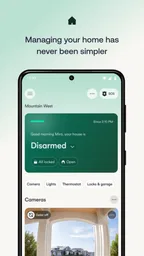
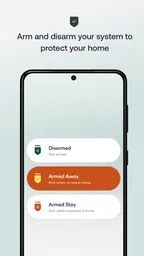
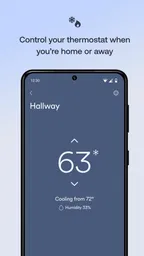
Managing a smart home is most useful when it feels like part of everyday life rather than another chore. The Vivint app is designed to put control of a Vivint Smart Home on a phone, giving users a single place to interact with the service. Its appeal is straightforward: when you want to check in on your home or make a change, you can start with the app instead of going from one task to another without a clear path.
From a home routine to a phone-based control point
When I think about using a smart-home app, I start with the situation that brings me to it. Maybe I am heading out, returning home, or simply want to manage the setup from my phone. Vivint’s app is positioned for that moment: it is the mobile companion for a Vivint Smart Home, intended to make the system accessible through an app experience.
That focus matters. A home-control app is not automatically useful just because it gathers technology under one name; it has to fit into the moment when a person actually needs it. Vivint’s store summary emphasizes control of the smart home, so the core promise is clear even before you begin: open the app as a way into the Vivint environment and use it as your mobile point of contact with the home.
The best way to think of Vivint is as a companion to the broader Vivint Smart Home, not as a standalone home system. That distinction sets expectations. The app’s usefulness is tied to the home setup it is meant to control, so it makes the most sense for people already using Vivint rather than someone looking for a general-purpose tool for any smart-home brand.
Getting from intention to action
The basic flow begins with a need. You open the app because you want to engage with your Vivint Smart Home, then use the app as the control surface for that relationship. In practical terms, that can make the phone feel like the starting point for a home-management task. The benefit is less about flashy presentation and more about reducing the mental jump between “I need to manage something at home” and “I know where to begin.”
I like that the product identity is easy to understand. There is no mystery about the intended audience or the broad purpose: it is for Vivint customers who want to control their smart home through a mobile app. That clarity is valuable in a category where products can easily blur together. It also gives the app a defined role in a household routine, whether you are the person who manages the system every day or someone who checks in only when there is a reason.
In a smooth routine, the app becomes a familiar handoff point. Instead of treating home management as something that only happens in front of equipment inside the house, you reach for your phone and start there. That can be especially convenient when your routine changes and you want access to your smart-home setup away from the place where it is installed. The appeal is the ability to carry that control point with you.
How the handoffs shape the experience
Smart-home use rarely belongs to just one person or one device. A household may have one person who sets things up, another who uses the system casually, and different people who approach the app with different levels of familiarity. In that context, an app is not merely a remote control; it is a handoff between the home system and the people who rely on it.
Vivint’s role is to make that handoff feel direct. You move from the intention to manage your home into the mobile experience built for Vivint customers. From there, the app serves as the bridge between the user and the wider smart-home setup. This is a sensible model because it gives the household one recognizable starting point instead of requiring people to guess where a particular home task belongs.
Still, a handoff only feels effortless when everyone understands the same starting point. If one household member is comfortable with the app and another is less familiar with smart-home technology, the more experienced person may need to explain how the app fits into the household routine. That is not unique to Vivint; it is a common reality of connected-home products. The app can centralize access, but a shared understanding of how the household uses it remains important.
There is also a handoff between the app and the broader Vivint service. The mobile experience is part of a larger smart-home arrangement, so the app’s role is best understood in that context. For an existing customer, this connection can make the app feel like a natural extension of the system. For someone comparing home-control apps without a Vivint setup, the same connection may make it less relevant. The right fit depends on whether Vivint is already part of your home.
What the everyday result feels like
When the flow works well, the result is convenience through familiarity. You know which app to reach for, and the app gives you a mobile route into your Vivint Smart Home. That can make home management feel less like a separate project and more like a normal part of checking in on your household. I value that kind of practical usefulness: a good companion app should help the system feel accessible without demanding attention for its own sake.
The app’s staying power is reflected in its broad adoption. It has more than a million installs, and its average rating is 4.3 from around 180,000 ratings. Those figures suggest that many people are using it as part of their Vivint experience, though a rating cannot tell you exactly how well it will fit your own home or routine. I would treat that popularity as helpful context, not as a guarantee that every household will have the same experience.
Another useful signal is that the product has been around for a while while continuing to receive a current version. It was released on March 3, 2014, and the current version is 26.11.200. For users, the practical takeaway is that Vivint is an established mobile companion rather than a newly introduced experiment. The app’s purpose remains easy to explain: control your Vivint Smart Home from your phone.
It is free to download and has an Everyone content rating, which makes it straightforward to consider as a household app. The minimum operating system requirement is version 12. That requirement is worth checking before installing, especially if you are planning to use an older device as a shared home-control phone. These details are simple, but they affect whether the first handoff—from deciding to try the app to actually opening it—goes smoothly.
Where the flow can feel less seamless
The main friction point is the app’s close relationship with Vivint. That is a strength when you already use the Vivint Smart Home, because the app has a clear purpose in your setup. It is also a boundary: people who do not use Vivint may not find it useful as a general smart-home control app. If you are choosing a system from scratch, consider the whole home setup and how the app fits into it, rather than judging the app in isolation.
Another possible snag is expectation. The phrase “control your smart home” sounds broad, and users may arrive expecting every possible home-management task to work in the same way for every household. In reality, the experience belongs to the Vivint environment and depends on how the service is used at home. The safest approach is to think of the app as the mobile interface for your Vivint setup, rather than assuming that the same workflow applies to every connected device or household arrangement.
There can also be everyday friction when a household has different habits. One person may want to handle home tasks through the phone, while another prefers not to interact with an app unless necessary. A single mobile control point can help bring the routine together, but it does not automatically make everyone equally comfortable with it. Taking a moment to agree on who uses the app and when can make the handoff from one household member to another feel more natural.
For me, the app’s value is therefore tied to consistency. If the household already relies on Vivint and the people who need access understand that the app is the place to start, its purpose is easy to appreciate. If you are looking for an app that stands independently from its associated home service, the same focused design may feel limiting. That is less a flaw than a reminder to match the app to the system it supports.
Who is most likely to appreciate Vivint
Vivint is best suited to people who use a Vivint Smart Home and want a phone-based way to manage that setup. It may be especially appealing if you like having a familiar mobile starting point for home tasks and want the smart-home experience to travel with you. For a household, its usefulness also depends on whether the people who need to interact with the system are comfortable using an app as part of their routine.
If you are already a Vivint customer, installing the app is a natural step in getting mobile access to the service. If you are still deciding which smart-home approach makes sense, look at the complete experience: the home system, the people who will use it, and the role you want a phone app to play. That broader view helps avoid expecting one app to solve needs that belong to the entire home setup.
From a search perspective, anyone looking for a Vivint app review, a smart-home control app, or a mobile companion for a Vivint system will find a clear answer here: the app is designed around controlling Vivint Smart Home. It is free, established, and aimed at a specific ecosystem. Those are useful strengths when they line up with your home, but they are not reasons to choose it without considering whether Vivint itself is the right fit.
My take after following the workflow
Vivint makes the most sense when I follow the full path from need to outcome: a household member wants to manage the smart home, reaches for the phone, opens the app, and uses it as the mobile connection to the Vivint setup. The handoff is easy to understand, and the app’s focused identity helps keep expectations grounded. Its strongest quality is that straightforward role, rather than a promise that it will serve every kind of home or every smart-home platform.
My overall impression is positive for the audience it is built for. If Vivint is already part of your home, this app gives you a clear place to begin when you want mobile access to that experience. If you do not use Vivint, it is probably not the right starting point for a general smart-home search. The result is a practical, ecosystem-specific app that can fit neatly into daily life when the home system, the app, and the household’s habits all line up.
In short, Vivint is worth considering as the mobile companion to a Vivint Smart Home, especially if you want a recognizable phone-based control point and are comfortable making the app part of your routine. Its value comes from that focused connection: the app gives existing customers a direct route into their smart-home experience, while its close ties to Vivint define exactly who is most likely to benefit.
What we like
- Smart home controls are gathered in one app.
- Video feeds make it easier to check cameras remotely.
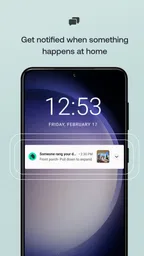
- Custom alerts help users stay informed about activity.
- Compatible devices can be managed from a central dashboard.
- Remote access lets users check their home while away.
What could be better
- Many features require Vivint equipment and a service plan.
- App performance depends on a reliable internet connection.
- Some devices may need professional installation.
- Camera recordings may require a paid storage plan.
- A Vivint account is needed to use the app.





