
VIN Scanner review
 Analysis by Appsdrops
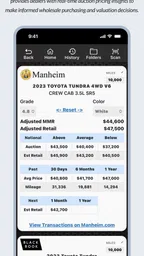
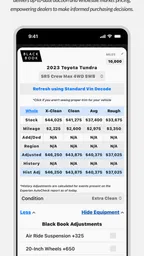
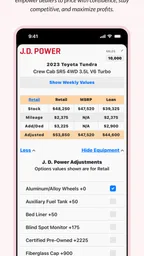
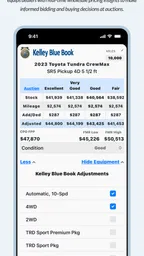
I’d look at VIN Scanner as a workbench for people who need to assess vehicles, not as a general-purpose car companion. Its focus is on appraisals, auction run lists, market context, and the calculations that help a buyer decide whether a vehicle is worth pursuing. That makes it a more specialized choice than a basic VIN lookup tool, and it also means the value depends on how often you make decisions around vehicle condition and resale potential.
In the Auto & Vehicles category, the app is free and developed by VIN Scanner. It has an average rating of 3.8 from about 590 ratings, with more than 100,000 installs. Those figures suggest a product with a real niche audience, though they don’t tell me whether its workflow will suit every buyer. I’d treat it as a practical aid for making and organizing judgments, not as a substitute for inspecting a car or checking important facts through appropriate sources.
Where an appraisal workflow can get stuck
The first challenge with an appraisal tool is often not the scan itself; it is knowing what decision you want the scan to support. A VIN can help identify a vehicle, but a useful appraisal still depends on context: the car’s condition, the asking or auction price, likely costs, and what comparable vehicles are doing in the market. VIN Scanner’s emphasis on run lists and market insights makes most sense when you are weighing several vehicles against one another rather than looking up a single car out of curiosity.
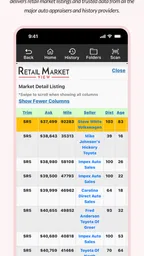
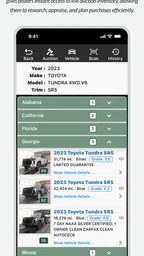
A realistic example is preparing for an auction. You may have a list of vehicles to review, limited time to decide which ones deserve closer attention, and a rough profit target in mind. The app’s appraisal-oriented approach can help make that process more deliberate: use it to organize the information you are considering, then compare the result with your own inspection and budget. The useful habit is to treat each estimate as a decision aid, not a promise of resale value.
That distinction matters because market context can be easy to overread. A vehicle that looks attractive on paper may need repairs, have an unusual trim or history, or be harder to sell in your area. An app can help surface a potential opportunity, but the person bidding still has to account for transport, repair uncertainty, time, and local demand. I would set a firm maximum price before browsing so that a promising appraisal does not become an excuse to stretch beyond the numbers that work for you.
Another common point of friction is input quality. If a VIN is entered or captured incorrectly, any subsequent result may be misleading or incomplete. Before relying on a vehicle record, I’d compare the identifier shown by the app with the one on the vehicle or its paperwork. This simple check is especially worthwhile when moving quickly through a run list, where one mistaken character can send your attention toward the wrong vehicle.
Check the basics before relying on a result
VIN Scanner is available for devices running Android 7.0 or later, and the current version is 3.2.4. If the app does not behave as expected, I’d start with straightforward checks: confirm the device meets that minimum, make sure the app is up to date in the app store, and carefully re-enter the VIN if a scan or lookup seems off. Those steps are more useful than repeatedly trying the same action without checking whether the underlying identifier is correct.
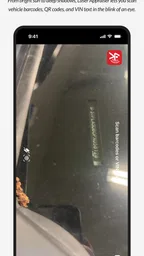
Lighting and presentation can also affect a camera-based scan in ordinary ways. If you are using the camera to read a VIN, try to avoid glare, keep the characters in clear focus, and move the phone until the full identifier is visible. If scanning remains unreliable, manually checking the characters is a sensible fallback where the app allows it. I would not assume that a failed scan means the vehicle is unsupported; first rule out a hard-to-read label or a mistaken character.
For anyone setting up the app before an auction or appraisal session, I’d do a short practice run beforehand rather than learning the workflow beside a vehicle with a deadline approaching. Check that you can open the app, locate the relevant appraisal or run-list tools, and understand where you need to enter or review vehicle details. This does not require building a complicated system. The point is simply to discover any navigation or input friction while there is still time to correct it.
It also helps to decide how you will use the information before collecting it. If you are comparing several cars, use the same assumptions for each one: similar repair allowances, comparable resale expectations, and a consistent profit threshold. Otherwise, a neat-looking set of appraisals can create a false sense of precision because each vehicle has been judged by a different standard. That kind of consistency is a user habit, not a feature I would expect any app to enforce for you.
Recover the workflow without losing your judgment
If an appraisal session gets interrupted, I’d pause and identify what is actually missing before starting over. Is the VIN uncertain, is a vehicle no longer on the run list, or do you simply need to revisit the market context? Rechecking one vehicle at a time is less confusing than rescanning everything, particularly when multiple cars have similar descriptions. Keep a separate note of any decision-critical details you cannot afford to lose, such as your maximum bid or the inspection issue that would rule a vehicle out.
For a busy buyer, a helpful approach is to divide the work into passes. First, identify candidates and remove the obvious mismatches. Next, review the most promising vehicles more carefully and consider their condition and likely costs. Finally, make a bid or purchase decision only after checking the individual vehicle. This keeps the run-list stage from turning into an assumption that every item has been fully assessed just because it appears in a tool.
When a result looks surprising, verify the input before interpreting the output. Confirm the VIN, make sure you are considering the correct vehicle, and revisit the assumptions behind your appraisal. If the number still seems out of line, compare it with other relevant market references and your own knowledge of the vehicle. A mismatch is a prompt to investigate, not a reason to force the result to fit your expectations.
This is also where the app’s niche becomes a trade-off. Someone who regularly appraises inventory or follows auction run lists may appreciate having a vehicle-focused workflow in one place. A casual owner who only wants occasional maintenance reminders, general vehicle information, or a one-off identification may be better served by a simpler tool built around that specific need. VIN Scanner’s stated focus is not the same as a complete ownership dashboard, so I would choose it for appraisal work rather than expect it to cover every automotive task.
When the phone or the vehicle is the real problem
Not every failed scan or confusing result points to a problem with VIN Scanner. A damaged, obscured, or poorly lit VIN label can make any camera-based reading difficult. A device camera may also struggle with glare or motion. If the characters are hard to read in person, it is sensible to inspect another legitimate location for the identifier or consult the vehicle’s documentation rather than repeatedly trying the same scan.
Network conditions can be another ordinary source of delay for tools that rely on current information. If the app is slow to return a result, check that the device has a working connection and try again when reception is better. I would avoid making a purchase decision based on a partial screen or an old note taken before the latest vehicle details were checked. If timing is tight, keep the decision conservative until you can verify what you need.
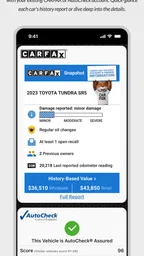
There is also a limit to what an appraisal workflow can establish. A VIN-based tool cannot replace a physical inspection of a vehicle’s mechanical condition, nor should a market estimate be treated as proof that a car is free of title, damage, or other concerns. If the stakes are high, pair the app with an inspection and the appropriate checks for the transaction. That is not a weakness unique to this product; it is the boundary between software-assisted research and actually assessing a car.
VIN Scanner is rated for Everyone, which makes it broadly accessible as an app, but that does not mean its intended workflow is useful to everyone. New buyers may find the appraisal language and auction-oriented emphasis less intuitive than a straightforward lookup. If you are unfamiliar with vehicle valuation, begin with one car you can inspect carefully and use the app as a prompt for questions, rather than treating the first result as a complete buying recommendation.
Who should use it, and who should choose something else
I’d recommend it most readily to independent vehicle buyers, dealers, and other people who regularly sort through candidate cars and need to think about market value and potential profit. Its focus can be especially useful when you need to compare opportunities quickly, then decide which ones deserve a closer look. The practical benefit is not merely finding a number; it is bringing a repeatable appraisal mindset to a process that can otherwise be rushed or inconsistent.
I would be less enthusiastic about it for someone who wants a broad, everyday car app. If your main goal is tracking fuel, arranging service, navigating, or getting a basic identity check once in a while, a tool dedicated to that task may be more direct. Likewise, a first-time buyer who expects a scan to answer whether a car is safe or worth buying should use a more careful process: independent inspection, documentation checks, and realistic cost estimates still matter.
The app has been available since May 19, 2010, and its present version is 3.2.4. Its long-running presence and specialist focus may appeal to users who want an established tool for a particular kind of vehicle work. At the same time, longevity alone does not guarantee that every screen or workflow will feel modern to every person. I’d judge it by whether it helps you make your appraisal routine clearer and faster, not by age or version number alone.
My practical verdict is that VIN Scanner is worth trying if appraisals, auction lists, and market-minded buying are part of your regular routine. It is free to start, but the real value comes from using it with disciplined inputs and independent checks. I would not rely on it as the sole authority for a major purchase, and I would not install it expecting a complete toolkit for general car ownership.
If you do try it, begin with a low-pressure comparison: choose a vehicle you can verify, check its VIN carefully, and see whether the appraisal workflow helps you organize your thinking. Then compare that experience with your normal method. If the app makes it easier to filter candidates and keep your assumptions consistent, it may earn a place in your process. If you only need occasional basic vehicle information, the specialized focus may be more than you need.
What we like
- Quickly decodes VINs into useful vehicle details.
- Helps verify a car before purchase.
- Simple interface makes scans easy to start.
- Saves time compared with manual VIN searches.
- Useful for checking vehicles while shopping.
What could be better
- Scan accuracy depends on clear lighting and a readable VIN.
- Some vehicles may return incomplete information.
- A VIN scan cannot confirm a vehicle's mechanical condition.
- Older or less common models may have limited data.
- VIN details should be verified with official records.





