





VeSync review
 Analysis by Appsdrops
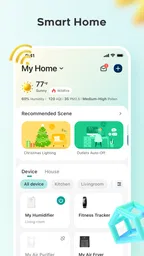
VeSync is best understood as a companion for connected home and wellness products, rather than a lifestyle magazine or a general-purpose habit tracker. I would consider it when I want to manage compatible devices from one place, but I would not install it expecting it to improve daily routines on its own. Its value depends on whether its tools fit the products I actually use and whether I am comfortable managing those devices through an app.
Trust starts with knowing what the app is for
Developed by Vesync, this free Lifestyle app has been available since September 29, 2017. Its broad “smart and healthy living” positioning makes more sense when viewed as a device companion: the practical question is not whether the app sounds useful, but whether it supports the particular VeSync-compatible product in your home.
The app has a 4.4 average from around 38,000 ratings, with about 6,300 written reviews and over 5 million installs. Those figures suggest a sizeable user base, but they do not tell me whether a particular device will suit my needs or how its setup will feel. I would treat them as context, not as a substitute for checking compatibility and deciding what information I am willing to provide.
VeSync is rated for Everyone, which is about its audience classification rather than a promise that every household workflow is effortless. A connected-device app can still involve choices about accounts, network access, and information entered during setup. I think it is sensible to approach those moments deliberately, especially if I am setting up a device in a shared home.
The app’s role also affects the trust question. A paper checklist or a basic phone timer does not need to connect to household hardware; a device companion may need a different setup to do its job. I would compare VeSync with the simplest option that meets my need, rather than assuming that app control is automatically better.
What to check before setting up a device
Before installing, I would identify the exact product I intend to use and check that VeSync is the companion it supports. That small step can prevent a frustrating setup in which the app is installed but does not serve the device I own. I would also make sure the phone is available during setup and read each on-screen request instead of tapping through automatically.
When Android or iOS asks for access, I would consider the request in the context of the task I am doing. If a permission appears during device discovery or setup, I would look at the explanation shown at that moment and decide whether it makes sense to continue. I would not infer from the app’s category or its name what information it collects, nor would I assume a permission is required unless the app or operating system presents that choice.
This is also where account decisions matter. If the app presents account creation, sign-in, or other account controls, I would review the available choices before proceeding and use the account settings it exposes to manage them later. The useful habit is to make a note of the sign-in method and the device associated with the account, particularly when more than one person in a home may be involved.
Everyday use is about reducing small bits of friction
A realistic reason to use a connected-home companion is keeping device management together instead of searching for a separate control for each product. For example, I might want to check or adjust a compatible device before leaving home, then return to a familiar place in the app when I need it again. That is a convenience workflow, not a guarantee that every device offers the same controls.
My practical tip is to start with one device and learn its own screen before building a larger routine around the app. Notice which controls are easy to reach, what information is displayed, and whether the device remains usable in the way you expect if you do not open the app. This gives you a better basis for deciding whether VeSync is genuinely simplifying your household or just adding another screen to manage.
For a shared home, I would agree on who handles setup and who should have access before connecting a device. That avoids the common confusion of one person managing the product while another expects to control it without knowing how access is arranged. If the app offers sharing or account-management choices, I would use only the options I can see and understand rather than assuming that household access works a particular way.
There is a trade-off here: centralized control can be handy, but it creates a point of dependence. If the phone is unavailable, the account needs attention, or the app is not the right route for a particular task, a physical control or another supported method may be more convenient. I would not make a basic household task depend solely on an app until I had tried the product’s usual controls too.
Privacy decisions are easiest at the moment they appear
Connected-device setup is a data-sensitive moment because it is when a person may be asked to provide information or allow access. I recommend pausing at each prompt and asking what task it supports. If the purpose is clear and relevant to the device I am configuring, I can make an informed choice; if it is not clear, I would read the in-app explanation or the operating system’s permission details before deciding.
I would also separate information needed to operate a device from information that is optional, where the interface makes that distinction. Avoid entering details merely because a form offers a field, and revisit account settings if your circumstances change. These are practical safeguards, not claims about VeSync’s particular data practices: the responsible approach is to rely on what the app actually displays and the choices it actually provides.
On a phone used by several people, I would pay attention to who can unlock the device and open the app. This can matter even when no one is sharing an account: a device dashboard may reveal household preferences or routines simply by being visible on a shared screen. A screen lock and a clear household agreement are useful complements to whatever controls the app provides.
Version 6.0.10 is the current release, and the minimum operating-system requirement is version 8.0. I would keep the app and phone software in a state the device supports, while still reading update prompts and reviewing settings afterward if anything about the interface or account flow changes. An update is a reason to check, not a reason to assume that permissions or privacy choices have changed in a specific way.
Where it compares well—and where it may not
Compared with a generic notes app, paper reminder, or standalone timer, VeSync makes most sense when the task involves a compatible connected product. Those simpler alternatives can be better if all I need is a reminder or a record that does not depend on hardware. Conversely, switching among separate device apps may feel less tidy if several supported products already fit into VeSync’s ecosystem.
The key limitation is that usefulness is conditional. If you do not own a compatible device, the app may have little reason to occupy space on your phone. If you prefer to operate household equipment locally and avoid account-based setup, a product with straightforward physical controls or a different companion-app arrangement may suit you better. I would not choose VeSync based only on its broad lifestyle framing.
Another trade-off is attention. A connected app can make controls easier to find, but it can also encourage checking a phone for tasks that were previously simple. I would judge it by whether it saves a real step in my day. If I find myself opening it repeatedly without a clear benefit, I would simplify the workflow or rely on the device’s direct controls where possible.
The app is free, which lowers the barrier to trying it, but free does not mean that every product, service, or use case is necessarily included in the same way. I would look at the device’s own terms and the choices shown during setup rather than assuming that installing the app settles every cost or account question. That distinction is particularly useful when buying a device for someone else.
Who should try it, and who should pass
I would recommend giving VeSync a measured try if you already have a compatible product and want a central place to manage it. It is also a reasonable option for someone comfortable with app-based setup who is willing to review permissions and account choices as they appear. Starting with one device makes it easier to see whether the convenience is real before making the app part of a broader household routine.
I would skip it if you have no compatible hardware, dislike account-based device management, or only need a simple reminder that a standard phone tool can handle. I would also be cautious about building an essential routine around it until I had tested what happens when the phone is offline, the app is closed, or another household member needs access. Those checks reveal more than a quick first impression.
Overall, VeSync is a practical, device-dependent lifestyle companion rather than a standalone solution for healthier living. Its strongest case is convenience when a supported product is already part of your home; its weakest is for people who want a general lifestyle app or minimal digital involvement. My advice is to check compatibility first, make deliberate choices at setup, and keep a familiar alternative available for tasks you do not want tied to an app.
On balance, I see it as worth considering, not something every user needs. The 4.4 average and broad adoption can help a new user feel that the app is established, but I would give more weight to whether the setup is understandable, the available controls suit the device, and the account choices feel acceptable to me. If those conditions line up, VeSync can earn a place in a home routine without needing to become the center of it.
What we like
- Control compatible appliances remotely from the app.
- Schedules can automate device operation.
- The app supports monitoring energy use on compatible plugs.
- Share device access with other household members.
- Voice control works with supported smart home assistants.
What could be better
- Features depend on owning compatible VeSync devices.
- Some functions require a stable Wi-Fi connection.
- Device setup can take several steps.
- Remote control may be unavailable during service outages.
- App compatibility and features vary by device model.





