

USAA DriveSafe review
 Analysis by Appsdrops
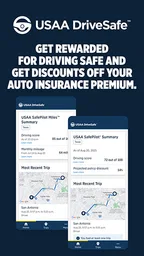
I see USAA DriveSafe as a focused driving app rather than a general-purpose car companion. Its appeal depends on a practical question: are you eligible to use it where you live, and do you want a tool centered on driving behavior? USAA makes it available in select states, so location is the first thing I would check before planning to rely on it. If it is available to you, it may suit drivers who want a dedicated way to engage with safer driving, without expecting a full vehicle-maintenance or navigation suite.
That limited scope is both the app’s clearest strength and its main trade-off. In the broad Auto & Vehicles category, many apps help with directions, fuel, repairs, or vehicle records. DriveSafe occupies a narrower lane. I would consider it alongside those tools, not as a replacement for them: it is relevant to driving habits, while a navigation app is still the better choice for route planning and a service log is better for maintenance reminders.
What the app offers today
USAA, the developer, has kept the product’s identity straightforward: the app is called USAA DriveSafe, and its short store description is simply “USAA DriveSafe.” That tells me not to assume it does more than its name suggests. I would approach it as a driving-focused utility and judge it by whether its experience fits my routine, rather than expecting a broad dashboard of unrelated car services.
The app is free, carries an Everyone age rating, and has a 3.7 average from around 63,000 ratings. It has passed one million installs, while roughly 14,000 users have written reviews. Those figures suggest that plenty of people have tried it, but the average rating also makes me cautious about treating the experience as universally smooth. Ratings are a useful signal, not a guarantee that it will suit every phone, driving pattern, or state.
Availability is a real decision point, not a minor footnote. If you are outside the supported states, the app is not a dependable choice for your everyday driving workflow. If you are in an eligible area, I would still check that the app’s current setup and requirements make sense for your circumstances before building habits around it. A driving app can only be useful when it fits both where you drive and how you use your phone.
For a realistic example, imagine someone who commutes on familiar roads and wants a simple prompt to pay closer attention to how they drive. A focused app can make more sense in that routine than opening a map or vehicle-service app that is built for a different task. But if that person mostly wants directions, traffic conditions, or an easy way to record oil changes, DriveSafe would not be my first recommendation. Choosing the right tool starts with the job, not the category label.
How I would fit it into a driving routine
I would set it up before relying on it during a busy week, then take a moment to understand its in-app instructions and any choices presented during setup. That is a useful habit with any driving-related app: do the learning while parked, not while preparing to leave. I would also avoid treating a phone-based driving tool as something that needs constant attention on the road. Its value should come from supporting safer habits, not from creating another reason to look at a screen.
A less obvious but useful approach is to keep a short personal note of the situations in which you drive most often—commuting, errands, or longer trips—and assess whether the app fits those patterns after using it. That helps separate a genuine mismatch from an unusual first day. For example, a week dominated by short stop-and-go errands may feel different from a steady commute. I would not draw a big conclusion from one trip or assume that a single session represents my usual driving.
Another practical tip is to decide in advance what you want from the app. If your goal is simply to become more mindful behind the wheel, use that as the standard for judging whether it belongs in your routine. If your goal is to monitor vehicle condition, find routes, or manage several cars in one place, you are asking it to solve a different problem. Clear expectations prevent frustration and make comparison with other apps more honest.
Where it sits among car apps
Compared with a typical navigation app, DriveSafe is not the tool I would open to find the quickest route or avoid a traffic jam. Compared with a maintenance tracker, it is not the obvious place to organize service history. Its distinguishing role is its connection to safer driving, so the sensible comparison is with other driving-behavior tools rather than every app filed under vehicles.
That distinction matters if you already use a USAA product or are considering one. The developer name may make the app feel like part of a larger ecosystem, but I would not assume that a familiar brand means the app will automatically meet every driver’s needs. I would evaluate the specific experience on its own: eligibility, setup, day-to-day usefulness, and whether it earns a place on my phone. If you need a universal tool that works as a complete car organizer, a more general alternative may be a better fit.
There is also a trade-off in choosing a specialized app. A narrow focus can make the purpose easier to understand, but it leaves other tasks to separate tools. I prefer that honesty to an app that claims to do everything and makes routine actions harder to find. Still, anyone who dislikes maintaining multiple apps should weigh that inconvenience before adding another driving utility.
What has changed, and what that means
The current version is 4.1.1.135062, and the app was released on January 23, 2019. That provides a concrete sense of its history: DriveSafe is not a brand-new release, and the version number indicates that the product has continued through multiple iterations. I would treat that as evidence of ongoing product development in a broad sense, not as proof of any particular feature, redesign, or improvement.
For someone who has used an earlier version, the practical takeaway is to check the app itself after updating rather than assume the interface or workflow is unchanged. Version information can help identify what is installed when seeking support or comparing notes with another user, but it does not tell me what specifically changed between releases. I would avoid relying on old screenshots or old instructions if the current app presents a different setup flow.
For a new user, the history is less important than the present experience. I would install the current version, confirm that it is available for my location, and follow the app’s own setup guidance. If it works well on the first drive, I would test it across ordinary trips before deciding it is a permanent part of my routine. If it feels awkward or does not suit my driving, the fact that the product has existed for years is not a reason to keep using it.
What existing users should keep in mind
People who already rely on the app should be cautious about making assumptions when their phone, driving routine, or location changes. A new device can alter how an app behaves, while a move can affect whether a service is available. I would revisit the current setup and confirm that the app still behaves as expected after a major change, rather than assuming that a previous configuration carries over perfectly.
I would also separate the app’s usefulness from the idea that it can replace personal judgment. No driving utility should encourage a driver to inspect a phone while moving. The safest workflow is to handle settings before departure and review anything relevant only once parked. That sounds basic, but it is especially important for an app whose subject is driving behavior: the tool should reinforce attention, not compete with it.
For users deciding whether to keep it, I suggest a modest test: use it during a representative stretch of normal driving, then ask whether it adds enough value to justify its place on the phone. If it supports a habit you care about and is available where you drive, that may be enough. If it creates confusion, does not fit your routine, or you mainly need maps and maintenance records, switching to a better-matched app is a sensible decision.
Where the experience may fall short
The strongest limitation is its selective availability. A driver who crosses state lines often, moves, or lives outside the supported area should not assume DriveSafe will be a consistent solution everywhere. That restriction can outweigh the app’s appeal, especially for someone seeking a single tool to use across a wide region. I would check availability before spending time setting up a routine around it.
The narrow purpose is another potential drawback. Someone looking for an all-in-one motoring companion may find that DriveSafe leaves too much to other apps. Its store presence in the vehicle category does not make it a substitute for a trip planner, repair tracker, or general car-management tool. I would skip it if those are the needs that brought me to the app store in the first place.
The average rating suggests that experiences vary, so I would keep expectations measured. A rating cannot tell me whether a particular complaint applies to my phone or driving habits, and it should not be read as a precise quality verdict. Still, it is a reason to test the app in ordinary conditions before depending on it. If the first setup or routine feels unclear, I would not assume that persistence alone will make it a good fit.
Who I would recommend it to
I would recommend giving it a look if you live in a supported state, want a driving-focused app, and are comfortable assessing it through your own routine. It is most plausible for someone who values a dedicated tool for safer-driving awareness and does not expect it to handle unrelated car tasks. The free price also makes a trial less of a financial commitment, though time spent setting up and learning any app still counts.
I would advise skipping it if you need broad state coverage, want one app to manage every aspect of car ownership, or are mainly searching for navigation. It may also be a poor match for someone who prefers not to use a phone-based tool as part of driving at all. In that case, a habit-based approach without another app—or a different app designed specifically for the task you care about—may be more comfortable.
My overall view is that DriveSafe is worth considering for the right driver, but not an automatic recommendation for everyone. Its long-running presence and substantial audience make it a recognizable option, while its selective availability and focused role call for a careful fit check. I would install it only after confirming it serves my location and purpose, test it on normal trips, and keep it only if it supports the kind of driving routine I want. That is a more useful standard than expecting the app to solve every problem associated with owning a car.
What we like
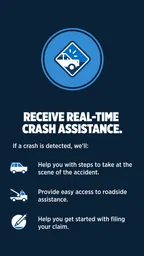
- Automatic crash detection can help connect drivers with assistance.
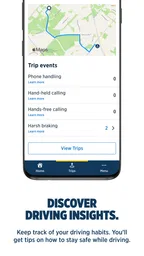
- The app can provide trip details for reviewing driving habits.
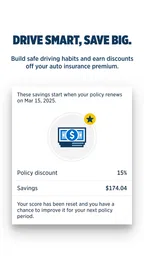
- USAA members can use driving data to support insurance programs.
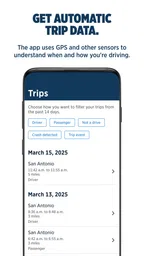
- Background trip tracking reduces the need to start each drive manually.
- The app is designed to work with compatible Android and iOS devices.
What could be better
- Accurate tracking may require location access even when the app is closed.
- GPS use can increase battery consumption during frequent driving.
- Phone handling or passenger trips may affect driving scores.
- Some features may be limited to eligible USAA members or policies.
- Tracking can raise privacy concerns for drivers who share a device.





