Universal Remote TV for Roku review
 Analysis by Appsdrops
I like a TV remote app best when it solves a small, familiar problem without making me rethink how I use the television. Universal Remote TV for Roku is aimed at that everyday gap: controlling a compatible Roku TV from a phone when the physical remote is missing, out of reach, or inconvenient. It is a House & Home app from AxenGrid Labs, and its appeal is straightforward rather than flashy. The important question is not whether a phone can replace every remote in every home, but whether this app fits the particular television and routine you have.
What the app offers right now
The app is free to install, carries an Everyone age rating, and is currently at version 1.3.2. It has a 4.8 average from around 5,200 ratings, with more than 50,000 installs. Those figures suggest that people are finding a use for it, but they do not guarantee that it will work with every Roku-branded television or every home network. Compatibility is the first thing I would check before relying on it as a replacement for a remote.
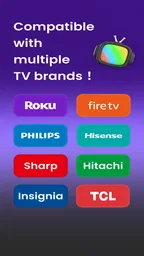
The supported TV brands named for the app include TCL, Hisense, Insignia, Hitachi, RCA, and Westinghouse Roku TVs. That range matters because Roku televisions are sold under several manufacturers’ names; a user may know the brand on the front of the set without thinking of it as a Roku TV. Still, the key distinction is the television’s Roku capability, not merely the logo. A Roku streaming player connected to a non-Roku television is a different setup, so I would not assume that a TV remote app aimed at Roku televisions will control every external player.
In practical terms, this kind of app is most useful for common actions: reaching for a phone to adjust the television instead of hunting through sofa cushions, or keeping a spare control option nearby. It is especially appealing if several people in the household already keep their phones close. The phone is not automatically a better remote, though; it is an alternative whose convenience depends on the television being compatible and the connection working when you need it.
One useful way to judge the fit is to try it during an ordinary viewing session rather than during a rushed moment. Keep the original remote close, open the app, and see whether you can reliably carry out the actions you use most. That quick, low-stakes test tells you more than installing it during a power-up problem or after the physical remote has disappeared. I would not put the original remote away until the phone has proved dependable in your own setup.
Where it fits among remote options
Compared with a manufacturer’s original remote, a phone-based control has one obvious advantage: the phone is often already in your hand. It also avoids having to buy another physical remote just to cover an occasional lost or misplaced one. The trade-off is that a phone depends on its own battery, and an app introduces a setup step that a familiar button remote does not. If you want a control that works without opening an app, a physical remote remains the simpler choice.
Compared with a general-purpose universal remote, this app is a more targeted option. A universal hardware remote may make more sense if your living room has several devices and you want one set of physical buttons for the whole arrangement. This app is better suited to someone whose main need is controlling a supported Roku TV from a smartphone. I would choose according to the problem: one TV and an occasionally missing remote favors trying the app; a complicated collection of equipment favors a dedicated multi-device control.
There is also a practical difference between using a phone as a spare and making it the household’s only control. As a backup, occasional friction is tolerable. As the sole option, small inconveniences become more important: someone else may need your phone, you may be using it for something else, or its battery may be low. I see the app as a useful extra route to the TV rather than a reason to discard a working remote.
Making the first test useful
When trying a remote app, I recommend checking the home setup before judging the controls. Confirm that the television is one of the supported Roku TV models and that the phone and TV are in the environment where you expect to use them. If the app does not find or control the set, first check those basics rather than immediately concluding that the television itself is incompatible. Network and device setup can affect remote apps, so a controlled test at home is more informative than trying it from another location.
A good first test is to work through the actions that matter to you in sequence: bring up the control, change the volume, navigate a menu, and return to what you were watching. This is more revealing than tapping one button and calling the app successful. It also helps you notice whether you can operate it comfortably without looking down for long. A phone screen can be convenient, but it does not offer the same tactile feedback as dedicated buttons.
For a realistic example, imagine settling down to watch something and realizing the remote has slipped between the cushions. If your phone is nearby, the app may save you from interrupting the evening to search the whole room. That is exactly the kind of modest, repeatable convenience I value in a remote app. If the television is not already compatible or the phone takes longer to set up than finding the remote, the advantage disappears.
What has changed, and what that means for existing users
The release date is listed as July 5, 2026, and the current version is 1.3.2. That gives a reader a clear snapshot of the app’s present release, but it is not enough by itself to establish a particular feature history. I would avoid reading a version number as proof that a specific control, interface change, or compatibility improvement has recently arrived. The responsible takeaway is simply that this is the version currently offered, and existing users can compare their installed version with it when checking whether they are up to date.
For someone already using an earlier build, an update is worth considering if the app store offers it and the app has been giving them trouble. But I would test the controls after updating rather than assume that a newer version automatically fixes a particular issue. If it works reliably now, there is no need to change a household routine solely because the version number has advanced. If a family member depends on the app, it is sensible to keep the original remote available while confirming that the updated setup behaves as expected.
The developer, AxenGrid Labs, places the app in a practical corner of home technology: the phone becomes a way to control a television, not a broader home-management system. That focus can be a benefit because it keeps the decision simple. You are evaluating a remote for a Roku TV, not buying into a promise that the app will coordinate every device in the room. For my purposes, that narrower role is easier to judge against an actual need.
Small trade-offs that matter in daily use
The clearest limitation is that the app’s usefulness depends on compatibility. The listed brands help narrow the choice, but brand alone is not a universal guarantee for every television setup. Before making this your only remote, identify whether your set is a Roku TV rather than assuming that any television carrying one of those brand names will behave the same way. This check is especially important in a home where one brand’s TVs have different platforms across models.
The second trade-off is the phone itself. A phone remote competes with notifications, other apps, and the need to unlock or retrieve the device. That may be no bother when you are already holding it, but it can be more awkward when you want to make a quick adjustment from across the room. I would consider the people who share the TV: a household member who does not want to use a smartphone may prefer the familiar physical buttons, even if the app works well for everyone else.
There are also in-app purchases, priced from $4.99 to $15.99 per item. The app is free to install, but I would check what an optional purchase covers before paying, and decide whether the free experience already meets your needs. A remote app should earn its place through dependable everyday control; it is reasonable to try the basic option first and spend only if a clearly useful extra matters to you. I would not treat a purchase as a substitute for confirming that the TV is compatible.
The minimum operating-system requirement is Android 7.0 or later. If you are setting up an older phone, checking its software version first can save time. For people using a more recent phone, the more relevant question is likely to be whether the TV and home setup cooperate. These are separate checks: a compatible phone does not make an unsupported television compatible, and a supported television does not solve an out-of-date phone.
Who I would recommend it to
I would recommend giving it a try if you own a supported Roku TV, want a convenient backup, and are comfortable using your phone for simple television controls. It also makes sense for someone who often misplaces the remote or wants an extra control option in a shared living room. With a 4.8 average, the app has a positive reception, but I would treat that as useful context rather than a promise that every setup will be effortless.
I would skip it, or at least avoid depending on it alone, if your television is not a Roku TV, if you need to control a mix of unrelated devices from one physical handset, or if you strongly prefer tactile buttons. I would also hold off on spending money until you know the app works with your set and the free installation meets your needs. For a household where the remote is rarely lost and the original control is comfortable, adding a phone app may solve a problem that does not really exist.
Overall, Universal Remote TV for Roku is worth considering as a practical spare for a compatible television, not as a guaranteed replacement for every remote in the house. I like the clear use case and the fact that it is free to try, while the compatibility check, phone dependence, and optional purchases are real considerations. Test it in your normal viewing routine, keep the physical remote until the phone proves reliable, and decide based on how often the convenience actually helps. That is the fairest way to see whether this particular app belongs in your home.
What we like
- Simple setup helps you connect a phone to a Roku device.
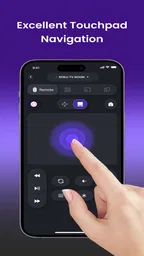
- Touch controls make navigating menus feel familiar.
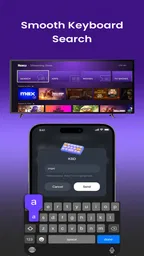
- A built-in keyboard can speed up text entry.
- Works as a convenient backup when the physical remote is missing.
- The app interface is easy for most users to understand.
What could be better
- Phone and Roku must usually share the same Wi-Fi network.
- Some features may require a paid upgrade.
- The app cannot control a TV when the Roku device is offline.
- Ads may interrupt the experience in the free version.
- Compatibility can vary across Roku models and network setups.





