

Ulta Beauty: Makeup & Skincare review
 Analysis by Appsdrops
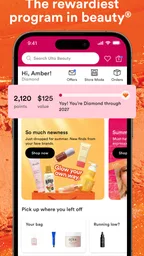
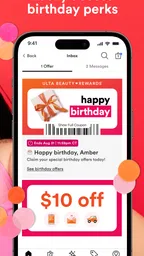
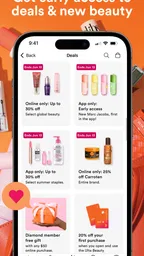
I think Ulta Beauty: Makeup & Skincare makes the most sense when you already shop for beauty products and want a single place to browse Ulta’s selection on your phone. It is a free shopping app from Ulta Inc., focused on beauty, including haircare and fragrance as well as makeup and skincare. In my experience, its value is less about replacing every beauty retailer and more about making product discovery and purchase planning easier when Ulta is already one of your regular stops.
There is plenty to explore, so how quickly it feels depends on what you are doing: checking a familiar item is a simpler task than browsing several product types and comparing options. I would approach it as a convenient shopping companion, not as a promise of instant results on every device or connection. That distinction matters if you are installing it mainly to make a quick purchase while out and about.
Browsing without getting lost in the catalog
Beauty shopping can turn into a long series of small decisions: which shade, what finish, whether a product suits your routine, and whether it is worth switching from something you already know. A retailer app is useful when it helps you narrow that process rather than merely put a large catalog on a screen. Ulta’s broad beauty focus gives the app room for different kinds of shopping, from replenishing a familiar hair product to looking for a fragrance or makeup item.
My practical advice is to go in with a short list when you can. If you need a replacement, search for the product you already use before wandering through unrelated categories. If you are exploring, decide which part of your routine you are shopping for first. That small bit of preparation reduces the chance of spending your whole session comparing products you did not intend to buy.
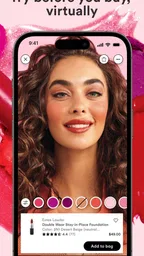
For a more considered purchase, I would compare a few candidates rather than treating the first appealing result as the obvious choice. Beauty descriptions and images can help orient you, but they cannot reproduce how a shade looks on your skin or how a fragrance develops in person. When those details are decisive, I would use the app to make a shortlist and then consider seeing the product in a store before committing.
This is where the app differs from a general shopping marketplace. A broad marketplace may be more convenient if you are comparing unrelated household purchases or looking across many sellers. Ulta’s appeal is its beauty-centered setting: it is a more natural starting point when haircare, makeup, skincare, or fragrance is the reason you opened your phone.
When a short visit turns into a longer session
A common use case is running low on a staple while you are away from home. I would check the item in the app, confirm that I have the right product, and make the buying decision when I have enough time to review it. That is more dependable than rushing through a search while walking between errands, especially if packaging or product names look similar.
Browsing becomes heavier when you move between categories, inspect several alternatives, and reconsider a choice. On a phone, that kind of session can feel slower than a simple lookup even when the app itself is behaving normally. I would avoid judging performance from one long browsing session alone: the amount of content you are trying to inspect, your connection, and the device you are using can all shape the experience.
A useful trade-off is to separate discovery from checkout. I like to browse when I have time to think, then return with a clearer idea of what I want. That approach is especially helpful for unfamiliar skincare or fragrance purchases, where a quick impulse decision may not be as satisfying as taking time to compare options.
Reliability and what to do if a session falters
For a shopping app, reliability means more than opening successfully. I want to be able to pick up a product search, check the details I need, and finish the task without having to repeat the whole process. I would still treat any mobile shopping session as something to verify before completing a purchase: review the selected product and the details shown at checkout rather than assuming a tap or screen transition has settled everything.
If a page takes longer than expected, my first move would be to check the connection and give it a moment before repeating an action. Tapping repeatedly can create uncertainty about what the app has registered, so I prefer to pause, see whether the screen updates, and then try again if necessary. If the app closes or becomes unresponsive, reopening it and returning to the item is a sensible recovery step; I would confirm the selection again before proceeding.
I would not call a retailer app dependable solely because it has a large audience, but its scale does give prospective users a useful signal that it is an established shopping option. It has an average rating of 4.6 from around 221,000 ratings, with roughly 47,000 written reviews. Those figures suggest many people have formed an opinion, though they do not guarantee that every device or individual session will behave the same way.
For my own expectations, I would keep the app updated rather than assuming an older installation will feel identical to the current release. The current version is 10.17.1. If something goes wrong, updating through the app store is a straightforward step to consider before deciding the app is unsuitable, while recognizing that an update cannot fix every network or device issue.
Device fit, storage, and everyday constraints
The app is free and rated for Everyone, which makes it easy to try without paying for the download. It requires iOS 9 or later. I would check that requirement before installing on an older Apple device, and I would also leave room for normal app updates and other phone needs rather than treating the minimum operating-system requirement as a guarantee of a smooth experience.
I cannot infer how much battery or storage a particular session will use just from the app’s purpose. In ordinary use, I would expect the practical demands to depend on the device, its available space, and how long I spend browsing. If your phone is already short on storage or running slowly, the sensible first step is to make room and close other demanding tasks, then judge the app under normal conditions.
Ulta Beauty has been available since November 8, 2012, and has passed five million installs. That history and reach make it a familiar option for people who want to shop Ulta on mobile, but neither figure tells me how well it will run on a particular older phone. I would put more weight on your device’s current condition and whether it meets the operating-system requirement.
The app is also not the right solution for every beauty question. If you need to test a shade against your complexion, smell a fragrance, or get in-person advice before buying, visiting a store is the better tool. If your main goal is to compare prices across many retailers, a broader comparison service may suit you better. Ulta’s app is most useful when you want to browse or shop within Ulta’s own beauty-focused experience.
Who will get the most from it
I would recommend Ulta Beauty: Makeup & Skincare to someone who already shops at Ulta, likes to browse beauty products on a phone, or wants a convenient way to look up potential purchases between errands. It can also be useful if you are exploring a new category but want to keep the search within one beauty retailer rather than jumping between general marketplaces.
I would be less enthusiastic about it for someone who rarely buys beauty products, prefers shopping entirely in person, or expects an app to resolve questions that depend on trying the product. It is also not ideal if you want a single place for shopping across unrelated categories. Knowing that boundary helps set expectations: this is a specialist retailer app, not a universal shopping tool or a substitute for hands-on testing.
One small but worthwhile workflow is to use browsing time for research and make the final choice only after checking the exact item again. That is particularly sensible when several products look similar or when you are replacing something you already own. It cuts down on avoidable selection mistakes and makes the app more useful as a planning aid, even if you ultimately complete the purchase another way.
My performance verdict
Overall, I see Ulta Beauty as a useful, focused companion for beauty shopping rather than an app I would install just to browse casually without a purpose. Its best performance is likely to be felt in straightforward tasks—finding a familiar product or narrowing a shopping list—while longer comparison sessions naturally ask more of your patience, connection, and phone.
Ulta Inc.’s app has a clear audience, a free entry point, and a substantial user base, but I would keep the same sensible expectations I have for any mobile retailer: check your connection, avoid rushing through decisions, and verify the item before completing a purchase. If those habits fit the way you shop, it is worth trying. If you need a real-world test of color, scent, or texture, the app can help you prepare, but the store experience is still the better final check.
What we like
- Browse beauty products from many well-known brands in one app.
- Save favorite products to revisit or compare later.
- Check product reviews before making a purchase.
- Find nearby Ulta Beauty stores with the store locator.
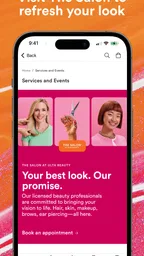
- Explore beauty services offered at participating locations.
What could be better
- Some features and promotions may require an Ulta account.
- Product availability can vary by location.
- Color shades may look different on your device than in person.
- App offers and prices may change without notice.
- Beauty services are not available at every store.





