
Mirror Plus - HD Mirror app review
 Analysis by Appsdrops
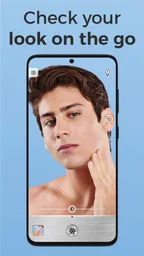
I judge a mirror app less by how many effects it offers than by whether I can get a useful view quickly, in the place where I need one. Mirror Plus - HD Mirror is built for that simple job: it turns a phone screen and camera into a personal mirror for makeup, shaving, or a quick appearance check. That focus makes it easy to understand, but it also means the experience depends on familiar phone controls, a usable camera view, and enough light to see what you are doing.
Readable at a glance, simple to understand
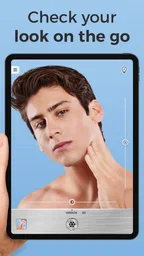
The main appeal is directness. Rather than opening a beauty editor or searching through a camera app’s modes, I can reach for a dedicated mirror when I want to check a detail. The idea is especially handy for small adjustments—seeing whether mascara has smudged, checking a hair part, or making sure a collar sits straight—where taking a photo and reviewing it would feel like extra work.
The app sits in the beauty category, though its usefulness is practical rather than cosmetic: it helps me inspect my appearance, not transform an image. Digitalchemy, LLC develops it. Its store summary points to magnification and light as part of the mirror experience, which suits close-up grooming better than a camera view meant for composing a photograph.
That distinction matters for navigation. A regular camera app often surrounds its preview with capture controls, mode selectors, and other choices. A purpose-built mirror has a narrower task, so it can be a more comfortable first stop when all I need is to look. I would still treat it as a quick utility, not a full makeup workstation: it is for seeing what is there, while detailed application may require a physical mirror and both hands.
It has a 4.8 average from around 392,000 ratings, with more than 31,000 written reviews. Those figures suggest that many users find the basic idea worthwhile, but they cannot tell me whether the screen layout will suit every person. In practice, the useful question is whether I can orient the phone, find the view controls, and keep the image visible without fumbling. If I prefer a larger interface or need controls that are easier to distinguish, I would test it in a calm setting before relying on it in a rushed morning routine.
Using the view without adding friction
A small but useful habit is to settle the phone’s position before leaning in. Holding it close to the face can make the image harder to keep steady; resting an elbow on a counter or bracing the phone against a stable surface can make a close inspection less tiring. For shaving, I would check the whole area first, then move closer only to inspect a particular spot. That keeps the mirror useful without constantly changing distance.
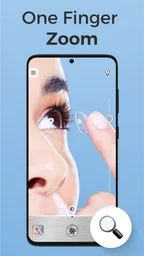
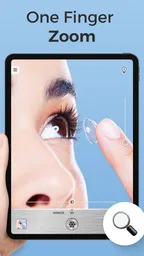
Magnification is helpful when I need to see a fine detail, but more magnification is not automatically better. It narrows the portion of the face in view and can make it harder to judge overall balance. I find the sensible workflow is to use a normal view for symmetry and general appearance, then magnify briefly for a stray hair or a small makeup edge. After that, step back again before deciding whether the result looks right as a whole.
Motor and sensory needs in everyday use
A phone mirror can be easier than carrying a separate compact because the device is already in a pocket or bag. It can also avoid the awkward angle of a small handheld mirror when I am at a desk or bathroom counter. Those are real conveniences, especially for someone who wants to inspect a face without lifting or repeatedly repositioning a separate object.
There is a trade-off: the phone must still be held or placed at a useful angle, and close-up work often calls for precise movement. Anyone with limited hand control, tremor, fatigue, or difficulty maintaining a grip may find that the image shifts just when they need it steady. A stand, a stable surface, or help positioning the phone can make the task easier, but the app itself does not remove that physical demand. If hands-free viewing is essential, a fixed mirror may be a better choice.
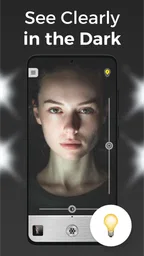
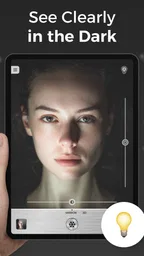
Lighting is another sensory consideration. The store summary mentions light, which can help when a room is dim, but a screen or illuminated view may feel uncomfortable to someone sensitive to brightness. I would use the least intense setup that still lets me see clearly and avoid relying on a bright display in a dark room. If glare is a problem, changing the room lighting or turning toward a window may be more comfortable than increasing screen brightness.
For low vision, the magnifying-mirror idea is promising, but it should not be mistaken for a dedicated accessibility tool. The practical result depends on the phone’s display, the camera image, ambient light, and how much enlargement is comfortable. People who need strong magnification, high contrast, spoken guidance, or a specific screen-reader workflow should compare it with tools designed around those needs. A mirror view can help with visual inspection, but it does not guarantee that every control or image will be accessible to every user.
Where it fits: home, travel, and quick checks
At home, I can imagine using it before leaving for work: after applying makeup, I check both sides of my face, then use magnification to inspect a small area near the eye. For shaving, I can position the phone where the bathroom mirror’s angle is inconvenient and make a quick check without carrying another mirror. The useful part is not a special routine; it is having a close view available when the room’s existing mirror is poorly placed or already occupied.
It also makes sense in a travel bag. A phone is usually easier to keep close than a separate grooming mirror, and the app is free to download. Still, travel use has limits: the phone needs enough battery for the rest of the trip, and a dim hotel room can make any camera-based mirror less satisfying. I would not make it my only grooming option for a long journey if a dependable physical mirror is important.
In a public restroom or shared space, a phone mirror can feel more discreet than taking a photo, since the task is simply to look at the live view. I would nevertheless be considerate about where I point the camera and avoid using it where other people could reasonably feel observed. The same discretion applies to workplace use: a short check is convenient, but the phone’s camera can attract attention even when no picture is being taken.
How it compares with the usual alternatives
Compared with a compact mirror, the phone offers a screen that can be easier to position and a magnified view for close inspection. A compact, however, does not need charging and is ready without opening an app. If I am going somewhere with limited battery access or want a mirror that works independently of a phone, the compact is the more dependable option.
Compared with the camera app, a dedicated mirror is appealing when I do not want to take, save, or delete a picture just to check my face. The camera app may be the better choice if I need to capture a look for comparison or share an image with someone. A physical wall mirror remains better for seeing my full appearance at once, especially when judging clothing or overall proportions. I see this app as a useful middle ground: more adaptable than a small compact, but not a replacement for every mirror.
The experience is also shaped by the device. A phone with a small screen or a camera that struggles in low light will make close inspection less comfortable, regardless of the app. Before depending on it for a particular routine, I would try it in the room and at the distance I expect to use. That simple check answers more than a generic claim about mirror quality could.
Limits, cost, and who should choose something else
The app is free, with in-app purchases priced at $2.99 per item. I would begin with the free experience and decide whether the basic mirror workflow already covers my needs before considering any purchase. The app is rated for Everyone, and its current version is 4.4.15; it requires Android 6.0 or later. It has more than 10 million installs, so it is a widely used utility, though popularity does not replace checking how it feels on your own phone.
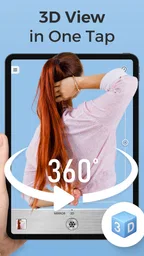
The main limitation is inherent to the format: a phone screen is smaller than a wall mirror, and holding it still can be awkward during detailed grooming. The camera view may also be less helpful in poor light or when I need to assess my whole face and outfit at once. If I want photo editing, beauty filters, or a record of my appearance, a camera or editing app is a better match. If I need a large, stable, hands-free view, a physical mirror is the clearer choice.
I would also be cautious about using a magnified view as the final judge of makeup or shaving. Close inspection can make tiny irregularities seem more important than they look at ordinary viewing distance. My practical tip is to finish with one check at a comfortable distance and ordinary room lighting. That reduces the temptation to keep correcting details that no one else is likely to notice.
A useful option when access means convenience
I recommend Mirror Plus - HD Mirror to someone who wants a straightforward way to check grooming details with a phone they already carry. It is particularly sensible for quick touch-ups, awkward mirror angles, and moments when a compact is too small. The focus on a mirror rather than photo editing keeps the purpose clear, and the option to magnify can make small visual checks more practical.
My recommendation is more qualified for anyone who needs hands-free positioning, a large full-body view, strong low-vision support, or very steady close-up work. In those situations, a physical mirror, a stable mount, or a specialized accessibility tool may fit better. For other users, this is a convenient extra rather than a replacement for the bathroom mirror. Its strongest quality is that it can make a familiar task easier to start; its boundary is that it cannot remove the physical and visual demands of looking closely at a phone.
What we like
- Offers adjustable zoom for framing a reflection.
- Includes a freeze feature for viewing details hands-free.
- Screen brightness controls help in dim environments.
- Front-camera support makes it useful for checking your appearance.
- Simple controls make basic functions easy to find.
What could be better
- Image quality depends on your device's front camera.
- Low light can make the reflection appear noisy.
- The camera view may be reversed from what some users expect.
- A small screen can make fine details hard to inspect.
- Camera access is required for the main features.





