


HD Camera for Android review
 Analysis by Appsdrops
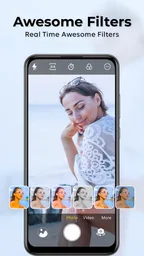
My first impression of HD Camera is that it aims to make taking a quick photo feel simple rather than turning a phone into a complicated camera kit. It is a free photography app in the beauty category, developed by One Music Player, and its focus is straightforward: use your phone to take photos and record moments. That makes it worth considering if you want a separate camera app to try for selfies or casual snapshots, but I would not approach it expecting a full editing studio or professional controls.
What I find useful about this kind of app is the chance to get from opening the camera to taking a picture without first learning a collection of unfamiliar settings. The name and presentation put image capture front and center. If you are new to photography apps, that is reassuring: you can begin with a simple goal, such as taking a brighter selfie, and judge the result before deciding whether the app suits your habits.
What to expect from a focused camera app
HD Camera is listed with a 4.5 average from around 51,000 ratings, and it has more than 10 million installs. Those figures suggest that plenty of people have tried it, though popularity alone cannot tell you whether its handling or image results will match your phone and preferences. I would treat it as a practical option to test, not as a guarantee that every photo will look better than one taken with your phone’s built-in camera.
The distinction matters because the camera already built into a phone is usually the natural starting point. It may be closely integrated with that device’s controls and photo library, while a separate app can appeal if you prefer its particular capture experience. The sensible comparison is not whether a standalone camera app sounds more advanced, but whether it makes your everyday photo-taking more comfortable or produces a result you prefer.
HD Camera is best approached as a capture tool first: open it when you want to take a picture or record a moment, then check whether the outcome works for you. Its beauty-category placement and selfie-focused positioning make casual portraits an obvious use case. I would also consider it for simple scenes around the house, a quick photo of something you want to remember, or a short recording when reaching for a camera app feels more direct.
There is a useful trade-off here. A focused interface can be less intimidating than a camera app packed with specialist modes, but fewer apparent choices also mean less room to shape a shot if you like adjusting every detail. If your main aim is quick, familiar pictures, that restraint may suit you. If you already rely on manual exposure, specialized controls, or a complete editing workflow, your usual camera or a more advanced photography app may be the better fit.
Start with one clear photo goal
On your first opening, I would keep the experiment small. Choose a familiar subject in steady light, such as your own face near a window, and take one photo before changing anything. A simple baseline makes it easier to decide whether the framing and brightness suit you. If you test several settings or move between rooms at once, it becomes hard to tell what actually improved the result.
For a selfie, stand facing a source of soft daylight rather than putting a bright window behind you. That advice is useful with any phone camera, but it is especially helpful when you are trying to judge whether a camera app gives you the kind of bright portrait you want. Keep the phone steady, look at the captured image rather than relying only on the live preview, and repeat the shot once if the first framing feels awkward.
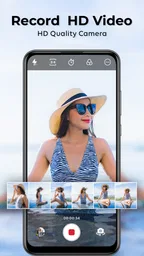
I would also make one short recording as a separate test if video is part of your reason for installing the app. A still photo and a recording are different tasks: a setup that feels comfortable for a portrait may not be the best way to hold the phone for a moving subject. Try recording something uncomplicated, such as a family member speaking or a pet at rest, then check whether the result is easy to use for your purpose.
A reassuring first setup
The app is free to install, and its content rating is Everyone. Its current version is 2.1.0, with Android 7.0 as the minimum operating system. I would still check the app’s compatibility in the app store on the particular device you plan to use, especially if it is an older phone. A camera app’s everyday feel can depend on the phone as much as on the app itself.
After installation, give yourself a moment to get oriented rather than rushing through the first screen. Look for the main photo-taking and recording actions, then decide which one you want to test. If the app requests access needed to use the camera or save your work, consider the request in the context of that task and your comfort level. I would avoid granting unrelated access without a clear reason, and I would check the phone’s own settings if I later wanted to review app access.
One practical first-use tip is to take a test photo that you do not mind deleting. It lets you see where the result appears in your phone’s usual photo browsing flow and whether you can find it again without interrupting a real moment. That small check prevents a common annoyance: taking several pictures, then discovering you are unsure where the app placed them or how to review them.
Another helpful habit is to compare like with like. Take one photo in HD Camera and one with your phone’s regular camera from the same position, in the same light, with the same subject. Look at the face or object, not just the overall impression. You may prefer one app’s framing or brightness, while the other may fit your established routine better. This is a more reliable test than judging either app from its name or a single unusually good shot.
From first success to a useful routine
A meaningful first success does not need to be dramatic. For example, imagine you want a clear selfie before leaving home. Open the app, face a window, hold the phone at a comfortable angle, take a picture, and review it at normal size. If the image is bright enough and the framing feels natural, you have answered the question that matters: can this app handle the small task you installed it for?
For a more challenging everyday scene, try photographing a meal or a small object on a table. Move the subject near even light, keep the phone still, and take a second version from a slightly different angle. This reveals whether the app works comfortably in your ordinary environment without relying on a staged portrait. It also teaches a useful lesson: light and steadiness often make more difference than repeatedly opening an app or changing settings at random.
If a picture seems too dark, first change your position or the room lighting before assuming the app is the problem. If a face looks awkwardly framed, adjust the distance or phone angle. Those are simple adjustments, but they make the test fairer and help you distinguish an app limitation from a shooting habit. I would keep the original versions until I had checked the results, rather than deleting everything immediately after a quick glance.
The app includes in-app purchases ranging from $0.99 to $99.99 per item. That is worth knowing before you explore any paid options: the installation itself is free, but purchases can vary substantially in cost. I would inspect each purchase screen carefully and only choose something if its purpose and price are clear to me. There is no need to buy anything just to find out whether the basic camera experience fits your daily use.
Where first-time users can get confused
The phrase “HD” can set expectations that are broader than what a camera app alone can promise. Image quality depends on the phone’s camera hardware, lighting, movement, and the way a shot is framed. I would not assume that installing a separate app automatically improves every photo. The more useful question is whether its results and handling suit you better than your built-in camera in the situations you actually encounter.
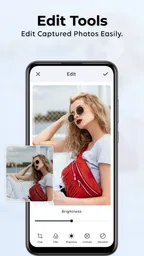
It is also easy to mistake capture for editing. If your goal is to retouch a portrait, add elaborate effects, or organize a large collection of images, a dedicated editor or gallery tool may be a more appropriate companion. HD Camera’s central appeal is taking photos and recording moments; I would not choose it on the assumption that it replaces every step that might come after capture.
Another possible source of friction is changing too many things between test shots. When a selfie looks different, it may be because the light shifted, the phone moved, or the distance changed—not necessarily because the app altered the image. Keep the setting and subject consistent while you compare. This quick, controlled test is particularly useful if you are deciding whether to keep a second camera app alongside the default one.
For video, think about what you need before recording something important. A quick test clip lets you see whether holding the phone and reviewing the result work for you. For a once-in-a-lifetime event or an assignment where you need predictable controls, I would use the camera setup I already know and trust rather than making a new app my only option without practice.
Who should try it, and who may prefer another option
I can see HD Camera appealing to someone who wants a straightforward alternative for selfies and casual photos, especially a first-time user who would rather test one simple task than learn a complex camera system. It is also reasonable to try if you sometimes want a separate place to start when taking a picture or recording a short moment. The app’s large user base is encouraging context, but your own quick comparison should make the decision.
I would skip it, or at least keep the built-in camera as my main tool, if I depend on a particular device feature or have a carefully established photo workflow that already works. The same goes for anyone seeking a highly customizable camera, detailed manual adjustments, or extensive editing in one place. In those cases, a more specialized camera or editing app may better match the job, even if it takes longer to learn.
One weeknight example makes the choice concrete. Suppose you want a quick picture of a dish before sharing it with family. You can open HD Camera, find a spot with decent light, take a test shot, and decide whether the color and framing are pleasant enough. If you then want to crop, retouch, or build a polished post, continue in a separate editor. This split workflow is often more realistic than expecting one camera app to handle capture, correction, and sharing equally well.
My recommendation after a fair test
My advice is to start with the app’s simplest promise: take a selfie and a casual photo, then make a short recording only if you need video. Compare those results with your normal camera in similar conditions. That gives you a practical answer without needing to interpret marketing language or spend time exploring every option. If you like the capture experience, keep it for those situations; if the difference is not useful, your phone’s built-in camera remains a sensible alternative.
One Music Player’s app has a broad audience, a strong average rating, and a free starting point, while paid in-app purchases make it sensible to pause before buying anything. It is suitable for everyone by its age rating, though that does not mean every feature or purchase will suit every user. I would treat it as an easy-to-test camera option rather than a guaranteed upgrade.
My overall view is that HD Camera is worth trying when your priority is uncomplicated photo-taking, particularly casual selfies, and you are willing to judge it on your own phone. Start with one well-lit test, check where the photo goes, and compare it honestly with your regular camera. If you want deeper control or an all-in-one editing workflow, choose a tool built for that instead. That approach keeps the first attempt low-pressure and makes it much easier to tell whether this app earns a place in your routine.
What we like
- Simple controls make it easy to take photos quickly.
- The app offers useful shooting modes for everyday photography.
- A timer helps when taking group photos or selfies.
- The interface is straightforward for new users.
- It provides a convenient alternative to the default camera app.
What could be better
- Image quality depends heavily on the phone's camera hardware.
- Some features may not work on every Android device.
- The app may request broad camera and storage permissions.
- Ads can interrupt the camera experience.
- Advanced manual controls may be limited.





