
Beauty Camera - Sweet Camera review
 Analysis by Appsdrops
If you want a quick way to give selfies a polished, playful look, Beauty Camera - Sweet Camera is built around a simple idea: take a photo, then dress it up with beauty filters, makeup effects, and stickers. I like that its purpose is clear from the outset. Rather than asking you to learn a complicated editing workflow, it focuses on the familiar fun of trying a look and seeing how it changes your picture.
A selfie app focused on quick edits
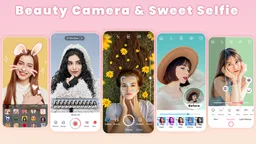
Beauty Camera sits in the beauty and photography space, with selfie taking at the center of the experience. Its store description highlights filters, makeup, and stickers, giving you a few different ways to personalize a shot. That mix makes it suitable for someone who wants more than a plain camera image but doesn’t necessarily want to spend time adjusting every detail by hand.
What the app is designed to do
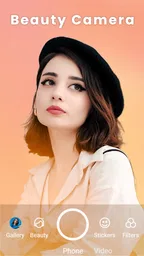
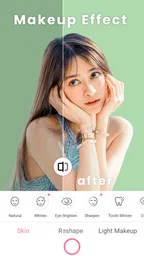
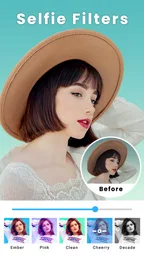
The appeal is immediacy. You can think of a look, open the camera, and experiment with the available effects before sharing or keeping your photo. Filters can change the overall mood of an image, makeup effects are aimed at enhancing a portrait, and stickers add a more casual, expressive touch. Together, those tools make the app feel geared toward everyday selfies rather than formal photo retouching.
I also appreciate that this combination leaves room for different moods. A filter can help create a softer or more stylized appearance, while stickers let you make a picture more playful. Makeup effects point toward a beauty-focused result. You don’t have to use every option on every photo; the best edits are often the ones that feel intentional and still look like you.
That said, the app’s central promise is a set of creative tools, not a guarantee that every image will come out perfectly. Lighting, camera angle, and the original photo all affect how an effect looks. I’d treat the results as a fun starting point and compare a few options before settling on one, especially if you want the finished selfie to feel natural.
Current version and its place in the app’s timeline
The app is currently at version 3.8.1, following its release on February 4, 2023. Those details give the product a visible history: it has been available for a while and has moved beyond its initial release. They don’t, by themselves, tell us exactly which tools have changed between versions, so it’s sensible to separate what’s confirmed from what might merely be expected of a continuing app.
What can be said clearly is that the present-day product remains centered on beauty selfies, filters, makeup, and stickers. If you’re considering installing it now, that is the practical picture to keep in mind. The version number indicates that the app has had subsequent releases, but it shouldn’t be read as proof of a particular new feature or redesign unless the app itself shows that change.
What it feels like for new and returning users
For a first-time user, the concept is easy to understand: this is a selfie camera with beauty-oriented creative options. You can approach it casually, opening it when you want to make a portrait more expressive or experiment with a different appearance. That straightforward purpose may be especially appealing if you’d rather explore visual effects than learn a full editing suite.
Returning users can judge the current version against their own past experience. Since the app has progressed beyond its launch version, updates may have helped maintain or refine the product, but I wouldn’t assume a specific improvement without seeing it directly. The useful question is whether the current camera and effects suit the way you take selfies today. If the core tools still match your routine, the app’s focused approach may continue to work well.
The app’s broader reception suggests that many people have been willing to try it. It has an average rating of 4.6 from around 38,000 ratings, and it has passed 10 million installs. Those figures offer a sense of its reach, but they aren’t a substitute for your own preferences. Beauty effects are personal: one person’s favorite filter can feel too strong to someone else, so it’s worth testing the looks yourself.
Room to experiment without over-editing
One of the nicest ways to use a beauty camera is to start lightly. Try a filter first, then see whether a makeup effect adds anything useful. If the picture already feels complete, there’s no need to pile on stickers or more styling. This small, step-by-step approach helps keep a selfie recognizable and avoids the overly processed look that can happen when several effects compete for attention.
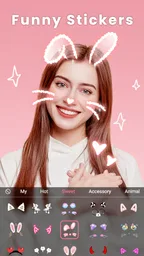
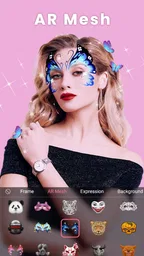
Stickers serve a different purpose from beauty adjustments. They can make a photo feel humorous, cute, or more conversational, which is handy when the image is meant for friends rather than a polished profile picture. Filters and makeup effects, on the other hand, are more directly concerned with the look of the portrait. Keeping those roles in mind makes it easier to choose an edit that fits the moment.
For anyone comparing selfie apps, the distinction matters. Some tools are meant for broad image editing, while this one presents itself specifically as a beauty camera. Its appeal is therefore less about doing everything and more about having a focused set of selfie effects in one place. If you’re searching for a beauty camera app or a selfie camera with filters and makeup, that focus is the main reason to give it a look.
Cost and basic compatibility
The app is free to download, with optional in-app purchases listed from $1.99 to $19.99 per item. That gives you the option to try the basic experience before deciding whether any paid extras are worthwhile. I’d check the purchase details in the app before spending, so you know exactly what an item offers and whether it fits the way you plan to use the camera.
It is rated for Everyone and requires Android 6.0 or later. The developer is iMediaStar. These are useful practical details when you’re checking whether the app is appropriate for your device and intended audience. As with any camera app, it’s also sensible to review its on-device prompts and settings when you install it, and to choose the options you’re comfortable using.
Where the experience may leave questions
A focused toolset can be convenient, but it also means your expectations should stay focused. The highlighted features are filters, makeup, and stickers, so I’d approach it as a way to personalize selfies rather than as a complete photo-editing workspace. If your usual process involves detailed adjustments to color, cropping, or image composition, you may prefer to handle those tasks in a separate editor.
There’s also the matter of taste. Beauty effects can be charming when they complement the original picture, yet less convincing when they feel too noticeable. A good result depends on choosing an effect that suits the lighting and expression in the photo. I recommend comparing the unedited image with the finished version; that quick check helps you keep the parts you like without losing the character of the original shot.
Another point to keep in mind is that an app’s version history doesn’t tell the whole story of its day-to-day quality. A newer version number shows that the product has progressed since release, but it doesn’t automatically establish how responsive the camera feels on every device or how each effect performs in every setting. Those details are best judged during your own use, with the kind of photos you actually take.
What to keep an eye on
If you decide to install it, pay attention to how the current effects fit your style and whether the available options are enough for your usual selfies. Future updates are worth watching for, especially if they make the camera easier to use or bring meaningful additions to its beauty tools. Until a change is visible in the app, though, it’s better to treat it as a possibility rather than a promise.
It’s also worth checking whether the free experience meets your needs before considering purchases. The app’s appeal rests on quick creative choices, so the best measure is simple: can you make a photo you enjoy without turning the process into a chore? If the answer is yes, the focused setup may be just right. If you want extensive manual control, a broader editing app could suit you better.
My take on Beauty Camera - Sweet Camera
Overall, I see Beauty Camera as a straightforward option for people who want to add a little personality to selfies. Filters, makeup effects, and stickers give you distinct ways to change a portrait, while the beauty-camera focus keeps the purpose easy to grasp. Its established presence and strong average rating make it a popular choice, though the right fit still depends on whether its visual style matches yours.
I’d recommend trying it if you enjoy experimenting with selfie looks and prefer accessible effects over a more involved editing process. Keep your edits subtle when you want a natural result, and use stickers when you’re aiming for something more playful. The app’s current identity is clear: it’s a free beauty selfie camera with optional purchases, made for quick creative touches. If that’s what you’re after, it’s a sensible app to explore.
What we like
- Live filters make it easy to preview a look before taking a photo.
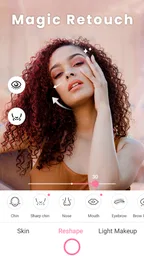
- Beauty adjustments offer quick control over skin smoothing and facial details.
- The camera interface is approachable for casual users.
- Photo effects help create varied styles without advanced editing skills.
- Selfie-focused tools suit quick portraits for social sharing.
What could be better
- Strong smoothing can make portraits look unnatural if overused.
- Some effects may be limited or require in-app purchases.
- Results can vary depending on lighting and camera quality.
- The app may request access to photos and camera to work properly.
- Ads may interrupt editing or browsing in the free version.





