


Sephora: Buy Makeup & Skincare review
 Analysis by Appsdrops
I see Sephora: Buy Makeup & Skincare as a useful shopping companion for people who already browse Sephora or want one place to compare beauty products before buying. Its strongest case is convenience: it brings skincare and makeup discovery together with shopping, so I can move from researching a routine to checking out without switching between several retailers. It is less compelling if I want a brand-neutral beauty guide, a simple stock tracker, or an app that keeps shopping out of my daily routine.
Where the app earns a place in my routine
Built by Sephora USA, Inc., this free beauty app puts the retailer’s product catalog in a mobile format. I find that combination most useful when I have a clear goal but still need to narrow down the options: replacing a cleanser, comparing makeup choices, or looking for a gift. Instead of treating every visit as a search for one item, I can browse around a need and decide whether a product fits what I was looking for.
The app has an average rating of 3.9 from around 80,000 ratings, and it has been installed over 10 million times. Those figures suggest a well-used shopping destination, not a guarantee that every part of the experience will suit every shopper. I would judge it by the practical question that matters more: does shopping through Sephora’s app make my own product research and ordering easier?
For me, the answer depends on how much I value shopping within one retailer’s ecosystem. A focused catalog can make discovery feel manageable, particularly when I am shopping for both skincare and makeup. The trade-off is that the selection naturally reflects Sephora’s range. If I want to compare the whole market, including products sold only elsewhere, I still need other sources.
Useful when a shopping trip starts with a question
My favorite way to use an app like this is to begin with a specific problem rather than scroll without a plan. For example, if my usual moisturizer is nearly finished, I can look for a replacement while keeping the choice tied to that need. I can also use a browsing session to compare makeup options before deciding whether to add anything to my basket. That small shift—from browsing for entertainment to researching a real purchase—helps me avoid treating every appealing product as an essential.
It also makes sense for gift shopping. Beauty can be difficult to choose for someone else because personal preferences matter so much. I would use the app to explore categories and shortlist plausible options, then check details carefully before committing. That is a more grounded approach than choosing solely because a product looks attractive in a promotional image.
One practical tip is to separate discovery from decision-making. I would first browse to find candidates, then revisit the shortlist with a clear budget and purpose in mind. This is especially helpful for skincare, where buying several new products at once makes it difficult to tell which one is a good fit. The app can support the search, but the more deliberate routine comes from how I use it.
Shopping convenience has a boundary
The central limitation is also the app’s defining feature: it is Sephora’s shopping channel, not an impartial overview of beauty retail. If I am comparing products across many stores, I will need to check other retailers as well. A shopper who prefers buying directly from individual brands may likewise get a more relevant experience elsewhere. I would not install this expecting a complete directory of every beauty product on the market.
Another consideration is the difference between browsing and evaluating. Product pages and catalog shopping can help me find options, but they cannot replace knowing how a shade looks on my own skin or how a formula feels after regular use. I treat digital discovery as a way to reduce the number of candidates, not as proof that a product will work for me. For complexion makeup in particular, I would be cautious about making a choice from appearance alone.
There is also a temptation to fill a cart simply because several categories are easy to browse in one place. I find it useful to decide in advance whether I am shopping for a necessary replacement, a planned treat, or a gift. If I cannot name the purpose of a product, I leave it for another day. That habit matters more than any app feature when shopping for beauty items, where attractive packaging and trend-led browsing can quickly overtake practical needs.
How it compares with other ways to shop for beauty
Compared with visiting a retailer’s mobile site, a dedicated app can feel like a more direct route for someone who regularly shops with that retailer. Compared with browsing a brand’s own app, Sephora offers a retailer-centered perspective across makeup and skincare rather than focusing on just one label. These are different conveniences, not proof that one channel is always better: a brand’s own store may be the more natural choice when I already know exactly what I want from that brand.
Compared with general beauty discussion or product-review platforms, a retailer app is closer to the purchase itself. That can make it convenient when I have already made up my mind, but I would not rely on a shopping environment alone for every part of my research. For a new product, I prefer to gather context, think about how it fits my routine, and only then use a retailer to complete the purchase. Keeping those stages separate helps me make a better decision.
This difference is important for people who are still learning what works for them. If I am unsure about my skin’s needs or makeup preferences, I would start with careful research and perhaps a trusted professional’s advice rather than treating product browsing as a diagnosis. Sephora’s app is most useful once I have a reasonably clear direction and want to explore purchasable options.
Who will get the most from it
I would recommend it to regular Sephora shoppers who want to browse from a phone, keep makeup and skincare shopping in one retailer’s orbit, or prepare a product shortlist before making a decision. It also suits someone who has a recurring shopping task—replacing a familiar item, checking possible gifts, or exploring alternatives within the retailer’s range—and prefers to do that research while away from a computer.
It is less likely to be the right fit for someone who wants a completely store-independent recommendation tool, does most beauty shopping elsewhere, or dislikes retailer apps. It may also be unnecessary if I buy only one known product occasionally and am happy using a browser. In that case, installing a separate shopping app may add little to my routine.
The app is rated for Everyone, and its first release was on December 16, 2013. Its current version is 26.20.1, with a minimum operating-system requirement of 10. That makes it worth checking device compatibility before downloading, particularly if I use an older phone. The app is free, so the more important question for me is not the download cost but whether its Sephora-focused shopping experience is useful enough to keep.
A considered way to use it
If I were setting up a sensible shopping workflow, I would start with one category and one reason to shop. I would note the type of item I need, browse a manageable set of possibilities, and avoid adding unrelated products while I am comparing. For skincare, I would be especially cautious about introducing several unfamiliar products at once. For makeup, I would treat online browsing as a shortlist exercise and look for a chance to check a shade in person when the exact match matters.
For gifts, I would begin with what I know about the recipient rather than browsing every category. A familiar preference, such as a type of makeup or a general skincare interest, gives the search a useful boundary. If I do not know those preferences, a beauty purchase can be a gamble; I would choose a less personal gift instead of assuming a product will suit them. The app makes options easier to explore, but it cannot remove that personal uncertainty.
I also would not interpret a smooth shopping flow as a reason to buy immediately. I would pause before checkout, review the basket, and ask whether each item serves the original purpose. That is a simple but effective way to make a retailer app work for me rather than letting the ease of browsing set the agenda. The best result is not a larger order; it is finding the product I actually needed with less effort.
My verdict on Sephora’s app
My overall take is that this is a convenient retailer app with a clear audience, not a universal beauty adviser. Its value comes from bringing Sephora’s makeup and skincare shopping into a phone-friendly experience. When I have a purchase in mind, want to explore a gift, or need to compare options within Sephora’s range, it offers a practical place to start. The free download makes trying it straightforward for shoppers who already use the retailer.
I would keep my expectations specific. It does not replace broader research, personal product experience, or comparison across retailers. I would also be mindful of impulse browsing and of the limits of choosing shades or skincare from a screen. Those are meaningful constraints, but they do not erase the convenience for someone whose shopping already centers on Sephora.
If a friend asked me whether to install it, I would say yes if they shop at Sephora often enough to benefit from a dedicated mobile storefront. I would suggest skipping it if they want unbiased recommendations across the entire beauty market or rarely buy from this retailer. Used with a clear shopping purpose, Sephora: Buy Makeup & Skincare is a handy way to research and shop; used as a substitute for thoughtful product choice, it is much less useful.
What we like
- Product pages include customer reviews to help compare options.
- The app offers shade and product recommendations.
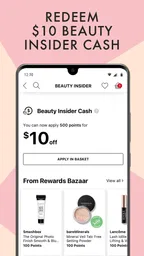
- Beauty Insider rewards are easy to track in one place.
- Saved items make it simple to revisit products later.
- Store availability details can help with in-person shopping.
What could be better
- Some features may require a Beauty Insider account.
- Recommendations may not match every user's preferences.
- Popular products can sell out quickly.
- The large catalog can take time to browse.
- App features and offers may vary by location.





