
Beauty Makeup Editor & Camera review
 Analysis by Appsdrops
I tend to judge a beauty editor by what happens after the first playful selfie: can I make a small adjustment, keep the result believable, and hand my phone to someone else without turning the process into a chore? Beauty Makeup Editor & Camera is aimed at quick face-focused changes, particularly makeup and lip looks. In a household where people share a device or pass it around to compare photos, that narrow focus can be handy—but it also makes expectations and personal boundaries worth discussing.
Quick makeovers on a shared phone
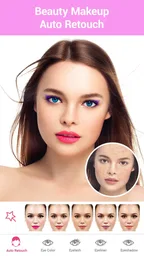
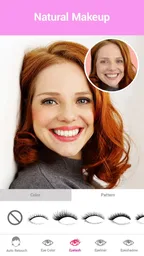
The app is a free beauty app from Photo & Video Editors - Instant Solution. Its central appeal is straightforward: use a photo for a makeup edit, then explore how a different lip look or beauty treatment changes the overall impression. I would reach for it before a casual outing, when a friend wants to preview a look, or when someone is curious about an edit without learning a full photo-editing suite.
That simplicity suits shared use. One person can make a portrait, pass the phone to another, and compare a more subtle treatment with a bolder one. It is less like a collaborative album and more like a quick creative activity that happens around one image. For a family or group of friends, that can make the app approachable even when not everyone is comfortable with layers, sliders, or detailed editing tools.
A realistic use is getting ready for a dinner and wondering whether a stronger lip color will work with a particular selfie. I would try the edit as a preview, then check it beside the untouched image before deciding anything. That comparison is important: a screen makeover can be entertaining and useful for inspiration, but it is not a guarantee of how a product will look in person under different lighting.
The app has a 4.7 average from around 442,000 ratings, and it has been installed over 50 million times. Those figures suggest that many people find the basic concept accessible, but popularity does not tell me whether a particular edit will suit every face or taste. I would treat it as a light creative tool, not as a substitute for personal advice or a careful real-world makeup test.
What works best when several people take turns
For a shared-device session, I would agree on whose portrait is being edited before opening the camera or selecting a photo. That small step avoids the awkwardness of someone making changes to a picture another person did not mean to use. It also gives everyone a chance to decide whether they want to participate, watch, or simply pass the phone along.
Another useful habit is to keep a clean original available. If you are experimenting with several looks, compare each result against the same unedited portrait rather than judging one edit against another. This makes it easier to spot when a change is flattering and when it is merely more dramatic. It also prevents the group from treating the most heavily edited version as the default.
Because the focus is facial makeup, it is a better fit for portraits than for landscape pictures, product shots, or a general photo cleanup task. If a household wants one app for cropping, removing objects, adjusting exposure, organizing pictures, and applying filters, a broader photo editor will be more practical. Here, the benefit is that the beauty angle is obvious; the trade-off is that the tool’s appeal is more specialized.
Setting boundaries before the first edit
Shared phones blur the line between “my photo” and “our screen,” so I would make the image owner part of the decision. Ask before editing or saving someone else’s portrait, and avoid turning a playful session into unsolicited comments about their appearance. A makeup preview works best when the person in the photo chooses the direction, rather than a group voting on what they should change.
I would also keep account expectations modest. The app is useful as a quick editor, but I would not assume that a shared device automatically separates one person’s activity from another’s. If different household members use the same phone, they should take turns deliberately and avoid treating the app as a private space unless they have checked the device’s own account and privacy settings.
For a more controlled workflow, edit one person’s chosen portrait at a time and return to the starting point before handing the device over. That keeps each person’s experiment distinct and reduces the chance of confusing one person’s changes with another’s. It is a simple routine rather than a special feature, but it makes casual sharing more comfortable.
There is also a practical editing trade-off: an effect that looks convincing on one portrait may feel too strong on another, especially when the lighting, angle, or image quality differs. I would start with the lightest available adjustment and increase it only if the result still looks natural. Small changes are easier to evaluate than a dramatic makeover, and they are less likely to distract from the person’s expression.
Coordinating edits without making them a contest
When friends or relatives use the app together, it helps to agree on a purpose first. Are you looking for a playful transformation, a subtle preview, or simply a funny before-and-after? Without that shared expectation, one person may be aiming for realism while another is pushing the look for amusement. The same tool can serve both moods, but the group should know which one it is choosing.
I would avoid making a single “best” result the point of the activity. A more useful comparison is to ask what changed: did the lip color draw attention, did the overall look remain recognizable, and would the person actually want to try something similar? That turns the edit into a low-pressure source of ideas rather than a judgment about who looks better.
For anyone preparing a social photo, the app can help test a direction before taking more pictures. I would still take the final photo in ordinary conditions and inspect it without the effect. If the goal is a polished image for a profile or an important event, a dedicated portrait editor with more precise controls may be preferable. The quick beauty focus is convenient, but it should not be confused with detailed retouching or professional image work.
People sometimes ask whether this is useful if they do not wear makeup every day. I think it can be, provided they see it as experimentation rather than instruction. Trying a lip look or a beauty treatment may help someone discover a style they like, but the app does not replace testing actual cosmetics or considering personal comfort. Someone who wants only natural photo correction may find even a makeup-centered editor unnecessary.
Age, trust, and realistic expectations
The app carries an Everyone age rating, which makes it broadly accessible in the store, but that label does not settle how a household should handle appearance-focused editing. Children and teens can be especially sensitive to comparisons, so I would keep the conversation friendly and emphasize that an edited face is a creative version of a photo, not a standard anyone needs to meet.
For younger users, I would make participation optional and avoid editing or sharing their pictures without their agreement. Adults can model a healthier approach by treating edits as temporary experiments and keeping unaltered photos in view. That is more useful than presenting a beauty effect as a correction to something “wrong” with a face.
The developer is listed as Photo & Video Editors - Instant Solution, and the current version is 2.1.2. The app dates back to January 20, 2016, and version compatibility starts at iOS or Android 7.0. It is rated Everyone, though device settings and household rules still matter when deciding who should use a shared phone.
It costs nothing to install, while in-app purchases range from $0.99 to $99.99 per item. I would check the purchase screen before letting someone else explore freely, particularly on a device where payment settings are shared. The wide range makes it sensible to treat any optional purchase as a deliberate choice rather than assume every tool or option is included at no cost.
Where it fits among beauty and photo apps
Compared with a general-purpose photo editor, this app is more immediately centered on makeup and face styling. That focus can save time when the only question is how a portrait might look with a different lip treatment. By contrast, an all-purpose editor is usually the better choice when you need precise color correction, image composition, or a variety of non-beauty adjustments in the same workflow.
Compared with trying makeup in person, the app is convenient for brainstorming but cannot reproduce the feel, wear, or real-world finish of a cosmetic product. I would use it to narrow down ideas, not to make a final purchasing decision based solely on a screen preview. For a quick playful transformation, that limitation is minor; for a serious event look, it matters more.
The main friction is that a beauty editor can encourage over-editing if the goal shifts from exploring a look to perfecting a face. I would watch for that tendency, especially in a group setting. A useful rule is to stop when the edit communicates the idea, rather than continuing just because another adjustment is available. If subtle, natural-looking results are difficult to achieve, a more precise editor—or no filter at all—may better match the user’s preference.
My household verdict
Beauty Makeup Editor & Camera makes the most sense for people who want a quick, face-focused way to play with makeup ideas or compare portrait looks. It is easy to imagine friends passing a phone around before an outing, or someone privately testing a lip style before deciding whether to try it in real life. Its large audience and strong average rating are reassuring signs of broad appeal, though personal results will depend on the photo and the look being attempted.
I would recommend it for casual experimentation, especially when users are clear about whose image is being edited and keep the process light. I would skip it if you need a complete photo studio, highly controlled retouching, or a realistic substitute for testing makeup. On a shared device, be mindful of purchases, get permission before editing someone’s portrait, and keep original images available for comparison. With those boundaries, it can be a fun and focused addition to a household’s photo-app collection rather than an all-purpose editor.
What we like
- Offers a quick way to preview makeup looks on photos.
- Useful for creating polished selfies without a full editing suite.
- The camera feature lets you capture photos within the app.
- Makeup effects can help enhance portraits for social sharing.
- A simple editing workflow suits casual users.
What could be better
- Results may look artificial when effects are applied too strongly.
- Some tools or content may require in-app purchases.
- Editing quality depends on the source photo and lighting.
- The app may request access to photos and the camera.
- Available features can vary by device or app version.





