
Twitch: Live Streaming review
 Analysis by Appsdrops
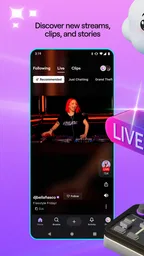
I think Twitch makes the most sense when you treat it less like a library of finished videos and more like a place to drop into something happening right now. You can watch people play games, follow other live broadcasts, and join the conversation as it unfolds. My first useful moment with it would not be building a perfect list of channels; it would be finding one stream that interests me, watching for a few minutes, and deciding whether I enjoy the creator’s style and chat.
Twitch is a free entertainment app from Twitch Interactive, Inc., and it has grown into a familiar destination for live creators and viewers. Its audience is broad: the app has more than 100 million installs, with an average rating of 4.3 from around 5.8 million ratings. That scale means there is usually a lot to explore, but it also means the experience can feel busy if you open it without a particular interest in mind.
What to expect when you open Twitch
The central idea is simple: choose a live stream, watch, and optionally participate in its chat. The details vary from channel to channel. A game stream may focus on play and commentary; another broadcast might be more conversational. The creator sets the pace, so two channels in the same broad topic can feel very different.
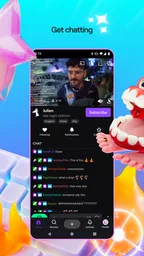
That live quality is the app’s strongest distinction from conventional video services. You are not only selecting a finished clip: you can arrive while something is happening and see how the audience responds. Chat can make a stream feel communal, but it can also move quickly or become distracting. I often get more out of watching first and joining the discussion only when I have something relevant to add.
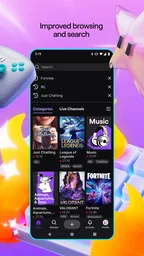
There is plenty to browse, which is useful when I know the kind of content I want but not the exact channel. It is less helpful when I am tired and expect the app to make every choice for me. A small bit of intent makes a real difference: start with a game, creator, or topic you already enjoy, then use the experience of watching to decide whether to follow that channel.
The app is rated for Teen audiences. I would still choose channels thoughtfully, especially if a younger viewer is using it, because live broadcasts and audience chat can vary in tone. The rating is a starting point for deciding suitability, not a promise that every stream will feel the same.
Start with one interest, not the whole catalogue
For a first visit, I would pick a familiar game or a creator recommended by someone whose taste I trust. That gives me a practical way to judge the stream: Is the commentary enjoyable? Can I follow what is happening? Does chat add to the broadcast, or would I rather ignore it? Those questions are more useful than clicking through many channels without settling in.
If I am browsing without a specific plan, I treat the first few streams as sampling rather than a commitment. A live channel may be quiet or between interesting moments when I arrive. Giving it a little time can help, but I do not feel obliged to stay if the style is not for me. Live content is shaped by timing, so a channel that does not click on one visit may feel different another time.
Make the first setup low-pressure
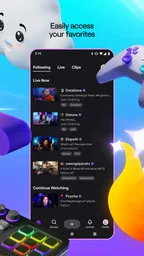
I recommend creating an account when you are ready to make Twitch more personal, but I would not turn setup into a project. Begin by finding a channel you genuinely want to revisit. Following a creator is a more useful early step than collecting channels at random, because a focused set of interests makes future browsing easier to manage.
For a first session, keep the choices modest. Open a stream, check whether its subject and pace suit you, and decide whether you want to keep watching. If chat is moving too fast, you can simply observe rather than trying to catch every message. If it is lively and welcoming, take a moment to understand the conversation before posting. That small pause helps avoid the awkward feeling of jumping into a running discussion without context.
It is also worth deciding what role you want the app to play. If you mostly want background entertainment, a stream with steady commentary may suit you better than one that depends on constant attention. If you want to interact, choose a channel where the creator or community makes that feel comfortable. The best first setup is not the most elaborate one; it is a viewing habit that fits your day.
Your first meaningful success: find a channel worth returning to
A realistic first win is discovering one creator you enjoy enough to watch again. For example, after work I might search for a game I have been playing, open a live broadcast, and stay long enough to see whether the streamer explains decisions or simply plays. If I like the atmosphere, I follow the channel. If not, I move on without assuming that the whole platform is a poor fit.
This is a more reliable approach than trying to understand every feature at once. Twitch works best when a channel becomes a familiar destination: I know what kind of broadcast I am opening, and I can choose whether I have time for it. Following should be deliberate. A long list of channels can create more noise than value, while a few well-chosen ones give me a manageable starting point.
One useful habit is to separate watching from chatting. I can first see how the broadcaster and regular viewers communicate, then decide whether I have something to contribute. This is especially helpful in fast-moving rooms, where a message may scroll away quickly. Chat is part of the appeal, but it is not a requirement for enjoying a stream.
Another small but valuable adjustment is to think about attention before pressing play. If I need to concentrate on work or a conversation, a live broadcast may compete for my focus. When I have a relaxed break, the same stream can be an enjoyable companion. That distinction helps me use Twitch intentionally rather than leaving it open by default and wondering why I have stopped paying attention.
What can feel confusing at first
The first confusing point is that “live” does not mean every channel is equally active or engaging at the moment you arrive. A broadcast can be underway without offering an obvious entry point for a newcomer. I give myself permission to sample and leave; there is no need to wait for a particular moment if the channel is not holding my interest.
Chat is the other common stumbling block. It can look like the main event because messages keep appearing, but the stream itself is still the reason to choose a channel. If the discussion is hard to follow, I focus on the video and audio. If the audience’s reactions help explain a joke or a moment, I glance at chat when it is useful. Treating it as optional makes the experience much less intimidating.
There is also a difference between finding a topic and finding a creator whose style suits you. Two broadcasters can play the same game and offer very different experiences. I would not judge the entire app from one channel, but I also would not keep searching indefinitely. If several attempts feel noisy or uninteresting, Twitch may simply not match the kind of entertainment I want that day.
Paid options are another area to approach carefully. Twitch is free to download and use, while in-app purchases are available, with listed item prices ranging from $0.99 to $1,598.00. That wide span is a good reason to check each purchase screen closely and not assume every paid choice is necessary for watching. I would first establish that I enjoy a creator’s content before considering whether any optional spending makes sense for me.
How it compares with other ways to watch
Compared with a service built mainly around edited videos, Twitch is better when I want to share the moment with a live audience or hear a creator react in real time. The trade-off is that a live stream may not get to the point immediately, and its schedule or pace may not fit my free time. If I want a concise answer, a polished tutorial, or a specific scene on demand, a search-focused video service is often the more efficient choice.
Compared with traditional television, Twitch gives me a closer sense of the person behind the broadcast and a way to participate through chat. But it does not have the same predictable, finished structure as a programme designed around a fixed running time. I choose it for personality and immediacy, not because every session will be neatly edited or tightly paced.
That difference matters for families and shared devices, too. A live platform can contain a wide range of people and conversation styles. Since the app is rated Teen, I would take an active role in choosing what a younger viewer watches rather than assuming a category or game alone tells me what the full experience will be.
Who is likely to enjoy it—and who may prefer something else
I would recommend Twitch to someone who enjoys watching games, likes following particular creators, or wants the feeling of being present while a community reacts together. It is especially appealing if I have a favourite game and enjoy hearing another person’s approach to it. Even when I am not chatting, the audience can make a familiar game feel more social.
I would be less likely to recommend it to someone who wants every video to be short, carefully edited, and available at the exact moment they choose. It may also frustrate anyone who dislikes busy chat or does not want to browse for a creator whose style fits. In those cases, recorded video or a more structured entertainment service can be a better match.
With 248,000 reviews and a large, established audience, Twitch is clearly a major part of live-streaming culture, but popularity does not guarantee that its format suits everyone. I judge it by whether I can find a channel that makes the time feel worthwhile, not by how many options appear on screen.
My next step after finding a good stream
Once I have found a channel I enjoy, I would follow it and return when I have time for a live session. I would keep my list selective, pay attention to the creator’s style, and use chat only when it improves the experience. That gives me a simple routine: choose a familiar interest, try a broadcast, and keep the channels that genuinely earn another visit.
My overall view is that Twitch is most rewarding when I approach it as a community around live creators, not as an endless video shelf. It is free to get started, has a Teen content rating, and is developed by Twitch Interactive, Inc.; its in-app purchases make it sensible to be intentional about spending. I would try it if I enjoy real-time entertainment and am willing to explore a little. If I want tidy, on-demand clips with no chat or waiting, I would choose a different kind of video app instead.
What we like
- A large creator community makes it easy to find streams for many interests.
- Live chat lets viewers interact with creators and other fans in real time.
- Following channels helps keep favorite streamers easy to find.
- Clips make it convenient to revisit memorable stream moments.
- Available on mobile and other platforms for flexible viewing.
What could be better
- Frequent ads can interrupt the viewing experience.
- Stream quality depends on your internet connection.
- Busy chats can move too quickly to follow comfortably.
- Some content may not be suitable for younger viewers.
- Subscriptions and other paid features can add up over time.





