


Twinkly review
 Analysis by Appsdrops
Twinkly makes the most sense when you already have its smart lights and want to shape how they look, rather than simply switch them on. I’d think of it as the control room for a display: you map the lights, choose an effect, and adjust the scene until it suits the space. That extra creative control is its appeal, but it also means the experience begins with a more hands-on setup than a basic lighting app.
From a box of lights to a planned display
As a House & Home app from Twinkly, Twinkly is built around connected decorative lighting. It is free, rated for Everyone, and has a 4.5 average from around 37,000 ratings. The app has passed 500,000 installs, which suggests it has found an audience among people who want more than a fixed sequence of blinking colors. Its current version is 3.33.0, and it runs on operating systems from version 9 onward.
The useful starting question is not “Which effect should I pick?” but “What do I want the finished display to look like, and where will the lights sit?” A tree, a window outline, and a wall arrangement all present different visual problems. Thinking about placement first helps because the app’s mapping approach is meant to connect a light’s physical position with the image or pattern you see on screen.
That distinction matters if you are used to ordinary smart bulbs. A bulb app usually asks you to choose a room, select a color, and perhaps set a schedule. Twinkly’s central idea is more visual: it is designed for decorative light strings and arrangements where the position of individual points affects the overall effect. If your goal is simply to turn one lamp on at a certain time, this is likely more elaborate than you need.
Mapping is the important first handoff
Once the lights are arranged, mapping is the step that turns a physical installation into something the app can treat as a composed display. This is where I would slow down rather than rush straight to effects. If the lights are still being moved, or the display has loose sections that may shift, mapping too early risks making the on-screen arrangement a poor match for what is actually in front of you.
A practical workflow is to finish the physical layout first, then map it, then preview effects from the position where you expect to judge them. For a tree, that means checking the display as a whole rather than concentrating on one patch of lights. For a window or wall, it means considering whether the effect reads well from the room and from outside, if that is the intended view. The map is most valuable when the installation stays put; changing the layout afterward can undermine the care you took to arrange it.
This is also where the app asks more of the user than a standard color picker. You are not just choosing a mood; you are setting up a relationship between the lights’ arrangement and the effect. That can be rewarding for someone who enjoys tinkering, but it may feel like unnecessary setup for a person who wants instant, predictable decoration with little adjustment.
Choosing an effect without losing the room
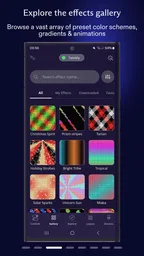
After mapping, the next handoff is from layout to appearance. I would treat effects as a design choice, not just a catalog to scroll through. A busy animation may look lively when viewed close up but become distracting in a room where people are talking, eating, or watching a screen. A calmer look can be more useful for everyday evenings, while a more animated display may suit a party or a seasonal focal point.
One helpful habit is to evaluate an effect at the distance where it will normally be seen. Close inspection can make individual points seem more important than they are; across a room, the overall shape and color balance matter more. If an effect looks attractive only when you stand beside the lights, it may not be the best choice for a display meant to brighten a living area.
Another useful trade-off is to keep a clear idea of the display’s purpose before changing settings. A decorative arrangement can be the center of attention, or it can provide atmosphere in the background. Trying to make it do both at once often leads to a result that feels too intense for routine use. I’d settle on one everyday look first, then experiment when I have time to judge the more dramatic options properly.
When the display moves from setup to daily use
The payoff comes when the lights become part of a real routine rather than a one-night experiment. Imagine setting up a seasonal display in a living room: first arrange the lights, then map the finished shape, then test an effect from the sofa. Once the look feels right, the app has served its main purpose by helping translate a physical arrangement into a deliberate visual scene.
That workflow is particularly appealing if you like changing the character of a display without rearranging the lights themselves. The physical installation can remain in place while you revisit its appearance. It gives a decorative setup more range than a simple string with a small set of fixed patterns, and it makes thoughtful placement feel worthwhile rather than merely practical.
For a household, the handoff from the person who installs the lights to everyone else matters too. A technically satisfying setup is not automatically a convenient shared one. I would make sure the main look is easy to recognize and that the person who will use the display later knows where to find it. Keeping the arrangement stable and the chosen result straightforward can prevent the app from becoming a project only one person understands.
This is a small but important distinction: Twinkly is strongest when one person enjoys the creative setup and the finished display is then easy for others to live with. If everyone expects to improvise settings every day, the novelty of adjusting effects may turn into friction. The best result is often a considered setup that does not demand constant attention.
What it does better than ordinary lighting apps
Compared with the usual smart-lighting alternative, Twinkly is more focused on decorative arrangements than on managing a whole home’s everyday illumination. A general-purpose bulb app is usually the better fit for lamps, rooms, and simple on-off routines. Twinkly has a clearer advantage when the visual placement of many lights is part of the design and you want the app to work with that arrangement rather than treat it as one undifferentiated source.
That focus is also a limit. Someone shopping for a broad smart-home hub, room-by-room lighting controls, or a replacement for every bulb interface should not assume this app is intended to cover those jobs. Its value is concentrated in creating and managing a decorative light display. If you do not own compatible Twinkly lights, downloading the app alone is unlikely to deliver the experience that makes it distinctive.
There is a similar difference from a basic timer or controller bundled with decorative lights. A simpler controller can be quicker when all you need is a preset pattern. The app’s mapping-centered approach is more appealing when you care about how effects sit across the physical layout. The trade-off is time: a basic control can get you to a passable result faster, while Twinkly offers more reason to arrange, inspect, and refine.
Where the workflow can break down
The most obvious friction is the gap between an idea and a stable physical installation. If lights are tangled, unevenly placed, or still being shifted around, the app cannot make the underlying arrangement feel intentional by itself. I would spend effort on the physical layout before trying to solve everything with an effect. Neat placement is not glamorous, but it gives the mapping and visual choices a better starting point.
A second point of friction is expectation. The phrase “smart lights” can suggest a quick, universal setup, but this app is most compelling for people willing to make a display and then shape it. If you want a single tap to produce a polished look without any preparation, a simpler preset-based controller may suit you better. If you enjoy the process of refining a visual arrangement, the extra steps are part of the appeal rather than a flaw.
There is also a practical reason to avoid over-tuning. A display can look impressive during setup and still be uncomfortable as part of daily life if its effect competes with the room. Try the result in its actual setting, at the time you expect to use it, and judge whether it supports the space. That ordinary check is more useful than endlessly switching between options while focused on the phone.
Finally, plan for changes to the installation. If the lights are taken down, moved to another shape, or rearranged substantially, revisit the mapping rather than expecting the old visual plan to remain a perfect fit. This is a workflow app as much as a control app: the digital result depends on the physical display it was built around.
Who I’d recommend it to
I’d recommend Twinkly to someone who owns its decorative lights, likes setting up seasonal or expressive displays, and cares about the effect as seen across a real space. It is especially suitable for a person willing to map a finished arrangement and spend a little time judging how patterns work from normal viewing distances. The app can make that effort feel worthwhile by giving a physical display a more deliberate, customized character.
I would steer away from it if you only need ordinary room lighting, want a broad controller for unrelated smart devices, or dislike setup that involves arranging and refining a display. It is also a poor match if the lights will be constantly moved and you do not want to revisit the visual setup. In those situations, a straightforward bulb app or simple preset controller is likely to be less demanding.
Overall, I see Twinkly as a focused tool rather than an all-purpose lighting solution. Its strongest idea is that decorative lights can be treated as a mapped visual composition, not just a string with a few colors. Get the physical arrangement right, map it after it is stable, and assess the result in the room where it will live. If that hands-on process sounds enjoyable, the app offers a distinctive way to make a display feel considered; if it sounds like work, its simpler alternatives may be the better choice.
What we like
- Compatible with many Twinkly smart lights for unified control.
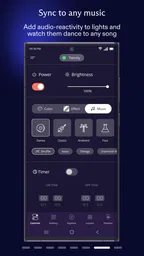
- Music sync adds reactive lighting effects for parties.
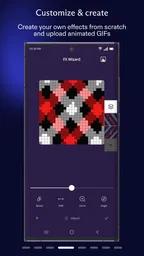
- Animations can be customized with colors and movement.
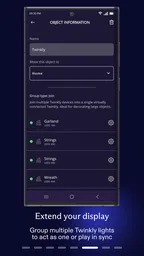
- Groups let you control multiple light sets together.
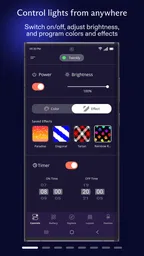
- A built-in timer can automate when lights turn on or off.
What could be better
- Some features require a Twinkly light set to work.
- Initial setup can take time if lights need mapping.
- Advanced effects may take practice to customize.
- Music sync may not suit quiet or ambient lighting.
- Performance can depend on a stable Wi-Fi connection.





