TV Remote Control Universal review
 Analysis by Appsdrops
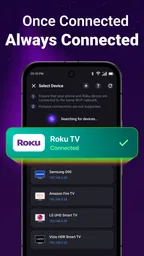
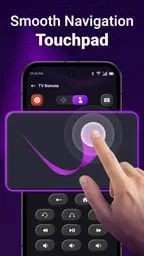
I like the idea of keeping a Roku remote on my phone for the moment the physical one disappears between couch cushions. TV Remote Control Universal, from developer 8 square, is aimed at that straightforward household problem: it offers phone-based control for Roku TVs, Roku Sticks, and other Roku devices. It sits in the House & Home category, and its appeal is practical rather than flashy. Whether it is worth keeping depends less on the promise of replacing a remote and more on whether it works reliably with the Roku setup you actually use.
What the free download does—and what it costs
The app is free to download, which makes trying it a low-commitment way to see whether it suits your home. There are also in-app purchases priced from $6.99 to $24.99 per item. Those purchases matter when judging value: the free entry point is clear, but the paid options mean I would check what each purchase covers before paying rather than assuming every useful function is included at no cost.
I would treat the app as a potential backup first, not as a guaranteed replacement for every Roku remote. A phone can be nearby when the remote is missing, but it is only useful if the app can communicate with the particular Roku device and the phone is ready to use. For a household that often misplaces its remote, testing the free version in the room where the TV is used is a sensible first step.
The app is marked for Everyone, so its audience is broad. Its current version is 1.2.3.1, and the minimum operating-system requirement is version 8.0. That gives prospective users a quick compatibility check before installing: confirm the phone meets that requirement, then see whether the app behaves well with the Roku device at home.
Where it can earn its place at home
The strongest value is convenience in small, ordinary moments. Imagine settling in to watch something, reaching for the remote, and finding only a cushion or an empty coffee table. If your phone is already in hand, a remote-control app may save a search and let you get back to the TV. That is a modest benefit, but one people can appreciate repeatedly in a busy living room.
It can also be useful when more than one person shares a television and the physical remote tends to migrate. Rather than making the phone app the household’s only control method, I would keep it as a fallback that family members can try when the remote is unavailable. This avoids making the TV experience depend on one person’s phone battery, while still giving the household another way to interact with its Roku device.
A less obvious use is as a practical test of where control friction really comes from. If the app works in the usual viewing spot but not from another room, that tells you to use it as a couch-side backup rather than expect it to control the TV throughout the home. Try it from the seat where you normally watch, and again from the place where you commonly reach for the remote. That small comparison helps set realistic expectations before you rely on it.
Another useful habit is to test the app before the original remote goes missing. Installing it during a calm moment lets you check whether your phone and Roku setup cooperate, rather than discovering a connection problem when everyone is waiting to start a show. I would also keep the physical remote accessible until that test succeeds. A phone-based controller is most valuable when it is a prepared backup, not an untested emergency plan.
The app has a 4.5 average from around 4.8 thousand ratings, and it has passed 100 thousand installs. Those figures suggest that many people have chosen to try it, but they do not guarantee that it will suit every Roku model, home network, or phone. I would use that popularity as a reason to consider a trial, not as a substitute for checking it in my own setup.
The tradeoffs behind a phone remote
A physical remote has one advantage that is easy to overlook: it is ready to grab and has a familiar set of buttons. A phone app adds another step because the phone must be available and usable. If your phone is charging elsewhere, its battery is low, or you simply prefer tactile controls, the original remote remains the more dependable everyday option. That makes this app better as a convenience layer than as a universal replacement in every household.
There is also a compatibility tradeoff. The description covers Roku TVs, Roku Sticks, and other Roku devices, but a broad device family does not mean every individual setup will behave identically. The useful question is not just whether you own a Roku product; it is whether your specific device can be controlled from the phone with the app. Test your own combination early, and do not base a purchase on the assumption that one successful setup proves compatibility with another.
Paid options deserve a little care, too. Since individual in-app purchases fall between $6.99 and $24.99, the free install alone does not tell you what the complete experience will cost if you decide you need a paid item. I would first identify what the free version lets you do, then consider a purchase only if a clearly described paid benefit solves a problem you actually have. If the free access already handles your occasional lost-remote moments, spending more may not add meaningful value for you.
Compared with a conventional replacement remote, this app avoids the need to buy another physical controller just to have a spare, but it asks you to use a phone instead. Compared with relying only on the remote supplied with your Roku device, it offers a second route to control when that remote is out of reach. Neither option wins in every situation: a dedicated remote is better for people who want simple, immediate buttons, while the app makes more sense for someone comfortable using a phone and willing to test the connection first.
I would not choose it as the answer to every television-control problem. If you need a controller that works without involving a phone, prefer physical buttons, or cannot confirm that your Roku setup responds properly, a physical replacement is the safer direction. Likewise, if your current remote is easy to find and works reliably, installing another control method may not change your daily routine enough to justify paying for anything.
Who is most likely to get value
I can see this being useful for Roku owners who regularly misplace their remote, keep their phone close while watching TV, or want a backup ready before a busy evening. It is also a reasonable trial for households where a phone-based alternative could prevent a minor annoyance from turning into a hunt around the room. The key is to treat it as a practical extra and verify that it works with the device you own.
It is less compelling for someone who strongly prefers dedicated controls or expects a phone app to behave exactly like a physical remote in every circumstance. A household with visitors or children may also find a shared physical remote easier to understand and pass around than asking everyone to use an app. In those cases, the phone controller can still be a personal backup, but it may not be the best central control method.
With 28 written reviews alongside its broader rating count, the app has some user feedback available, though I would still focus on testing rather than assuming that other people’s experience matches mine. The developer, 8 square, presents a narrowly defined Roku-control purpose, which makes the decision easy to frame: install it if phone-based backup control sounds useful, then judge it by how it performs with your own TV and phone.
My verdict: try it free, pay only for a clear reason
My recommendation is simple: if you own a Roku device and often wish your phone could stand in when the remote is missing, TV Remote Control Universal is worth trying at no initial download cost. Give it a real test while the physical remote is still nearby, and keep that remote available until you know the app suits your setup. That is a low-risk way to find out whether the convenience is real in your living room.
I would be more cautious about spending on in-app purchases. The free download makes experimentation accessible, while the listed purchase range means paid value depends on the specific item and whether it addresses a need you have. I would not pay simply because the app is useful once; I would pay only after confirming that a paid option offers something I want and that the app already works reliably with my Roku device.
Overall, this is a sensible backup for people who prefer having a phone-based option, not an automatic upgrade over a working physical remote. Its rating of 4.5 gives it a positive reception, and its broad uptake makes it a plausible candidate to test, but the final value is personal and practical: does it save you time when the remote is missing? If that happens often, give it a try. If you want tactile controls or do not need another way to operate the TV, sticking with the usual remote is perfectly reasonable.
What we like
- Works with many TV brands and models.
- Offers a convenient alternative to a physical remote.
- Provides quick access to common TV controls.
- Can help when the original remote is lost or damaged.
- The interface is straightforward for basic use.
What could be better
- Compatibility depends on the TV and phone model.
- Some features may require an infrared blaster.
- Wi-Fi control may need the phone and TV on the same network.
- Setup can take extra steps for certain televisions.
- Ads or paid features may affect the experience.





