

Tuya: Smart Life, Smart Living review
 Analysis by Appsdrops
I see Smart Life as a practical control panel for a home that has devices from the Tuya ecosystem, rather than as a complete answer to every smart-home need. Its appeal is straightforward: bring compatible controls into one app and make everyday tasks easier to manage. But convenience depends on the devices you own, how clearly you can navigate the screens, and whether using a phone is comfortable for you in the first place. For people weighing those trade-offs, the details matter more than the promise of a smarter home.
Finding your way around a shared control panel
Tuya Smart Inc. develops this free Lifestyle app, which has been around since November 11, 2015. Smart Life has a 4.5 average from around 550,000 ratings and has passed 10 million installs, so it is a familiar option for people assembling a home setup around compatible products. The current version is 7.13.0, and it requires Android 7.0 or later. The app is rated for Everyone; that describes its content rating, not a guarantee that every screen will suit every person.
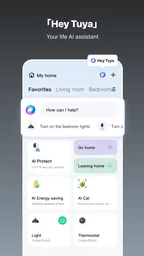
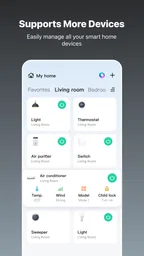
My first practical test for a home-control app is whether I can reach the action I need without stopping to interpret a maze of menus. Smart Life’s main job is to put device controls in one place. That can reduce the mental load of switching between separate manufacturer apps, especially when the household has accumulated several compatible devices over time. It also means the experience is only as orderly as the collection it is managing: a tidy setup with a few well-named devices is easier to scan than a crowded one with vague labels.
I recommend setting up names around location and purpose, not model or purchase history. “Hall light” is easier to understand at a glance than a product name or a generic label like “switch two.” If more than one person uses the app, agree on a naming convention before adding a large number of items. That small bit of planning is especially useful for anyone who has trouble remembering which control belongs to which room.
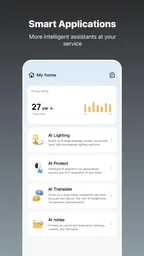
The app’s broad home-management role is a strength when I want one place to check, but it can also make the interface feel busier than a single-purpose control. Someone who only needs a straightforward way to operate one device may find a dedicated app simpler. Smart Life makes more sense when consolidation itself is valuable, and when the compatible devices in the home justify learning a shared system.
Readable controls depend on a thoughtful setup
Readable interfaces are not just about text size. A control is useful when its label is clear, its purpose is obvious, and the next step does not require guesswork. In a smart-home app, confusing device names can be a bigger obstacle than the number of controls. I would treat the initial setup as an accessibility task: use short, distinct labels, group devices by room where possible, and remove ambiguity before relying on quick access during a busy moment.
That advice is particularly valuable for people with low vision, attention differences, or memory challenges. If two controls look similar or have nearly identical names, it is easy to choose the wrong one when moving quickly. Keeping the list focused on devices that are actually in use makes the app less demanding. A clean layout is not automatic; it is something the household can create through consistent naming and restraint.
Smart Life may also appeal to people who prefer one familiar route to several everyday controls rather than remembering which app belongs to each product. The trade-off is that the shared app becomes another place to learn. If its terminology or organization does not make sense to you, the fact that it supports a wider device collection will not make it feel accessible. I would start with a small set of essential devices and see whether the structure feels comfortable before moving more of the home into it.
Different ways of interacting, different kinds of friction
For someone with limited dexterity, repeated precise taps can be tiring, and small targets can be frustrating. A phone app can put controls within reach without requiring a walk across the room, but it still depends on being able to unlock and handle the phone and operate its screen. I would not assume that an app-based control is automatically easier than a physical switch. The best arrangement may be a mixture: use the app where it removes effort, while keeping a familiar physical control for tasks that need quick, dependable access.
There is a similar balance for people with sensory sensitivities. A phone interface can avoid the need to approach a noisy or awkward device, yet alerts, screen changes, or the process of finding a control may create their own friction. I would keep the setup focused on the controls that matter most and avoid treating every available device as something that must be managed from the app. Less visual and cognitive clutter can make the everyday interaction calmer.
Voice control is often raised as an alternative for people who find touchscreens difficult, but it should not be treated as a universal substitute. Speaking to a device may be uncomfortable in shared spaces, unsuitable in a quiet environment, or unavailable when speech is not an easy option. A well-planned setup should leave more than one practical route to essential tasks, where the connected equipment allows it. Smart Life is most useful as one part of that arrangement, not as proof that every interaction barrier has been solved.
When the situation changes, access can change too
A realistic everyday case is arriving home with bags, a phone in one hand, and little patience for searching through a long device list. If the relevant controls are named clearly and kept easy to find, a single app can be more convenient than opening multiple product apps. If the household has not organized its devices, the same situation can turn into extra steps at exactly the wrong time. I would set up the most frequently used items first, then test whether another person in the home can find them without coaching.
Shared living introduces a different question: will the app’s organization make sense to everyone, not just the person who set it up? A household member with limited familiarity with smart-home technology may need plain names and a short, predictable route to routine actions. Before depending on the app for an important task, walk through that task together and see where hesitation occurs. This is more useful than assuming that a control is obvious because it makes sense to its installer.
Situational access also matters when a phone is unavailable, out of reach, or inconvenient to use. A smart-home arrangement that depends on one person’s phone can leave others feeling excluded. I would avoid making app access the only way to carry out an essential household action. Keep familiar alternatives where possible, and decide in advance which devices really benefit from remote or centralized control rather than converting every routine into a digital one.
For people who are often away from home, a consolidated app can be appealing because it offers a single place to manage compatible equipment. Still, remote convenience is not the same as guaranteed access: it depends on the home’s devices and setup. I would test the controls in ordinary conditions before relying on them for a time-sensitive routine. If a task has serious consequences when missed, a simple backup is more reassuring than assuming the app will always be the easiest route.
Where the convenience can stop
The most important limitation is compatibility. Smart Life is not a universal remote for every smart device, and choosing it before checking whether a household’s equipment works with it can lead to disappointment. If your home is already organized around another platform and its controls are familiar, switching just to consolidate may create more work than it saves. I would prioritize the devices you already own and the daily tasks you want to simplify, then choose an app based on that real list.
Another friction point is setup effort. A shared control panel needs meaningful names and a sensible organization to remain easy to use as devices accumulate. That maintenance may fall to one technically confident person, which can create dependence rather than independence for the rest of the household. If others cannot find what they need without asking for help, the setup has not achieved its practical purpose, even if all the devices are technically connected.
Cost also deserves a little attention. The app is free to download, but it includes in-app purchases ranging from $0.49 to $369.99 per item. That wide span makes it sensible to look carefully at any purchase prompt and decide whether the item is relevant to your use. I would not treat the free download as a promise that every optional part of the experience has no cost.
Someone who wants a minimal interface, a single-brand experience, or controls that work without relying on a phone may be better served by another approach. A manufacturer’s own app can be easier when all devices come from one maker and its layout is familiar. Physical controls may be preferable when reaching for a switch is quicker or more comfortable than navigating a screen. Smart Life’s strength is breadth within its compatible ecosystem, but breadth is not automatically the same as simplicity.
A useful option when the household shapes it around people
I would recommend Smart Life to someone who already has compatible Tuya-connected devices and wants a shared place to manage them, especially if the household is willing to organize controls carefully. Its reach and established user base make it a reasonable app to consider, and its free entry point lowers the barrier to trying it. The app is also a better fit for people who value centralization more than having the leanest possible interface.
I would hesitate to recommend it as the sole control route for someone who cannot comfortably use a phone, or for a household that needs every action to be instantly obvious without setup. In those cases, a physical switch, a simpler dedicated app, or a combination of methods may be more inclusive. The best choice depends on the person’s abilities and routines, not on the number of devices an app can gather.
My practical advice is to begin with the few controls that make a real difference, name them in everyday language, and invite everyone who will use them to try the arrangement. Notice whether they can find a device without help, whether the phone-based steps feel manageable, and whether a backup is needed for essential actions. The most inclusive smart home is the one that gives each person a usable way in, rather than expecting everyone to adapt to a single screen.
Smart Life is therefore worth considering as a flexible home-control app, but I would judge it by the fit of the setup rather than the appeal of centralization alone. For the right collection of devices and a household that takes time to make controls understandable, it can simplify everyday management. For anyone who finds phone navigation tiring or prefers a direct, no-menu interaction, it may be better as a secondary option. That is the honest balance: useful potential, with accessibility shaped by the devices, the organization, and the people using it.
What we like
- Supports devices from many smart-home brands.
- Offers voice control through popular assistants.
- Lets you automate devices with schedules and triggers.
- Remote access helps manage devices while away.
- Device sharing makes household control easier.
What could be better
- Some devices require a separate hub or gateway.
- Setup and pairing can be confusing for beginners.
- Compatibility varies between device models and regions.
- Automations may depend on a stable internet connection.
- The app may request broad permissions for some features.





