




Tubi: Free Movies & Live TV review
 Analysis by Appsdrops
I’d describe Tubi as a free, ad-supported way to find something to watch when I don’t have a particular film or series in mind. It is an entertainment app from Tubi TV, and its appeal is straightforward: open it, browse the available choices, and start watching without a subscription payment. In my experience, that makes it especially useful as a second streaming option rather than a complete replacement for a paid service.
Tubi has been around since September 19, 2014, and it has clearly found an audience: it has over 100 million installs, a 4.9 average rating, and around 2.6 million ratings. Those figures suggest broad appeal, but they don’t guarantee that its selection will suit every viewer. The useful question is whether its free, ad-supported approach fits the way you watch.
What watching on Tubi feels like now
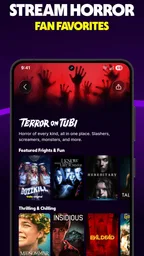
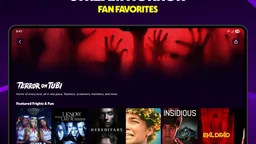
The app is best approached as a browse-and-discover library. Rather than treating it like a service where you arrive with a specific new release in mind, I’d open it when I want to explore and am willing to choose from what is available. That distinction matters: a free catalog can be a pleasant surprise, but it is not necessarily the right destination when you need one particular title immediately.
Because Tubi is free, advertisements are part of the viewing trade-off. I find that worth considering before settling in for a long film or a string of episodes. If uninterrupted viewing is your priority, a paid service may feel more comfortable. If you can accept ad breaks in exchange for avoiding a subscription, Tubi’s model is easier to justify.
Its Teen content rating is also a practical cue for households. I would not assume that every item is suitable for younger children simply because the app itself is easy to open. Parents should check what a child plans to watch and make choices together, especially when browsing a broad entertainment library.
Best for open-ended viewing
Tubi makes the most sense for someone who likes having another place to browse without adding a recurring bill. It can fit a quiet evening when the household wants a film but nobody has chosen one, or a short break when you would rather sample something than keep scrolling through a paid service’s familiar recommendations.
A realistic use case is a weeknight when dinner is over and you have enough time for a movie, but no title in mind. I would open Tubi, browse a few options, and choose based on the mood of the group. The key is to allow a little discovery time. If everyone has already agreed on one exact film, searching a free catalog may be less satisfying than checking a service known to carry that title.
It is also handy as a backup. If you already subscribe to one or more streaming services, Tubi can give you another catalog to check before deciding that there is nothing to watch. I would not cancel a service that reliably carries the shows I follow just because Tubi is free; its stronger role is adding variety without asking for another subscription.
How it differs from paid streaming
The obvious comparison is with subscription services that emphasize a more controlled, paid viewing experience. Those alternatives are generally a better fit when you want a specific current show, prefer fewer interruptions, or expect the same titles to remain available on demand. Tubi’s advantage is the low commitment: the price is free, so it is easy to try and easy to leave when its selection does not match your mood.
Compared with renting a single movie, Tubi is more appealing when you are undecided and open to browsing. Renting can be the simpler choice when you know exactly what you want and value getting straight to it. I think the two approaches solve different problems: Tubi helps with discovery, while a rental is about securing a particular viewing choice.
For live viewing, expectations should stay measured. The app’s name includes Live TV, but I would not assume that this makes it a full substitute for a traditional television package or for a service built around a particular channel lineup. If live programming is the main reason you are considering it, check the current options inside the app before changing how you watch.
What its history means for existing users
Tubi’s release date gives it a longer history than a brand-new streaming app, but that alone does not tell me exactly how its current experience has changed. I would separate that established presence from claims about specific updates: without a confirmed version history to rely on, it would be misleading to attribute particular features or interface changes to a specific release.
For existing users, the useful takeaway is more modest. A service that has been available for years and is used widely is familiar territory for many viewers, but the catalog and the way a person uses it still deserve regular attention. If you rely on a particular film or series, look for it when you are ready to watch rather than assuming it will remain available indefinitely.
That habit is especially helpful when you are planning a family night or coordinating with friends. I would choose a backup title before everyone sits down. The small extra step avoids turning a supposedly easy free movie night into a long search, and it acknowledges that catalog browsing is part of the experience rather than a guarantee of a specific selection.
Small habits that make browsing easier
My first practical tip is to browse by occasion, not just by title. Decide whether you need a quick episode, a background watch, or a film that deserves everyone’s attention. That narrows the decision before you start scanning and makes a broad library feel less overwhelming.
Second, treat the first promising choice as a candidate rather than a commitment. Check that it suits the people watching and that you have enough time for it. This is a simple way to avoid choosing a title based only on a thumbnail and then discovering that it is not right for the room.
Third, keep Tubi in a two-service routine if you already pay for streaming. I would check it after my primary service, not instead of it: use the paid service for must-see programs and use Tubi when the goal is free browsing. That makes the difference between the services useful rather than forcing one app to meet every need.
Finally, take the ad-supported format into account when deciding what to watch. A casual episode or a relaxed movie night may suit it well; a film where uninterrupted concentration matters may be better watched through another option. This is not a flaw unique to Tubi so much as the central trade-off behind watching without a subscription fee.
Where the experience can fall short
The biggest limitation is that “free” does not mean “the exact title I want, whenever I want it.” Catalog availability is the deciding factor, and browsing can take longer than expected if you arrive with a narrow request. I would skip Tubi as my only streaming choice if I need dependable access to specific ongoing series or if I dislike exploring before pressing play.
Advertisements are another real compromise. Viewers who find interruptions frustrating may prefer a paid service, especially for a focused movie night. Tubi is more attractive to people who judge the cost savings as worth the pauses. There is no single right answer; it depends on whether you value uninterrupted viewing more than avoiding another bill.
It may also be a poor fit for anyone who expects a streaming app to replace live television in every respect. The live element can be a reason to investigate the app, but I would verify that its current offering meets your own needs before depending on it for scheduled viewing. A dedicated television service remains the safer choice if particular channels or predictable programming are essential to your routine.
For families, the age rating deserves attention rather than a quick glance. Teen is a broad guide, not a promise that every available program will work for every child. I would stay involved in selection instead of handing over the app as an automatic kids’ destination.
Who should give it a try
I would recommend Tubi to viewers who want a no-cost way to browse movies and shows, are comfortable with ads, and do not need one specific title every time they open an app. It is also a sensible extra for people who already subscribe elsewhere and want another catalog to check before paying to rent something.
I would steer away from it as a primary choice if you require a particular series, want a consistently interruption-free experience, or expect live TV to work like a conventional channel package. In those cases, another service may be a better match, even if it costs more.
At 4.9 from around 2.6 million ratings, Tubi has drawn strong user approval, and its 658,000 reviews show that plenty of viewers have taken the time to share their experiences. I see that as encouraging context, not a guarantee that every search will be rewarding. The app is free, rated Teen, and developed by Tubi TV, so trying it is a low-commitment way to see whether its style of browsing works for you.
My overall recommendation is to think of it as a useful companion to other viewing options. The best reason to keep Tubi installed is the chance to find something enjoyable without adding a subscription; the best reason to keep expectations realistic is that free, ad-supported discovery is not the same as guaranteed access to a chosen title. If that trade-off sounds fair, it is worth opening on the next evening when nobody can decide what to watch.
What we like
- Free to watch without a paid subscription.
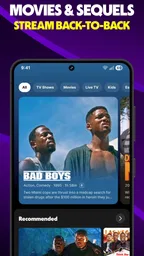
- A broad catalog includes movies and TV shows.
- Live TV channels add a cable-style viewing option.
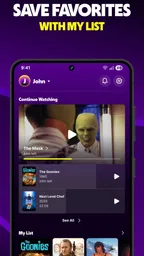
- Profiles help keep individual watchlists separate.
- Available on many phones and streaming devices.
What could be better
- Ad breaks interrupt movies and episodes.
- Titles can leave the catalog without notice.
- Some popular new releases may not be available.
- Video quality can vary by title and connection.
- Availability and content differ by region.





