
TP-Link Tapo review
 Analysis by Appsdrops
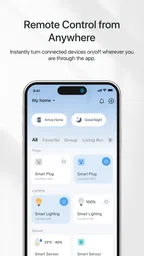
When I want to manage smart home devices without being in the same room—or even at home—the first thing I need is a reliable way to check their status and make changes. Tapo is TP-Link’s app for controlling compatible Tapo smart devices from anywhere. Its appeal is straightforward: bring device controls together in one place, so a small household task can begin on my phone and finish with the device doing what I asked.
From a household need to a phone control
The app sits in the lifestyle space, but its everyday value is practical. A connected device is only convenient when I can reach its controls at the right moment; otherwise, “smart” can feel like an extra step. Tapo aims to close that gap by making its compatible devices accessible through a mobile interface. I can think of it as the control point between a decision—whether made at home or away—and the device that carries it out.
That role gives the app a clear focus. Rather than presenting itself as a general-purpose home hub for every brand, Tapo centers on controlling Tapo smart devices. That distinction matters when deciding whether it belongs in a household’s routine: the app is most relevant when the devices you want to manage are part of the Tapo range. If they are, having their controls gathered in an app can make ordinary interactions feel less scattered.
TP-Link SYSTEMS INC. is the developer, and the app is free to download. It is rated for Everyone, which makes the intended audience broad. Tapo has been available since September 3, 2019, and its current version is 3.22.105. It requires Android 7.0 or later on Android devices. These details give a useful snapshot of the app’s place in the market without changing the central question: does it make controlling compatible devices feel simpler?
Starting with the task, not the technology
My preferred way to judge a smart-device app is to begin with a real task. Maybe I want to check a device while I am out, or I want to make a change without walking over to it. The app’s short promise—control Tapo smart devices from anywhere—speaks directly to that kind of situation. It frames remote access as the main handoff: I use the phone to express what I want, and a compatible device responds.
That simple framing is useful because a smart home is not a single action. The complete experience depends on several links working together: the device must be compatible, the app must provide the relevant control, and the instruction has to reach the device. Tapo’s role is to make the app-to-device part available in one place. For a user, the desired outcome is not “open an app”; it is getting a device into the state needed for the moment.
I also appreciate that the app has a defined ecosystem rather than an unclear promise of universal control. That keeps expectations grounded. Before making it the center of a routine, I would match the app to the Tapo devices I intend to use. Once that fit is right, the phone becomes a convenient starting point for interaction rather than a replacement for thinking through what the household actually needs.
Following the control flow
The workflow begins when I open the app with a particular device task in mind. I look for the relevant control, make the change, and then rely on the connected device to carry it out. That is the core loop: intention, app input, device response. The fewer mental steps that loop requires, the more naturally a smart device fits into daily life. Tapo’s central proposition is that these controls are reachable from wherever I am, not only when I am standing beside the hardware.
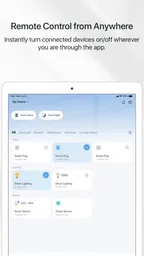
Remote control is especially meaningful when the user’s location and the device’s location do not match. A phone can act as the bridge between them, letting me handle a household task while away. The benefit is not that every routine suddenly becomes elaborate; it is that a control does not have to wait until I return to the room. For simple actions, that can make connected equipment feel more responsive to how people actually move through a day.
There is also a useful change in perspective here. With a conventional device, the control is often physically attached to the device or nearby. With a smart device, the app becomes another point of access. I can think about the intended outcome first and then use the phone as the interface. That is the kind of convenience I expect from a lifestyle app built around connected home products: it should make a familiar task easier to reach, not turn that task into a technical project.
Still, the app is only one part of the flow. A command has to connect the user’s intention to compatible hardware. That means the smoothness of the experience depends on both sides of the handoff: the app needs to present a clear control, and the device needs to be available to respond. I would judge Tapo less by how impressive a screen looks and more by whether I can move from opening the app to the intended result without unnecessary confusion.
Where the handoffs matter
The first handoff is from the person to the phone. I need to know which device I am controlling and which action will produce the result I want. A good app makes that relationship understandable, because uncertainty at this stage can make remote control feel less reassuring than simply using a nearby switch or control. Tapo’s value is strongest when its device controls are easy to associate with the task at hand.
The next handoff runs from the app to the connected device. This is where the promise of control from anywhere becomes tangible: the phone is not the destination, but the messenger. When the device responds as intended, the distinction largely disappears from the user’s point of view. I tap, the household changes, and the app has done its job. When that chain feels straightforward, it is easier to make the app part of a routine.
A final handoff is between the result and the person’s expectations. If I am checking or changing something remotely, I need the experience to leave me confident about what I asked for. This is a general requirement for any remote-control tool, not a special feature claim. The more important the device’s role in the household, the more I want the app interaction to feel clear and dependable. I would start with everyday tasks and build trust through repeated use rather than assume that the phone alone guarantees an outcome.
This is why compatibility is not a small detail. Tapo is designed around Tapo smart devices, so the app is not automatically a fit for someone who owns only unrelated connected products. The ecosystem match determines whether the flow can begin at all. For a household already choosing compatible devices, a dedicated control app can be a sensible way to keep interaction focused. For someone assembling a mix of brands, it is worth considering how each product’s control experience will fit together before settling on a routine.
The result in everyday use
When the sequence works, the payoff is modest but meaningful: I can reach a device control through my phone, act on a household need, and let the device complete the task. That kind of convenience is easy to overlook because it is designed to remove friction rather than create a dramatic new activity. The best outcome is often simply not having to interrupt what I am doing to reach a device in person.
Tapo has achieved broad adoption, with more than 10 million installs. It holds an average rating of 4.6 from around 550,000 ratings, alongside roughly 8,100 written reviews. Those figures suggest that many users have engaged with the app, although my recommendation still comes down to fit: it makes most sense for people who want to manage compatible Tapo products from a phone. The app is free, while in-app purchases are listed from $2.49 to $199.99 per item, so it is sensible to check the app store for purchase details relevant to any optional items.
For me, the strongest result is that the app gives connected devices a practical point of contact beyond the room they occupy. That is a useful role, especially for users who want remote access rather than a separate manual interaction at every device. The experience also has a clear boundary: Tapo is most useful when the household’s devices fit its ecosystem. I would treat that as a planning consideration, not a flaw in the basic idea.
Where the flow can lose momentum
The workflow can break before the first tap if I have the wrong device for the app. Since Tapo is centered on Tapo smart devices, owning a device outside that family changes what the app can do for me. That is why I would check product compatibility before building expectations around a single control point. A well-organized app cannot bridge an ecosystem mismatch by itself.
Another point of friction is the gap between issuing a command and seeing the outcome. Remote control depends on the connection between the phone, the app, and the device. If any part of that chain is unavailable, the user may not get the smooth handoff they were hoping for. I would approach the app as a convenient way to control compatible devices, while keeping in mind that a phone interface does not remove the ordinary dependencies of connected equipment.
There can also be a learning curve whenever a household moves from physical controls to app-based routines. At first, I have to remember where a control lives and understand how it relates to the device. The solution is not to add more complexity than necessary. I would begin with the tasks I genuinely want to handle from my phone, then see whether the app makes those actions easier to repeat. If it does, the new habit can settle in naturally.
Version and device support deserve a quick check as well. On Android, the app requires version 7.0 or later. If I am choosing a phone for this purpose, I would confirm that it meets that requirement and that the intended Tapo devices are compatible with the setup. A little preparation at the start can prevent frustration later, particularly when the goal is to rely on remote access as part of an everyday routine.
My take on Tapo
Tapo is a focused control app for people who want their compatible smart devices within reach from a phone. Its appeal is easy to understand: start with a household task, use the app as the bridge, and let the device deliver the result. The most convincing use case is everyday convenience, especially when I want to act on a device without being beside it.
I would recommend considering it if Tapo devices are already part of your home or are the products you plan to use. The app’s broad reach and strong average rating make it a familiar option in the smart-device space, but the practical test is whether its ecosystem matches your equipment and routines. It is free to download, has an Everyone content rating, and its Android requirement is version 7.0 or later.
Overall, Tapo makes the most sense as the phone-based link in a connected-home workflow, rather than as a reason to buy into smart devices on its own. If the device match is right and remote control is useful to you, it can make household interactions feel more accessible. I would start with a clear task, follow the app-to-device handoff, and keep using it where that flow genuinely saves effort.
What we like
- Control compatible Tapo devices from one app.
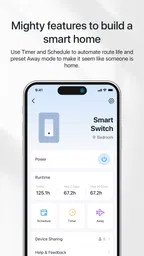
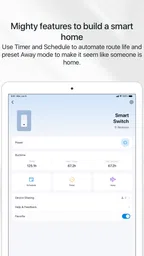
- Create schedules to automate lights and smart plugs.
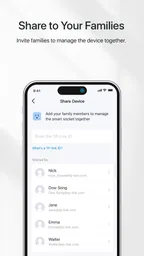
- Share device access with family members.
- Receive motion detection alerts from supported cameras.
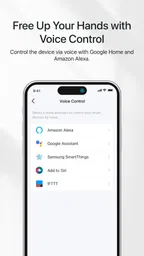
- Use voice commands with supported smart assistants.
What could be better
- Many features require compatible Tapo hardware.
- Remote access depends on a stable internet connection.
- Some camera features may require a paid subscription.
- Device compatibility can vary by model and region.
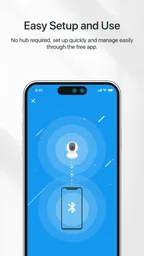
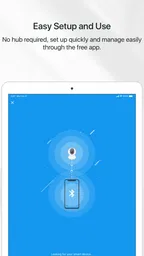
- Setup may be confusing when connecting devices to Wi-Fi.





