

Toyota review
 Analysis by Appsdrops
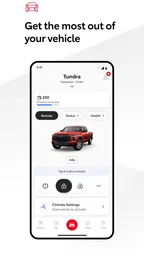
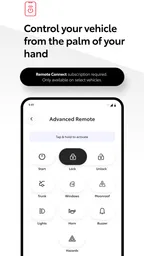
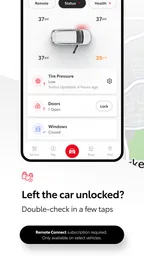
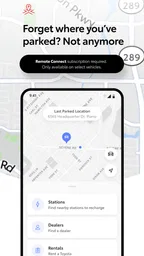
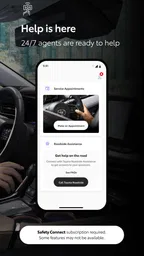
I think of the Toyota app less as a general-purpose car tool and more as a digital companion for people who already own a compatible Toyota. Its value comes from keeping ownership tasks and vehicle-related information close at hand, rather than replacing a mechanic, a navigation app, or the controls in the car. If you drive a Toyota and want a convenient place to start when dealing with routine ownership needs, it is worth a look. If you want one app to manage cars from several brands, its focus is also its main limitation.
A Toyota-focused tool for everyday ownership
This free Auto & Vehicles app is published by Toyota Motor North America, Inc. It has a 4.7 average from around 188,000 ratings, and more than five million installs. Those figures suggest it has reached a substantial owner base, but they do not tell me whether every feature will suit every Toyota; compatibility is the first practical question to answer.
Check your vehicle before building a routine around it
The app currently supports Toyota vehicles from 2010 onward, with a newer cutoff for Hawaii, where supported vehicles are from 2018 onward. That regional exception matters if you are helping a family member set things up or buying a used Toyota: check the model year and your location before assuming the app will work with that car. A compatible year is a useful starting point, not a reason to expect identical functions across every model.
In practice, I would treat the app as a Toyota-specific ownership hub. It makes the most sense when you want to use the manufacturer’s own digital tools alongside the car, rather than search across generic automotive apps and separate resources. That narrow focus can be convenient, but it also means the app’s usefulness is tied to the vehicle you own and the services available for it.
Where it fits in a normal week
Imagine you are arranging errands before work and want to deal with a Toyota-related task without waiting until you are back beside the car. The app gives you a manufacturer-branded place to begin. I would use it as a first stop for ownership matters, then switch to the car’s controls, a service provider, or another app when the job calls for something outside Toyota’s digital environment.
That distinction helps avoid a common frustration: expecting a carmaker’s app to replace every tool connected to driving. It is not a universal maintenance record, an independent vehicle diagnostic service, or a general trip planner simply because it sits in the Auto & Vehicles category. For a Toyota owner, its strongest case is having one familiar, brand-specific point of reference—not doing every automotive task in one place.
What the version history can—and cannot—tell an owner
The current release is version 3.6.0, and the app first appeared on August 6, 2019. Those details show that this is an established product with a maintained current version, rather than a newly launched experiment. They do not, by themselves, reveal which capabilities changed between releases, so I would not read a version number as proof that a particular feature has recently arrived or improved.
For an existing user, the practical way to judge an update is to look at what changes on the device and in the tasks you actually perform. If a familiar workflow looks different after an update, take a moment to confirm the vehicle and account details before relying on it for something time-sensitive. That is a sensible habit with any app connected to a specific car, especially when you use it only occasionally.
How it compares with the usual alternatives
Compared with a broad automotive app, Toyota’s offering has a clear advantage in focus: it is made for Toyota owners, not designed to serve every make equally. That can make it a more natural companion when your question is specifically about your Toyota. A third-party app may be a better fit if you need a single place to manage several brands or want tools that are not tied to one manufacturer.
Compared with simply using the vehicle’s built-in systems, the app is best considered an additional channel, not an automatic replacement. Some needs are still easier to handle in the car, through a service professional, or through another trusted tool. I would keep the app if it makes Toyota ownership more convenient, but I would not reorganize my entire driving routine around it before checking how well it serves my own model and use case.
Small checks that can save time later
One useful approach is to set it up when you have a few calm minutes, rather than waiting until you are standing in a parking lot trying to solve something quickly. Confirm that you have selected the right vehicle and can access the account you intend to use. This is particularly helpful in a household with more than one Toyota, where it is easy to begin in the wrong vehicle context and waste time looking for the relevant information.
If you are considering a used car, ask the seller for the model year and verify that it falls within the supported range before counting on the app as part of your ownership plan. For a Hawaii-based owner, remember the different year cutoff. These are simple checks, but they are more useful than installing first and only discovering a compatibility issue when you need the app.
What I would keep in mind as an existing user
The app’s age and current version make it reasonable to view it as an ongoing part of Toyota’s digital offering, but longevity is not the same as a promise that every older vehicle receives the same experience as a newer one. If it has been useful for your routine, keep evaluating it by whether it still saves you a step. If your car is near the edge of the supported range, verify compatibility rather than relying on another owner’s experience with a different model.
I would also avoid treating an app screen as a substitute for a direct check when a decision affects safety or a repair. A digital tool can help organize ownership, but an unusual warning, a mechanical concern, or an uncertain vehicle condition deserves attention in the car itself and, when appropriate, from a qualified professional. The app is most helpful when it supports good ownership habits rather than encouraging guesswork.
Where it may fall short
The biggest trade-off is brand dependence. If you change from Toyota to another make, or regularly manage vehicles from several manufacturers, this may become a secondary app rather than your main automotive organizer. The supported-year rule is another real boundary: not every Toyota owner can assume access, and the Hawaii exception makes a quick compatibility check especially important there.
There is also a practical expectation gap with manufacturer apps. Owners can understandably hope for a complete command center, but the exact experience can vary with the vehicle and the services available to that owner. I would install it with a specific purpose in mind, then see whether it handles that purpose well. If you mainly want cross-brand records, broad vehicle research, or a tool independent of Toyota, a general alternative is likely a better match.
Who should try it—and who can skip it
I would recommend trying it if you own a supported Toyota and prefer to handle brand-related ownership tasks through the manufacturer’s own app. It is also a sensible choice for someone who wants to explore Toyota’s digital ownership tools before deciding whether they are useful in daily life. The app is free, rated for Everyone, and available to a large audience, so trying it does not require a purchase decision.
I would skip it, or at least keep expectations modest, if you do not own a compatible Toyota, want one app to cover multiple vehicle brands, or already have a routine that works better through other tools. The rating and install count offer helpful context, but neither guarantees that the app will add value to your particular car. Compatibility and the tasks you care about matter more than popularity.
What I would watch for next
For owners deciding whether to keep using it, the useful question is not simply whether the app receives another version number. Watch for changes that make your own vehicle’s everyday ownership workflow clearer or easier, and verify that the app continues to support your model and region. Those are the changes that would matter to me more than a broad promise of new capabilities.
My overall view is positive but measured: the Toyota app is most worthwhile when it solves a Toyota-specific ownership need without being mistaken for an all-purpose car platform. I would install it, check compatibility, and try it in a low-pressure moment before relying on it for an urgent task. If it fits your vehicle and saves you time, it can earn a place in your routine; if you need brand-neutral tools, there are better places to start.
What we like
- Toyota offers a wide range of vehicles for different needs and budgets.
- Many Toyota models have a strong reputation for reliability.
- Hybrid options are available across several popular model lines.
- Toyota vehicles often retain their value well over time.
- The Toyota app can help owners manage vehicle services and features.
What could be better
- Some Toyota models have less engaging handling than key rivals.
- Popular models may have long wait times at certain dealerships.
- Higher trim levels can become expensive quickly.
- Infotainment systems vary in ease of use across model years.
- Toyota app features may require a compatible vehicle or subscription.





